
Bahn_Freak2112YT - Minecraft Skins & Skin History
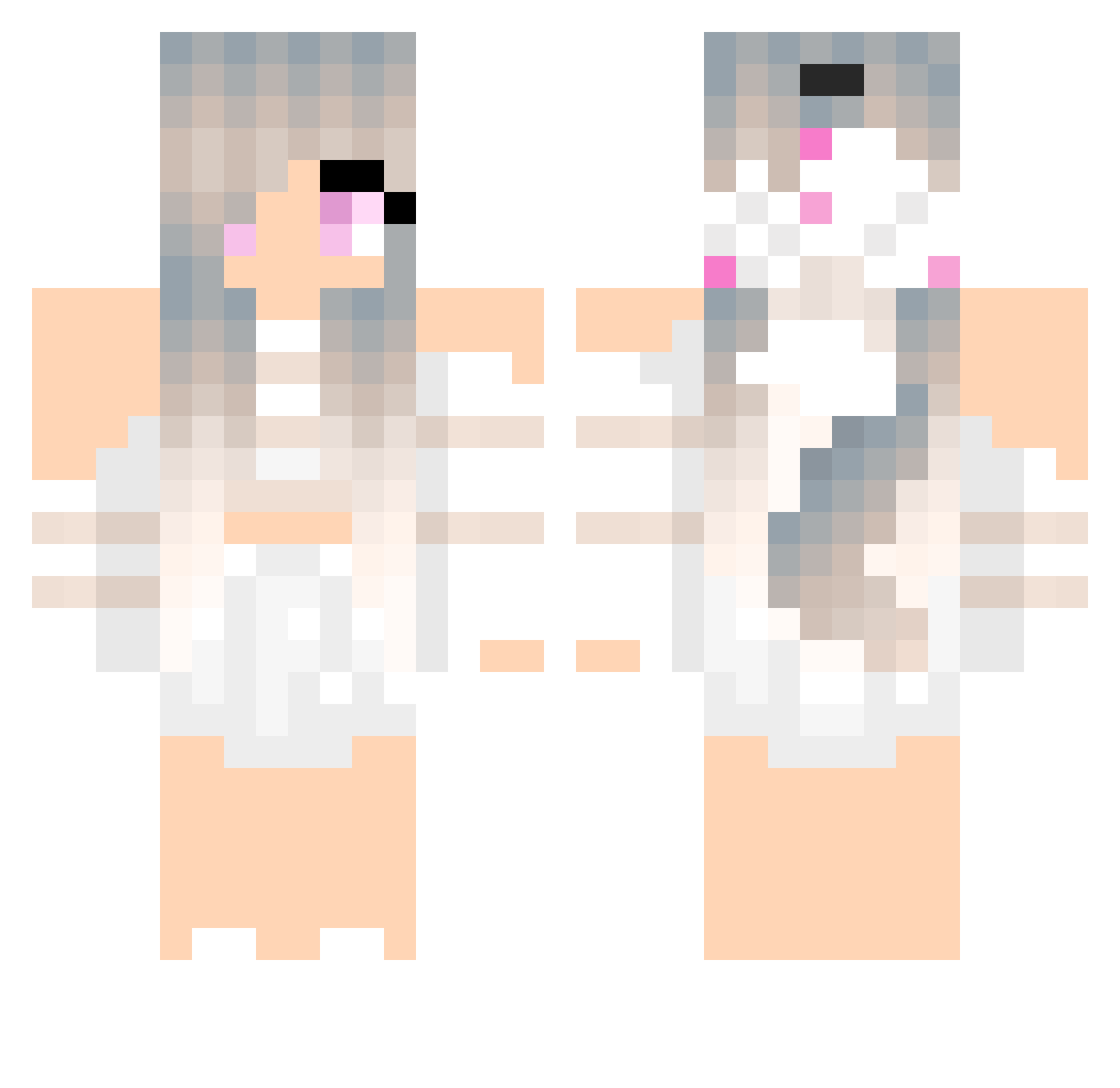
Current Minecraft skin of the player Bahn_Freak2112YT, loaded from the official Mojang API. Rotate the 3D model with your mouse or finger, then download the skin as a PNG file and use it in Minecraft: Bedrock Edition or Java Edition for free. When Bahn_Freak2112YT changes their skin, this page updates automatically and the old skin stays in the history below.
Other players with this skin (246)
Bahn_Freak2112YT was the 69th player we have seen with this skin, first spotted on 28.08.2026. The same skin was seen on these players. Open a nickname to see their current skin and skin history.
 mirandaskye TropicFrost48 Khether reol_920 Milje2012 Claxx7 word61 Atsyy Edwinl0 Anikan111 Galaxypauls catladyjamie NaturalySophh Lakko28 Sting_27 sarahthegirl VollyballTrin YaelYT123 _Dani1210_ Emmmzak dishlasagna Cixo2002 zweehn Utsutera_YunYun Ender_furye Hyrudan caatuss sara_bby Jonnse Alostiy Biwi28 ClownCutie Scarlettbebe Kont_Akif KevinGe_ Minestargirl06 BigBlackWoman65 milkMeUwU X5CBL HuskyPup01 itayravikovich Gallol907 lildixiee janpecha09 itayxyz MOABskill3000 Jolandri WingQ Nongjim 18rafa81 LightningTacos _ShyDen __Patii__ Aponi13 BossEnderDrag
 Wesley_2011 KeremK03 Impy24 LoverDeBiscoito AKitty1300
More Anime Minecraft skins
How to install the Bahn_Freak2112YT skin
- Press the Download button above to save the skin as a PNG file.
- Minecraft: Bedrock Edition (PE): open the Dressing Room from the main menu (or tap your character → Edit Character), go to Classic Skins → Owned, press the + (new skin) button, choose the downloaded PNG and pick the Classic (Steve) model. Works on PC and mobile; consoles cannot import custom skins.
- Minecraft: Java Edition: open the Minecraft Launcher, go to the Skins tab, click New Skin, load the PNG, pick the Classic (Steve) model and press Save & Use. You can also upload it at minecraft.net → Profile → Change Skin.
The skin does not show up after import - what should I do?
Restart Minecraft and open the Dressing Room again - imported skins sometimes appear only after a restart. Also make sure you selected the imported skin and picked the Classic (Steve) model.
Which model should I choose, Classic or Slim?
This skin is designed for the Classic (Steve) model. If you pick the wrong model, the arms of the skin will look stretched or squeezed.
Is the skin of Bahn_Freak2112YT free to download?
Yes. Press Download, save the PNG file and use it in Minecraft: Bedrock Edition or Java Edition - no payment or registration needed. The skin also works on multiplayer servers and Realms.
More skins
Looking for more? Go back to all Minecraft skins and check the top skins of the week, month and all time, or find any player's skin by nickname.