
B_sVIeHWDSZpo294 - Minecraft Skins & Skin History
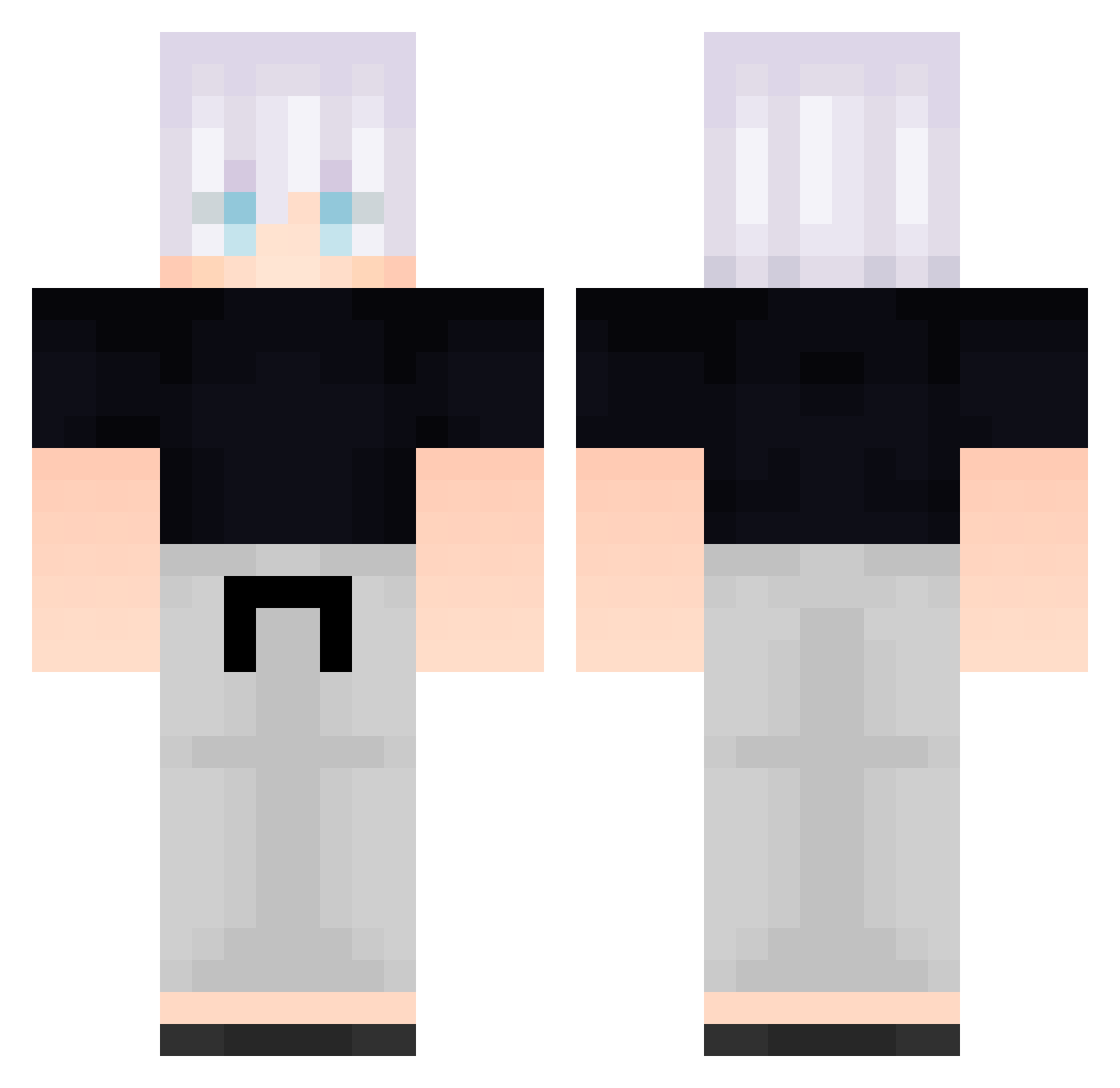
Current Minecraft skin of the player B_sVIeHWDSZpo294, loaded from the official Mojang API. Rotate the 3D model with your mouse or finger, then download the skin as a PNG file and use it in Minecraft: Bedrock Edition or Java Edition for free. When B_sVIeHWDSZpo294 changes their skin, this page updates automatically and the old skin stays in the history below.
Other players with this skin (585)
B_sVIeHWDSZpo294 was the 22nd player we have seen with this skin, first spotted on 27.07.2026. The same skin was seen on these players. Open a nickname to see their current skin and skin history.
 TitoDoritoss FolloMinecraft26 hxQ941 uMW648 FreeLoganRain966 nxo970 QNg670 ken_34 El_Giohhh
 Faixsal Tialp SjW859 Flakke19 _Aponia_ FreeLoganRain981 SvK427 AlanDBC Onu556 Tilincoquette enzuy kWu358 FreeLoganRain182 FolloMinecraft31 Derprofi2411 RpP380 _backbeingaaT479 Leviz79 ignescapers TPx628 EWh669 B_qwlizFaIWod452 WFW604 DBOinthehouse Particularize050 Congratulation4 VD_HiiuGz Suninha14 yjj570 FreeLoganRain678
 MKC5621 TonyPGz FolloMinecraft74 Rrk708 oNM204 Fio575 Angelo117 Yang_MC Qtp325 Liana481 _backbeingaCQ806 Bugugado DonNiko04 kak778
 Elane qMe203 FreeLoganRain929 DoFoxJoestar IFSoul8 awesome0605 yzd814
More Satoru Gojo Minecraft skins
See all 1318 Satoru Gojo skins
How to install the B_sVIeHWDSZpo294 skin
- Press the Download button above to save the skin as a PNG file.
- Minecraft: Bedrock Edition (PE): open the Dressing Room from the main menu (or tap your character → Edit Character), go to Classic Skins → Owned, press the + (new skin) button, choose the downloaded PNG and pick the Classic (Steve) model. Works on PC and mobile; consoles cannot import custom skins.
- Minecraft: Java Edition: open the Minecraft Launcher, go to the Skins tab, click New Skin, load the PNG, pick the Classic (Steve) model and press Save & Use. You can also upload it at minecraft.net → Profile → Change Skin.
The skin does not show up after import - what should I do?
Restart Minecraft and open the Dressing Room again - imported skins sometimes appear only after a restart. Also make sure you selected the imported skin and picked the Classic (Steve) model.
Which model should I choose, Classic or Slim?
This skin is designed for the Classic (Steve) model. If you pick the wrong model, the arms of the skin will look stretched or squeezed.
Is the skin of B_sVIeHWDSZpo294 free to download?
Yes. Press Download, save the PNG file and use it in Minecraft: Bedrock Edition or Java Edition - no payment or registration needed. The skin also works on multiplayer servers and Realms.
More skins
Looking for more? Go back to all Minecraft skins and check the top skins of the week, month and all time, or find any player's skin by nickname.