
AspectTheBoz0 - Minecraft Skins & Skin History
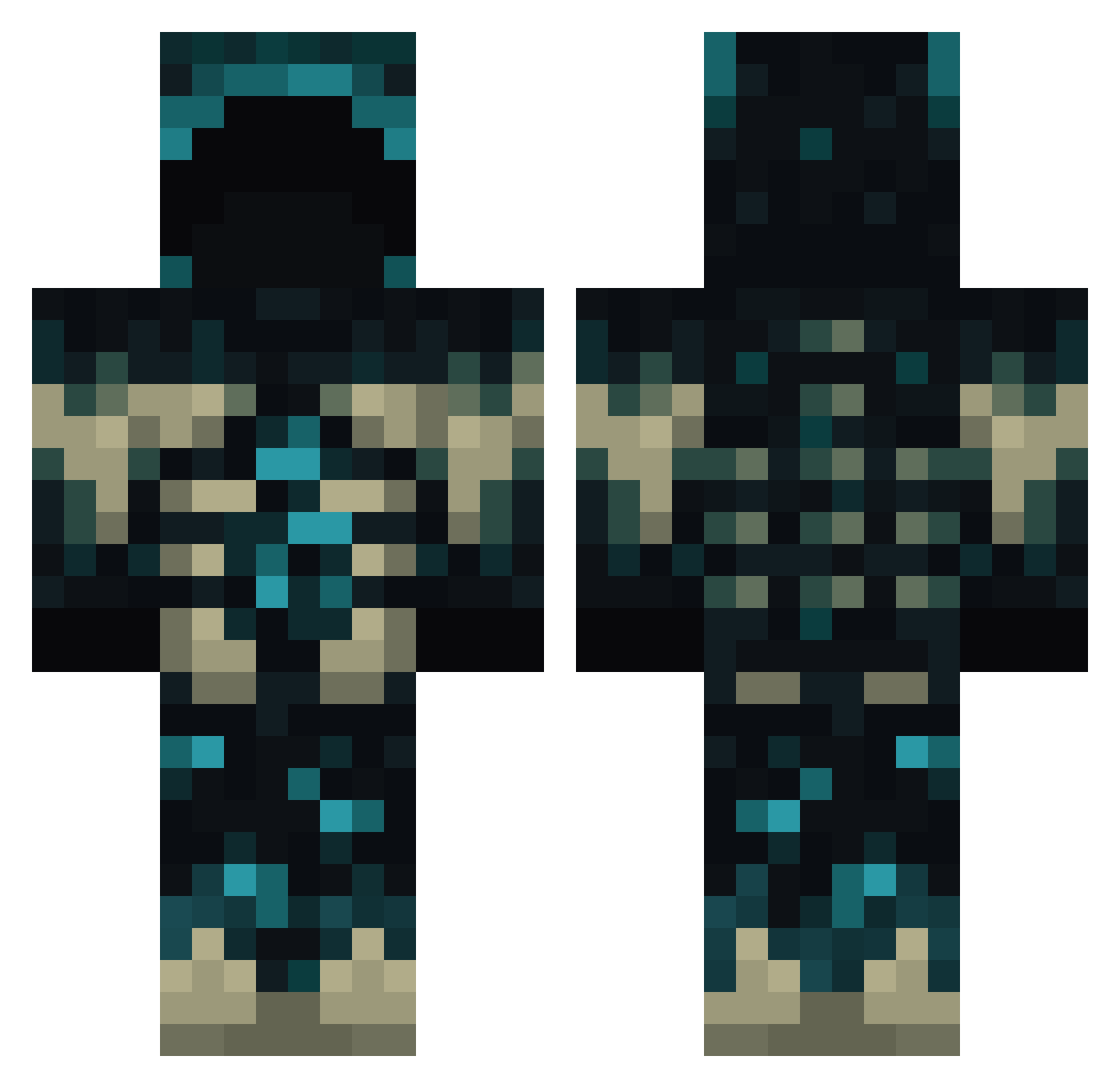
Current Minecraft skin of the player AspectTheBoz0, loaded from the official Mojang API. Rotate the 3D model with your mouse or finger, then download the skin as a PNG file and use it in Minecraft: Bedrock Edition or Java Edition for free. When AspectTheBoz0 changes their skin, this page updates automatically and the old skin stays in the history below.
Other players with this skin (790)
AspectTheBoz0 was the 501st player we have seen with this skin, first spotted on 01.10.2026. The same skin was seen on these players. Open a nickname to see their current skin and skin history.
 Polmyx 1lolplayer1 FinMcMi55ile dexterfan99 ernmi_uwu Lolix00 na1fon lolwut97 Artio_m MirVor HellHound999888 Penguin10000000 Roberto571 MagicTurtle17 Salatka_ WardenKillerKing Well_DoneSmith wqesqq AminazRivii rmqx Krinyin _Nagitoes_ popi__2008 JanKostek2 Blahhz snipercole0831 ArthurArman KadumBr Raa_One LucasTheBlade875 ryoku1234 BettyBoop_004 Murderqp Sagitaliss CooCo_ sointune RamBlack7 ELAARONVF Furdur HDGYZ Fielies856 HATZZ_696 BelarusJames ZekLag HTR_AY RNjavi S0f16 SPARTAN_8 SiTheGuy6 MateoGamer2023 Mr_AlphaBread Bulgy_Penguin yng_christ Huang1121 panpap7052 mineer0 Kraissen EntireBat A_P3rson TokenDog333
More Sculk Minecraft skins
How to install the AspectTheBoz0 skin
- Press the Download button above to save the skin as a PNG file.
- Minecraft: Bedrock Edition (PE): open the Dressing Room from the main menu (or tap your character → Edit Character), go to Classic Skins → Owned, press the + (new skin) button, choose the downloaded PNG and pick the Classic (Steve) model. Works on PC and mobile; consoles cannot import custom skins.
- Minecraft: Java Edition: open the Minecraft Launcher, go to the Skins tab, click New Skin, load the PNG, pick the Classic (Steve) model and press Save & Use. You can also upload it at minecraft.net → Profile → Change Skin.
The skin does not show up after import - what should I do?
Restart Minecraft and open the Dressing Room again - imported skins sometimes appear only after a restart. Also make sure you selected the imported skin and picked the Classic (Steve) model.
Which model should I choose, Classic or Slim?
This skin is designed for the Classic (Steve) model. If you pick the wrong model, the arms of the skin will look stretched or squeezed.
Is the skin of AspectTheBoz0 free to download?
Yes. Press Download, save the PNG file and use it in Minecraft: Bedrock Edition or Java Edition - no payment or registration needed. The skin also works on multiplayer servers and Realms.
More skins
Looking for more? Go back to all Minecraft skins and check the top skins of the week, month and all time, or find any player's skin by nickname.