
Aquaja - Minecraft Skins & Skin History
Current Minecraft skin of the player Aquaja, loaded from the official Mojang API. Rotate the 3D model with your mouse or finger, then download the skin as a PNG file and use it in Minecraft: Bedrock Edition or Java Edition for free. When Aquaja changes their skin, this page updates automatically and the old skin stays in the history below.
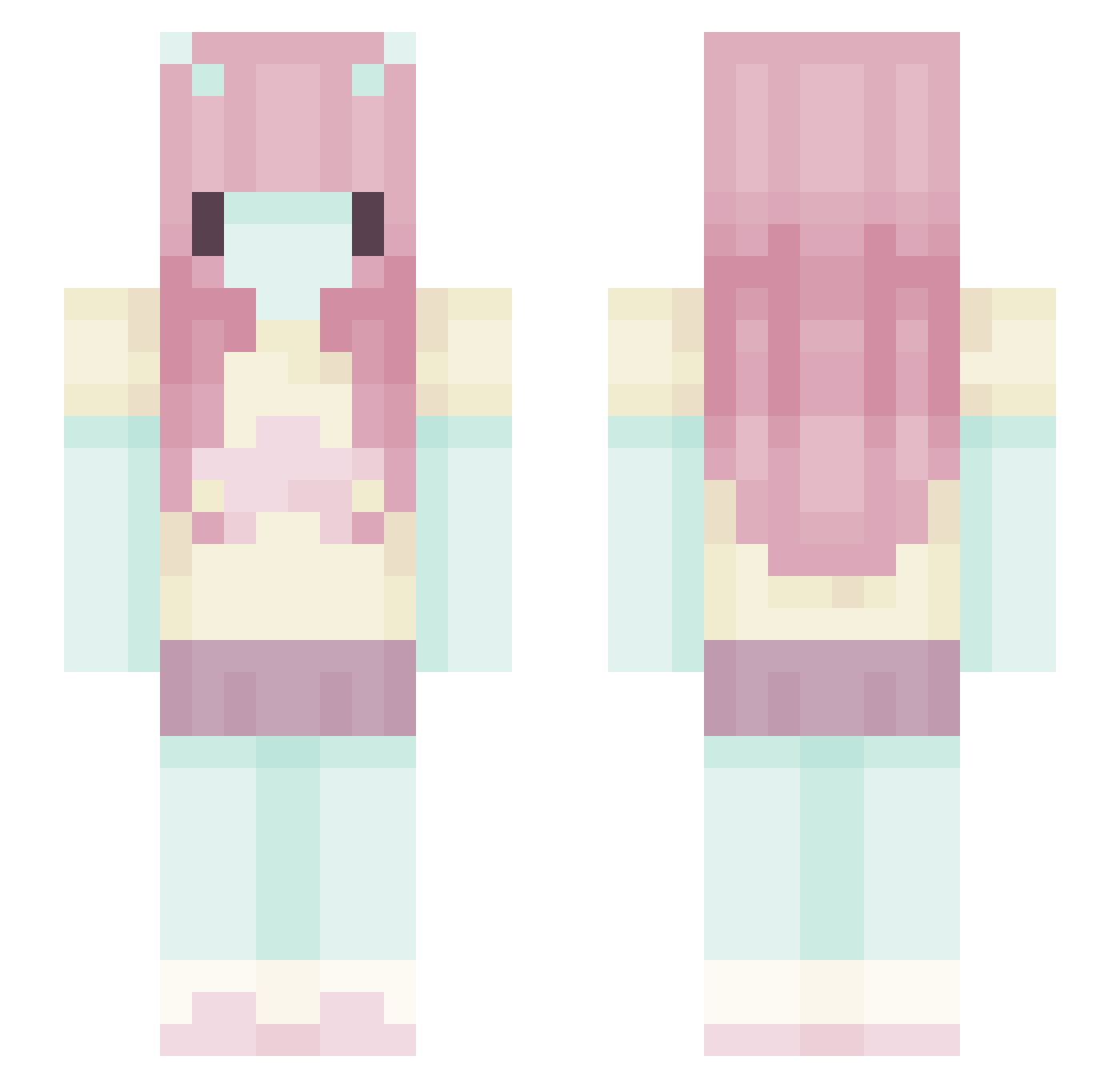
Other players with this skin (43)
Aquaja was the 1st player we have seen with this skin, first spotted on 23.07.2026. The same skin was seen on these players. Open a nickname to see their current skin and skin history.
 ghiacii
 Nandyz
 ShiranuiNoa mellohihi AbbWabb Pau_AYK maywee
 RheyLindo LeannaSunshine rhy4_5l Coquette04 bbyriri8
 chocomiau yari_lmao EuMorroFasil bae_chan
 misoobie gingerdlite Yestian mmaesy Neoei hazalymuu Kikiii_ sykish illumified UnformedColt293 r0siex krixssz kettleasf Orphi Aytexle Pompompurinn momoki55 MimiBlossom6053 Ghostly_Frog jokat17 ilykrissy AzELiATheSnake cat1nnthehat Bockx_ Bibiaah_ illumivy D1git44LL
More Zero Two Minecraft skins
How to install the Aquaja skin
- Press the Download button above to save the skin as a PNG file.
- Minecraft: Bedrock Edition (PE): open the Dressing Room from the main menu (or tap your character → Edit Character), go to Classic Skins → Owned, press the + (new skin) button, choose the downloaded PNG and pick the Slim (Alex) model. Works on PC and mobile; consoles cannot import custom skins.
- Minecraft: Java Edition: open the Minecraft Launcher, go to the Skins tab, click New Skin, load the PNG, pick the Slim (Alex) model and press Save & Use. You can also upload it at minecraft.net → Profile → Change Skin.
The skin does not show up after import - what should I do?
Restart Minecraft and open the Dressing Room again - imported skins sometimes appear only after a restart. Also make sure you selected the imported skin and picked the Slim (Alex) model.
Which model should I choose, Classic or Slim?
This skin is designed for the Slim (Alex) model. If you pick the wrong model, the arms of the skin will look stretched or squeezed.
Is the skin of Aquaja free to download?
Yes. Press Download, save the PNG file and use it in Minecraft: Bedrock Edition or Java Edition - no payment or registration needed. The skin also works on multiplayer servers and Realms.
More skins
Looking for more? Go back to all Minecraft skins and check the top skins of the week, month and all time, or find any player's skin by nickname.