
AnneyvMeii - Minecraft Skins & Skin History
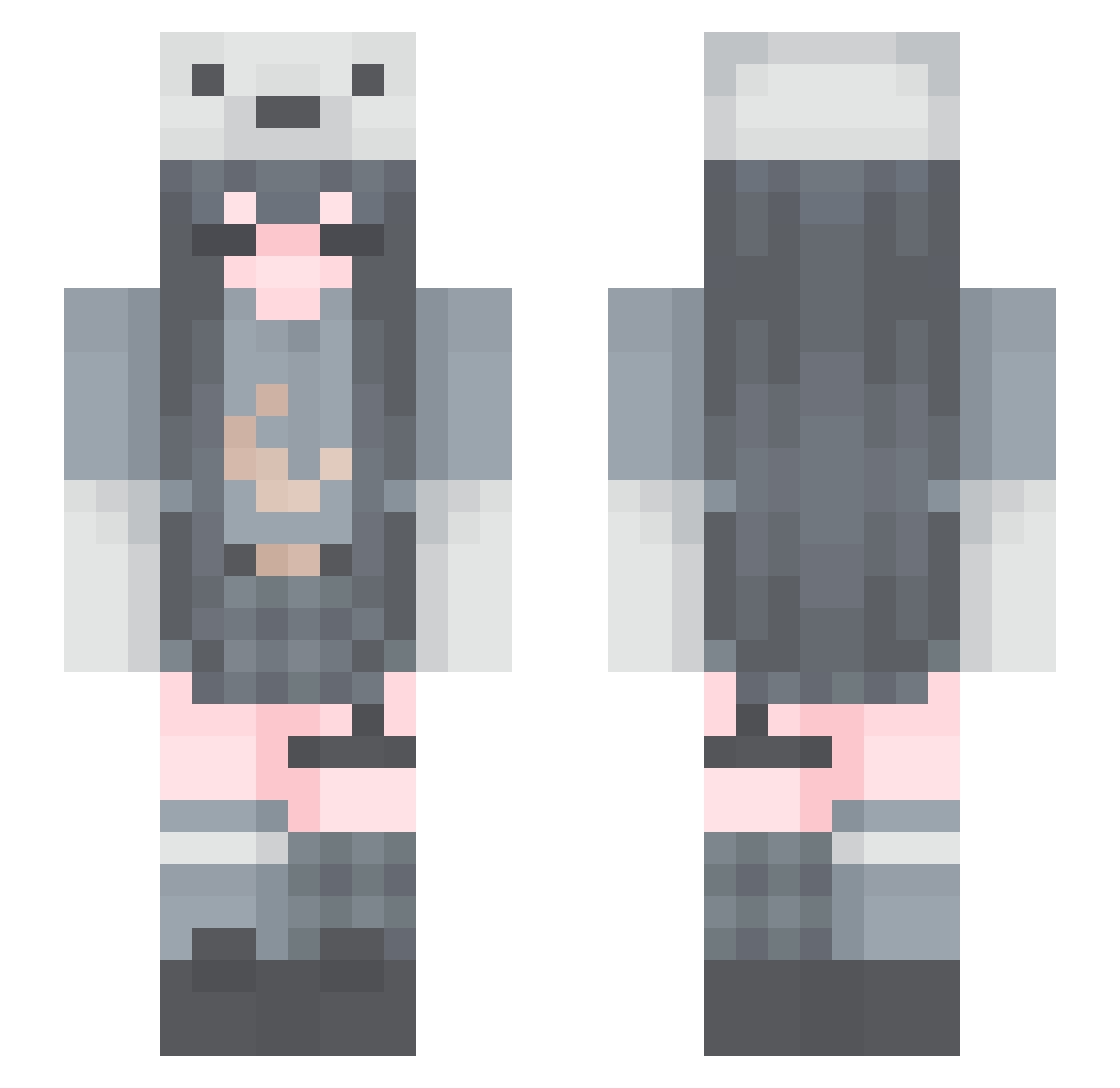
Current Minecraft skin of the player AnneyvMeii, loaded from the official Mojang API. Rotate the 3D model with your mouse or finger, then download the skin as a PNG file and use it in Minecraft: Bedrock Edition or Java Edition for free. When AnneyvMeii changes their skin, this page updates automatically and the old skin stays in the history below.
Other players with this skin (167)
AnneyvMeii was the 94th player we have seen with this skin, first spotted on 24.09.2026. The same skin was seen on these players. Open a nickname to see their current skin and skin history.
 InternetPop OkazakiShinichi nc_ohana whirlpool240 LittleJana1 ZhangDie squiishybear yaobao002 Emely24J Yi_seul7 SleepyBlock73 DragViZ EasonLinUoU _Lunachu_ zMango1 kikouu_ QueenAcedia Wxm_InF1n1ty graveyardgh0ul Triple_SSS SHaN3715 XxCujoxX yaoranx Sqwuidds jiuling6522 clouds_chan QinTong hannah_jooo leshaXx arcticissleepy Fox_son Yan2M Bluniversee cinnamonoroll iRaex su_leaf _Spikymetal_ Deltarios010 korrina__ kareat BelovedErin ay0ojuli Slient000 laxiaoya K4tr1Na_ xxxanny_ Menii_ GoldenAppleQ chuchuusagi Promewizard amemepanda Cori1217 qqwwwpp popo1212 Annababy16 Tyrelityris sxnpau Soraya1220
 xghosttea slowzyext
More Polar Bear Hat Minecraft skins
See all 55 Polar Bear Hat skins
How to install the AnneyvMeii skin
- Press the Download button above to save the skin as a PNG file.
- Minecraft: Bedrock Edition (PE): open the Dressing Room from the main menu (or tap your character → Edit Character), go to Classic Skins → Owned, press the + (new skin) button, choose the downloaded PNG and pick the Slim (Alex) model. Works on PC and mobile; consoles cannot import custom skins.
- Minecraft: Java Edition: open the Minecraft Launcher, go to the Skins tab, click New Skin, load the PNG, pick the Slim (Alex) model and press Save & Use. You can also upload it at minecraft.net → Profile → Change Skin.
The skin does not show up after import - what should I do?
Restart Minecraft and open the Dressing Room again - imported skins sometimes appear only after a restart. Also make sure you selected the imported skin and picked the Slim (Alex) model.
Which model should I choose, Classic or Slim?
This skin is designed for the Slim (Alex) model. If you pick the wrong model, the arms of the skin will look stretched or squeezed.
Is the skin of AnneyvMeii free to download?
Yes. Press Download, save the PNG file and use it in Minecraft: Bedrock Edition or Java Edition - no payment or registration needed. The skin also works on multiplayer servers and Realms.
More skins
Looking for more? Go back to all Minecraft skins and check the top skins of the week, month and all time, or find any player's skin by nickname.