
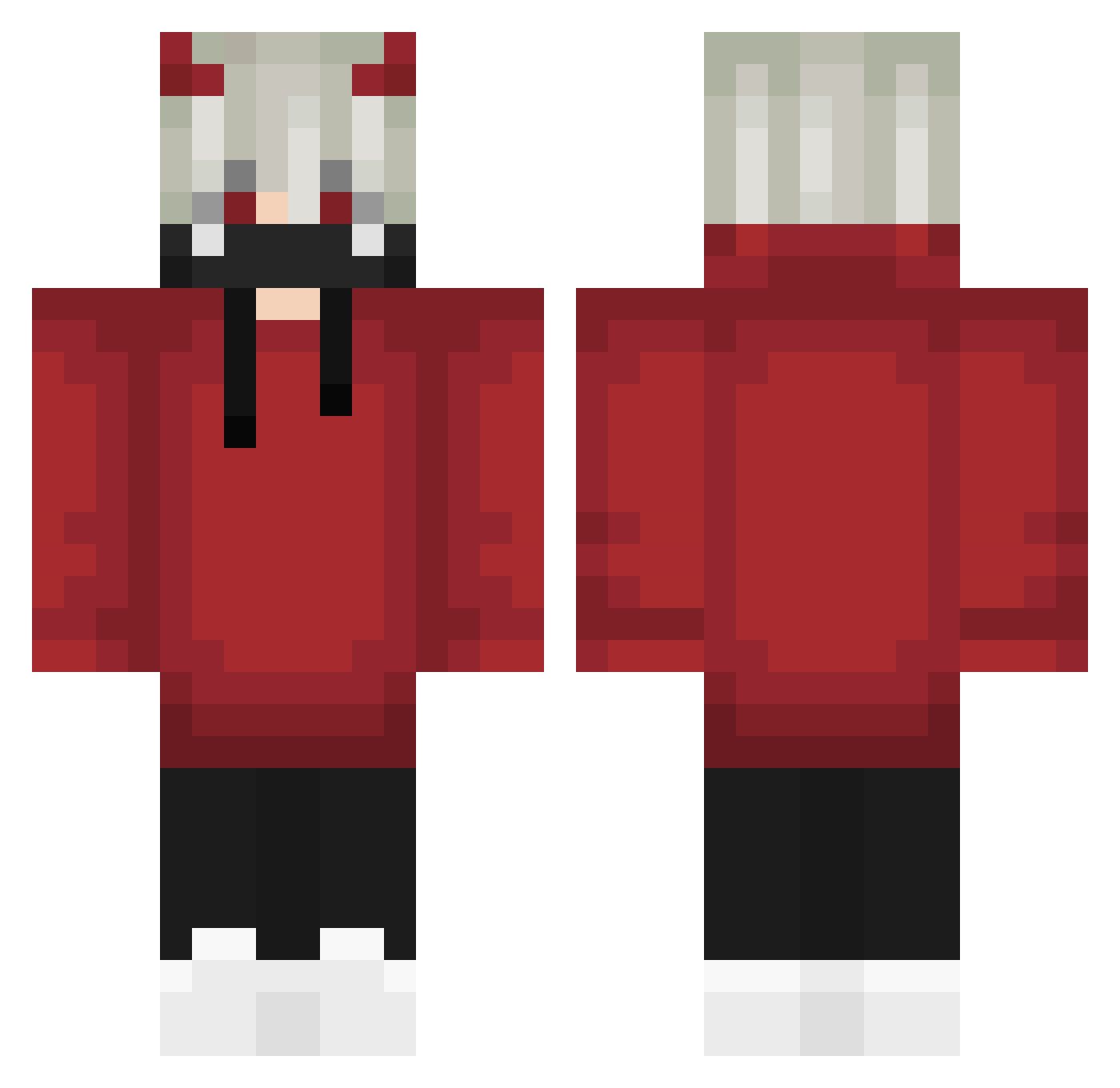
Current Minecraft skin of the player AngryTazZ96, loaded from the official Mojang API. Rotate the 3D model with your mouse or finger, then download the skin as a PNG file and use it in Minecraft: Bedrock Edition or Java Edition for free. When AngryTazZ96 changes their skin, this page updates automatically and the old skin stays in the history below.
Other players with this skin (571)
AngryTazZ96 was the 165th player we have seen with this skin, first spotted on 20.08.2026. The same skin was seen on these players. Open a nickname to see their current skin and skin history.
 el_manu_mc ashumi ForryS Melodyc10 Deveritas Redquaza Zwollys Beedus HaiseSama vS3eD _L2a Dracoler LittleAthan SSSSingle T1_itsuki wontons_ Meowo1023 MalikTheBabo Im_Nightmvre arugon103 Fikusaku MER_BRENIK Jeyfo SpringPeace ErrorAlt10 _xAloneDarkx SunshineBoy555 Askalonik Fushion2501 _Le0N___ r1nnegan ItzKaruna CruxOG Arian9Star 0hKozzox ogters Dugumodi NathanDrake01 Sfumazzing_Boy Xav0045 Hz_my kimihito4 mali_noyan JoshuaRS5 Sanya163 Iblaze14 Albtraumlama Words123 IlkayGllr GlyfiksYT HMNG_Thoj DoomBow tiger_soo LaudaSol caduedu312 xfb DEADxDRAG0Nx IM_JuST_ZeYaD Buffaloes Xiao_xiao_tu
More Demon Horns Minecraft skins
How to install the AngryTazZ96 skin
- Press the Download button above to save the skin as a PNG file.
- Minecraft: Bedrock Edition (PE): open the Dressing Room from the main menu (or tap your character → Edit Character), go to Classic Skins → Owned, press the + (new skin) button, choose the downloaded PNG and pick the Classic (Steve) model. Works on PC and mobile; consoles cannot import custom skins.
- Minecraft: Java Edition: open the Minecraft Launcher, go to the Skins tab, click New Skin, load the PNG, pick the Classic (Steve) model and press Save & Use. You can also upload it at minecraft.net → Profile → Change Skin.
The skin does not show up after import - what should I do?
Restart Minecraft and open the Dressing Room again - imported skins sometimes appear only after a restart. Also make sure you selected the imported skin and picked the Classic (Steve) model.
Which model should I choose, Classic or Slim?
This skin is designed for the Classic (Steve) model. If you pick the wrong model, the arms of the skin will look stretched or squeezed.
Is the skin of AngryTazZ96 free to download?
Yes. Press Download, save the PNG file and use it in Minecraft: Bedrock Edition or Java Edition - no payment or registration needed. The skin also works on multiplayer servers and Realms.
More skins
Looking for more? Go back to all Minecraft skins and check the top skins of the week, month and all time, or find any player's skin by nickname.