
Adomian - Minecraft Skins & Skin History
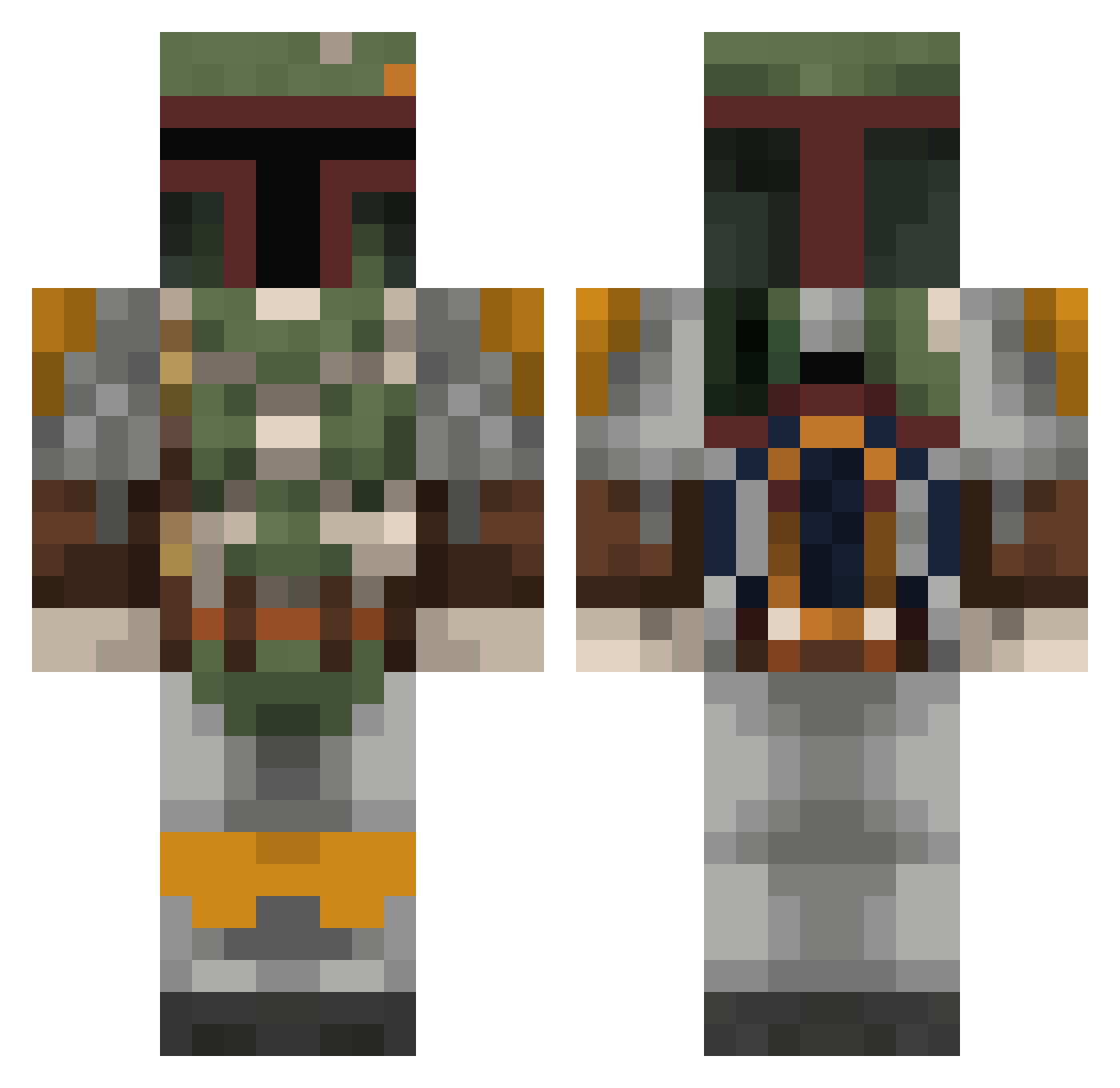
Current Minecraft skin of the player Adomian, loaded from the official Mojang API. Rotate the 3D model with your mouse or finger, then download the skin as a PNG file and use it in Minecraft: Bedrock Edition or Java Edition for free. When Adomian changes their skin, this page updates automatically and the old skin stays in the history below.
Other players with this skin (350)
Adomian was the 192nd player we have seen with this skin, first spotted on 26.09.2026. The same skin was seen on these players. Open a nickname to see their current skin and skin history.
 Big_E_23 KoruLeigh AmiralTintamar Mookah toucon Gnivom Edgodean Jrkutz ElliotTappin TheHorseman Beccaria_pro Callahanlevi Jthesoldier TimbleT Elinventado Andy_Precious NerHi568 Stuff_daddy BotNoHand aria_xx98 LuckyyLuk3 alexpeters lithiumeater namemelater Nirot puzzles_11 Devirix watermEllen12 Unlimited332 Toastmalone21 Koszatnikowy Bread114 emexo8 CUI2I2EY Rorcal SucoDeArroz Benthetimelord Louis1609 FisyBoy SpaghettiSosig Ellepi BigEth JEFFHARY69 BraydenPOG69 Ratukan beardquest frozwrx07 Joako119 MINEJAM1015 ZsoLee TheWolffYT Jamerniles Schueri ripplelxrd Oracle181 Kold87 pujkoo Prestigeww212 ProbablyWyatt Lilloc91
More Boba Fett Minecraft skins
How to install the Adomian skin
- Press the Download button above to save the skin as a PNG file.
- Minecraft: Bedrock Edition (PE): open the Dressing Room from the main menu (or tap your character → Edit Character), go to Classic Skins → Owned, press the + (new skin) button, choose the downloaded PNG and pick the Classic (Steve) model. Works on PC and mobile; consoles cannot import custom skins.
- Minecraft: Java Edition: open the Minecraft Launcher, go to the Skins tab, click New Skin, load the PNG, pick the Classic (Steve) model and press Save & Use. You can also upload it at minecraft.net → Profile → Change Skin.
The skin does not show up after import - what should I do?
Restart Minecraft and open the Dressing Room again - imported skins sometimes appear only after a restart. Also make sure you selected the imported skin and picked the Classic (Steve) model.
Which model should I choose, Classic or Slim?
This skin is designed for the Classic (Steve) model. If you pick the wrong model, the arms of the skin will look stretched or squeezed.
Is the skin of Adomian free to download?
Yes. Press Download, save the PNG file and use it in Minecraft: Bedrock Edition or Java Edition - no payment or registration needed. The skin also works on multiplayer servers and Realms.
More skins
Looking for more? Go back to all Minecraft skins and check the top skins of the week, month and all time, or find any player's skin by nickname.