
AchyCat - Minecraft Skins & Skin History
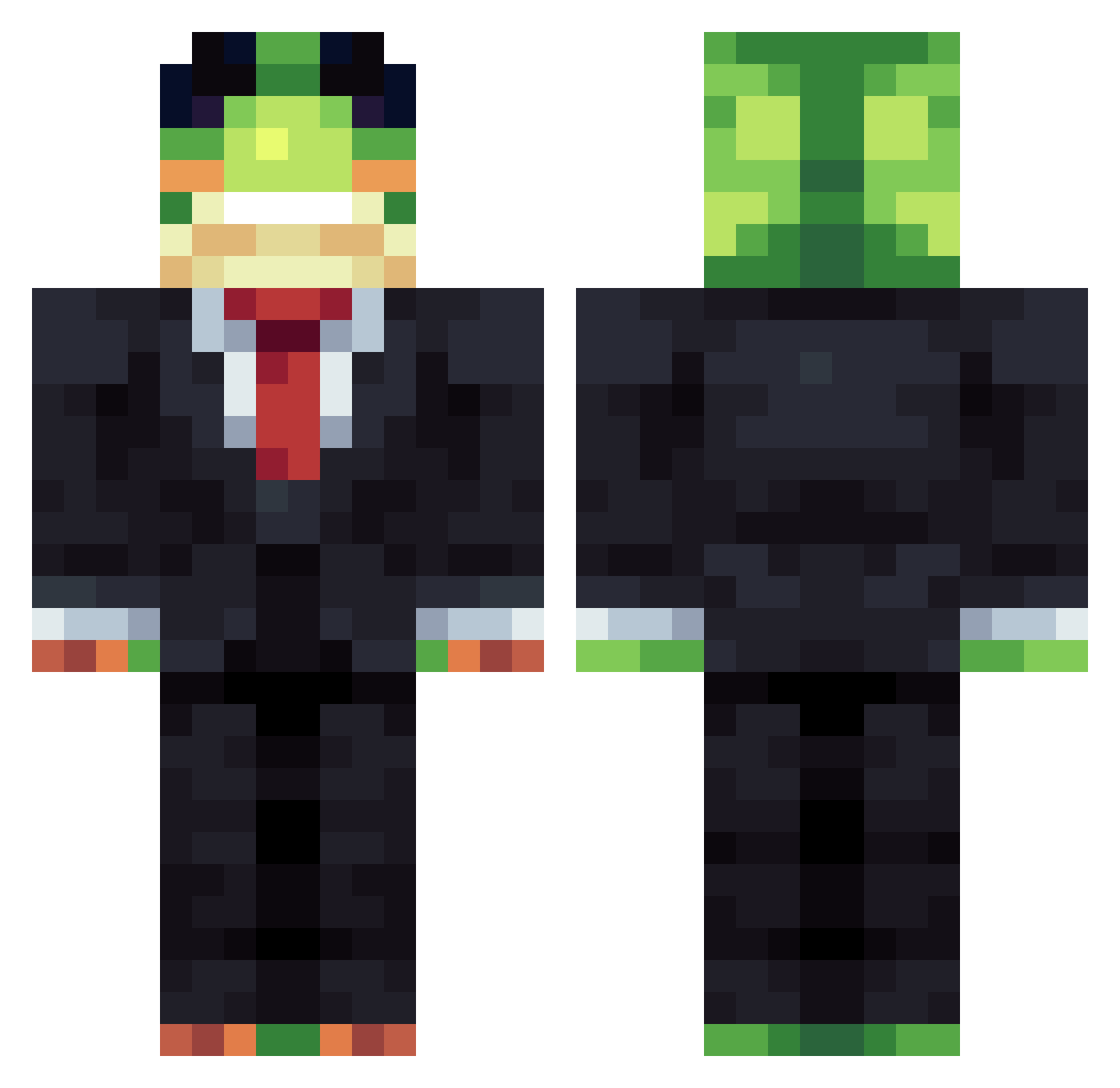
Current Minecraft skin of the player AchyCat, loaded from the official Mojang API. Rotate the 3D model with your mouse or finger, then download the skin as a PNG file and use it in Minecraft: Bedrock Edition or Java Edition for free. When AchyCat changes their skin, this page updates automatically and the old skin stays in the history below.
Other players with this skin (1445)
AchyCat was the 384th player we have seen with this skin, first spotted on 27.08.2026. The same skin was seen on these players. Open a nickname to see their current skin and skin history.
 zaluxx
 NOLHAD WilsyFrog Zachary96 chris5olson thex2686 Batmanhastam gaillewis000 SigmaSigmington szymnius Loffo14 ManiaIsTheBest Connorx12 BeerLover2007 NightRise_On Bollekassa crijeda RottenEggzz NightCashew9 TRP7953 Luxx__ Joki49 JakeTheSnake378 MikeHammer1976
 soccerkid1423 NxturalKwsh VortexG2000 cigsmoker erPippegaa WILLBILL24 NeverRec0n
 Xvlm 13xlyd Mattia0012 PctLag ROBERTRTZIN xaxsim00 FlimsyWolf w3fiskeleton zenn4 yangyangcheng Angel_GF Gordinykr
 BoschDrillGSR AetherCogs hynnee Gangeshwar wjddnjsdud111 Kva1ty
 GingerlyPizza51
 Wizard_321 BenderTheBlender
 Giga_Vantys CbTheCutie Ramirez6660 JASON01187HHS CuratorJ3 El_Colombianito9
 KAIZIH NicoySebas85
More Frog Minecraft skins
How to install the AchyCat skin
- Press the Download button above to save the skin as a PNG file.
- Minecraft: Bedrock Edition (PE): open the Dressing Room from the main menu (or tap your character → Edit Character), go to Classic Skins → Owned, press the + (new skin) button, choose the downloaded PNG and pick the Classic (Steve) model. Works on PC and mobile; consoles cannot import custom skins.
- Minecraft: Java Edition: open the Minecraft Launcher, go to the Skins tab, click New Skin, load the PNG, pick the Classic (Steve) model and press Save & Use. You can also upload it at minecraft.net → Profile → Change Skin.
The skin does not show up after import - what should I do?
Restart Minecraft and open the Dressing Room again - imported skins sometimes appear only after a restart. Also make sure you selected the imported skin and picked the Classic (Steve) model.
Which model should I choose, Classic or Slim?
This skin is designed for the Classic (Steve) model. If you pick the wrong model, the arms of the skin will look stretched or squeezed.
Is the skin of AchyCat free to download?
Yes. Press Download, save the PNG file and use it in Minecraft: Bedrock Edition or Java Edition - no payment or registration needed. The skin also works on multiplayer servers and Realms.
More skins
Looking for more? Go back to all Minecraft skins and check the top skins of the week, month and all time, or find any player's skin by nickname.