
Abinotfun - Minecraft Skins & Skin History
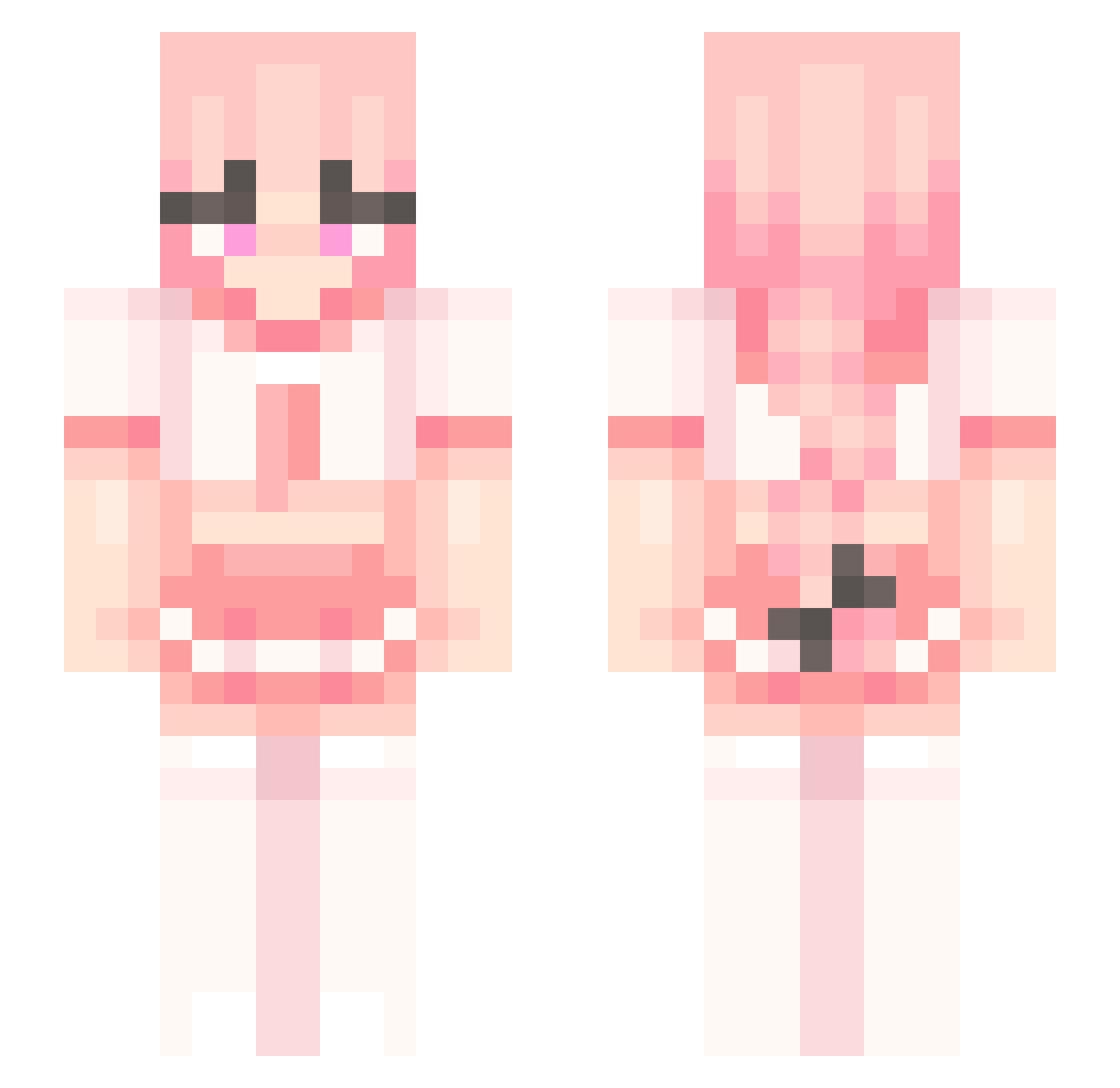
Current Minecraft skin of the player Abinotfun, loaded from the official Mojang API. Rotate the 3D model with your mouse or finger, then download the skin as a PNG file and use it in Minecraft: Bedrock Edition or Java Edition for free. When Abinotfun changes their skin, this page updates automatically and the old skin stays in the history below.
Other players with this skin (221)
Abinotfun was the 91st player we have seen with this skin, first spotted on 05.09.2026. The same skin was seen on these players. Open a nickname to see their current skin and skin history.
 MeganekkoArtist DentedFive6137 gangweedsmoker
 spicyeon Orcansana DerUncoole69 TSLKyotao zuzureal TastelessAcid Hamypig09 JoeMama1969 SDM488 WeinerDrainer Jimmythaboi on_bae_on_fleek EnkiduuN4T Dapa1169 QOFN Qawkl rey4k GMBaiter Sharpen_Wolf hazmatman Sayo156 Ekox Suhoone IAmGuby Lynxien7341 Sh4dow_Link Kitten676
 Alwipe Enrqorl1117 kapuchino_ Schadow_ghg tothpali32 WHEREMYEARSDUDE 17Strikes DonWetter TheMiniNinja21 twilighted1 Licensedr Viviana122112 MrP0tatoUwU fed673 nomnomkirby zeazzo Berryy08 Need_Some_Space TheEpicSwag Sylky_ Luckykuke KingoftheGRITS PeeWee_71 e1enay Sway420 Astl0f0 KloofyPuff IrrationalMinds PuzonBomba MrRustyDuck
More School Uniform Minecraft skins
See all 6215 School Uniform skins
How to install the Abinotfun skin
- Press the Download button above to save the skin as a PNG file.
- Minecraft: Bedrock Edition (PE): open the Dressing Room from the main menu (or tap your character → Edit Character), go to Classic Skins → Owned, press the + (new skin) button, choose the downloaded PNG and pick the Slim (Alex) model. Works on PC and mobile; consoles cannot import custom skins.
- Minecraft: Java Edition: open the Minecraft Launcher, go to the Skins tab, click New Skin, load the PNG, pick the Slim (Alex) model and press Save & Use. You can also upload it at minecraft.net → Profile → Change Skin.
The skin does not show up after import - what should I do?
Restart Minecraft and open the Dressing Room again - imported skins sometimes appear only after a restart. Also make sure you selected the imported skin and picked the Slim (Alex) model.
Which model should I choose, Classic or Slim?
This skin is designed for the Slim (Alex) model. If you pick the wrong model, the arms of the skin will look stretched or squeezed.
Is the skin of Abinotfun free to download?
Yes. Press Download, save the PNG file and use it in Minecraft: Bedrock Edition or Java Edition - no payment or registration needed. The skin also works on multiplayer servers and Realms.
More skins
Looking for more? Go back to all Minecraft skins and check the top skins of the week, month and all time, or find any player's skin by nickname.