
AahBears - Minecraft Skins & Skin History
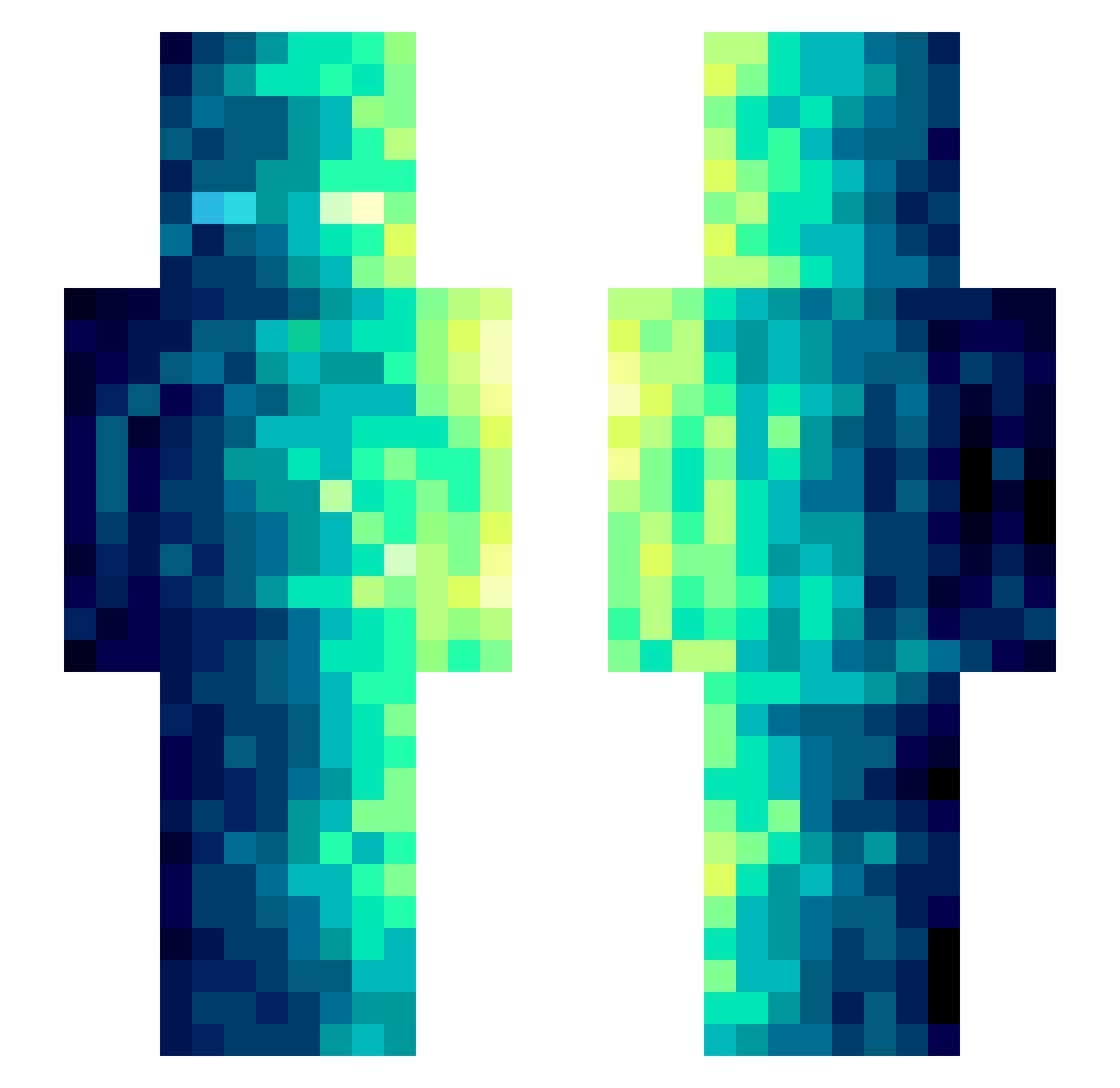
Current Minecraft skin of the player AahBears, loaded from the official Mojang API. Rotate the 3D model with your mouse or finger, then download the skin as a PNG file and use it in Minecraft: Bedrock Edition or Java Edition for free. When AahBears changes their skin, this page updates automatically and the old skin stays in the history below.
Other players with this skin (489)
AahBears was the 110th player we have seen with this skin, first spotted on 19.08.2026. The same skin was seen on these players. Open a nickname to see their current skin and skin history.
 XXBLD HHHHHHHHH777
 Milanv_ AkashiUrai ShaperLock 0Slumber0 Btajdestroyer wuboss s9001 emptycity8 ActionBravo Roser111 SinProblemas oren29 mqer Falling_feathers fled2090 candycane100 jangufacegenius Quiet_Kid69 Ghost012312 XiaMo567 Ricky_baixiao StarChild892 waymakesTTV popmarkovkoa Rukis94 jolenain Lolycorn Erx1027 Viozi thorfax_arabello Nhimbaloth Clarkbar2125 wang12345 kirka0821 Sblpok heopaf Thiboriginal WatanabeToru querySelector NashedPotatoess ZeroShade00 Annabelle9283 nawu13 RimurURu1 AcidElsa Johnes1992 ASAPQuan DeedleBop1 antino369 JacobD96 JefferyZETA Lv_20 _Diego_2006 MiMiJkd MrDreadd TakaMundo spEcter_360 XtrieX
How to install the AahBears skin
- Press the Download button above to save the skin as a PNG file.
- Minecraft: Bedrock Edition (PE): open the Dressing Room from the main menu (or tap your character → Edit Character), go to Classic Skins → Owned, press the + (new skin) button, choose the downloaded PNG and pick the Slim (Alex) model. Works on PC and mobile; consoles cannot import custom skins.
- Minecraft: Java Edition: open the Minecraft Launcher, go to the Skins tab, click New Skin, load the PNG, pick the Slim (Alex) model and press Save & Use. You can also upload it at minecraft.net → Profile → Change Skin.
The skin does not show up after import - what should I do?
Restart Minecraft and open the Dressing Room again - imported skins sometimes appear only after a restart. Also make sure you selected the imported skin and picked the Slim (Alex) model.
Which model should I choose, Classic or Slim?
This skin is designed for the Slim (Alex) model. If you pick the wrong model, the arms of the skin will look stretched or squeezed.
Is the skin of AahBears free to download?
Yes. Press Download, save the PNG file and use it in Minecraft: Bedrock Edition or Java Edition - no payment or registration needed. The skin also works on multiplayer servers and Realms.
More skins
Looking for more? Go back to all Minecraft skins and check the top skins of the week, month and all time, or find any player's skin by nickname.