
ARE52 - Minecraft Skins & Skin History
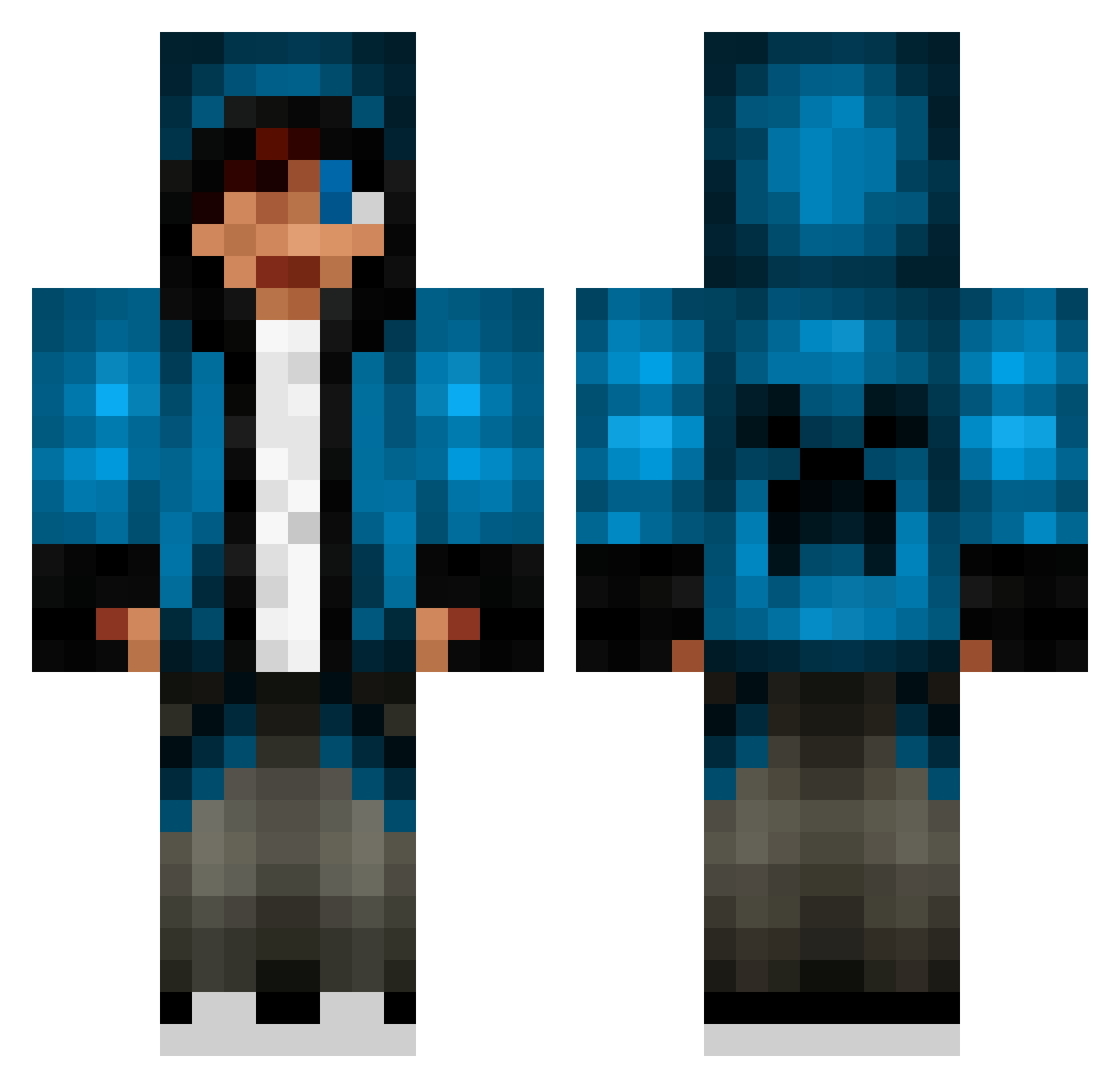
Current Minecraft skin of the player ARE52, loaded from the official Mojang API. Rotate the 3D model with your mouse or finger, then download the skin as a PNG file and use it in Minecraft: Bedrock Edition or Java Edition for free. When ARE52 changes their skin, this page updates automatically and the old skin stays in the history below.
Other players with this skin (653)
ARE52 was the 225th player we have seen with this skin, first spotted on 29.08.2026. The same skin was seen on these players. Open a nickname to see their current skin and skin history.
 ReaperlxP frappe4000 liam0402 beffelmann Krusty42013 RazorPvP_ H20Delirious1018 littlebro90 alexfeilifeili Siphlem Jaycr3 TallyWorld x50x123 creeper221100 14Adam Bradly549 TheMouseYT AleksandarPop MrMadHatter01 fullyflared19 HazimJF79 tuike ininlaw yoitsnova TheHojnik minecraftDIGITAL kwonHo IdunnHK Jerry44221 seg050500 FlamingSword72 JasonHarper1998 Laviran johnchickeneater redpuredude toni_pu nightslay lupeters jason12722222 Angrysquirrel03 Toxvig yeshualualu ohtheregoes Kjetti ninja3521 Lukeman200 CrazyHorse999 Kaltsuk01 PeresTT xx_masterkill_xx M7MD1417 PhantomViperX blabla23 oskar80 Chqmpion malene01 benbot429 FireRust10082 MCsuperGamer oliverfk
More Creeper Minecraft skins
How to install the ARE52 skin
- Press the Download button above to save the skin as a PNG file.
- Minecraft: Bedrock Edition (PE): open the Dressing Room from the main menu (or tap your character → Edit Character), go to Classic Skins → Owned, press the + (new skin) button, choose the downloaded PNG and pick the Classic (Steve) model. Works on PC and mobile; consoles cannot import custom skins.
- Minecraft: Java Edition: open the Minecraft Launcher, go to the Skins tab, click New Skin, load the PNG, pick the Classic (Steve) model and press Save & Use. You can also upload it at minecraft.net → Profile → Change Skin.
The skin does not show up after import - what should I do?
Restart Minecraft and open the Dressing Room again - imported skins sometimes appear only after a restart. Also make sure you selected the imported skin and picked the Classic (Steve) model.
Which model should I choose, Classic or Slim?
This skin is designed for the Classic (Steve) model. If you pick the wrong model, the arms of the skin will look stretched or squeezed.
Is the skin of ARE52 free to download?
Yes. Press Download, save the PNG file and use it in Minecraft: Bedrock Edition or Java Edition - no payment or registration needed. The skin also works on multiplayer servers and Realms.
More skins
Looking for more? Go back to all Minecraft skins and check the top skins of the week, month and all time, or find any player's skin by nickname.