
8corpses - Minecraft Skins & Skin History
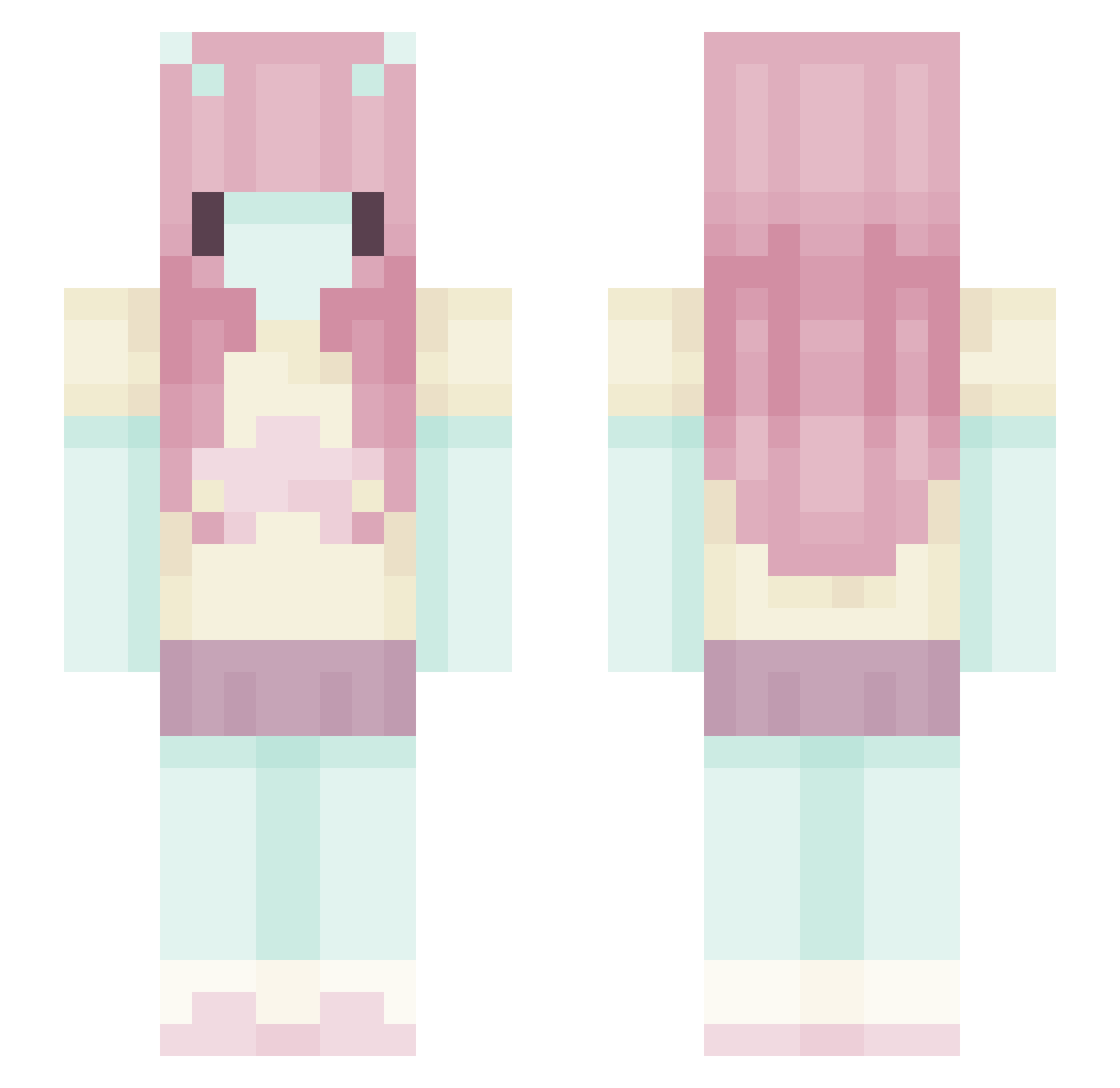
Current Minecraft skin of the player 8corpses, loaded from the official Mojang API. Rotate the 3D model with your mouse or finger, then download the skin as a PNG file and use it in Minecraft: Bedrock Edition or Java Edition for free. When 8corpses changes their skin, this page updates automatically and the old skin stays in the history below.
Other players with this skin (551)
8corpses was the 479th player we have seen with this skin, first spotted on 16.10.2026. The same skin was seen on these players. Open a nickname to see their current skin and skin history.
 bunnydays_u AlanLD666 Kaboom_XP martiiilol ChoosingMak Nattigator _WenZero_ solaendis Fairytuff andromeda006 Earthysoup69 oliwia8901 OniMyo Isa_Belleee Sniffient _MEEEEEeEeOW_ NotSoupVR hatsPOSTAL floophyy sstinkymouse katee543 myatchai still_potato SweetsMalone ImADreamm weiwei1627 yungestleen d0ll_face_xo Giihz vicky_vibu Neookai Skrzacikus umslept labubub DevdoZap lottieJar hhmnyaring rayyeah ThzSky hekserij zaichikks majskaja_28 qkyy Kwityu ELECTRICALSP4RK Blehsoup LOUCOMOTIVE CatWorm0107 Nanicaa carefreeinsect H_J_26 DiogooHeenrique sohpian MaritJM Hamsterdough IamStrawberrys iluvmae delilahj Schluerfsuppe yumeelodyy_
More Zero Two Minecraft skins
How to install the 8corpses skin
- Press the Download button above to save the skin as a PNG file.
- Minecraft: Bedrock Edition (PE): open the Dressing Room from the main menu (or tap your character → Edit Character), go to Classic Skins → Owned, press the + (new skin) button, choose the downloaded PNG and pick the Slim (Alex) model. Works on PC and mobile; consoles cannot import custom skins.
- Minecraft: Java Edition: open the Minecraft Launcher, go to the Skins tab, click New Skin, load the PNG, pick the Slim (Alex) model and press Save & Use. You can also upload it at minecraft.net → Profile → Change Skin.
The skin does not show up after import - what should I do?
Restart Minecraft and open the Dressing Room again - imported skins sometimes appear only after a restart. Also make sure you selected the imported skin and picked the Slim (Alex) model.
Which model should I choose, Classic or Slim?
This skin is designed for the Slim (Alex) model. If you pick the wrong model, the arms of the skin will look stretched or squeezed.
Is the skin of 8corpses free to download?
Yes. Press Download, save the PNG file and use it in Minecraft: Bedrock Edition or Java Edition - no payment or registration needed. The skin also works on multiplayer servers and Realms.
More skins
Looking for more? Go back to all Minecraft skins and check the top skins of the week, month and all time, or find any player's skin by nickname.