
3DW1n_ - Minecraft Skins & Skin History
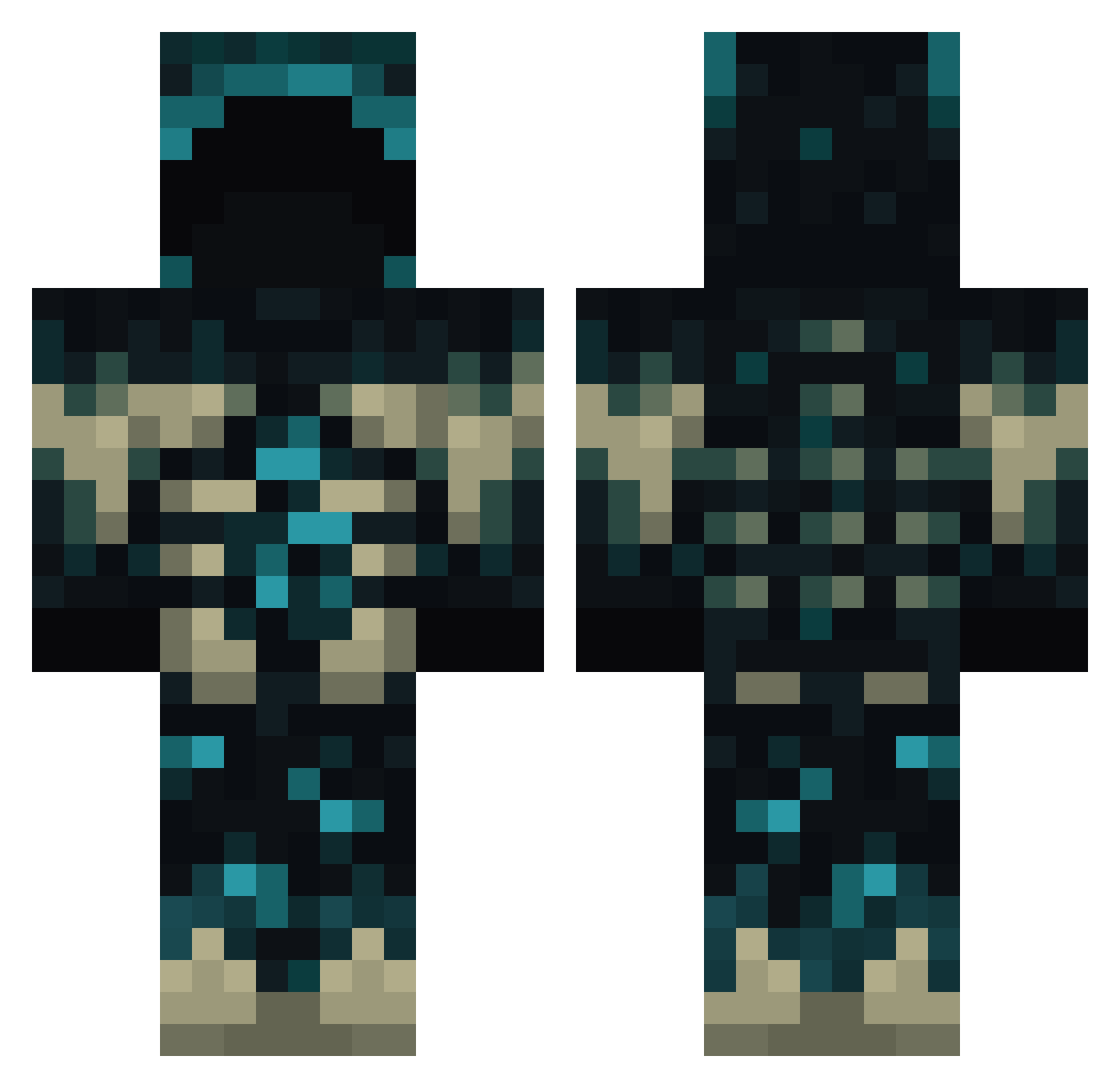
Current Minecraft skin of the player 3DW1n_, loaded from the official Mojang API. Rotate the 3D model with your mouse or finger, then download the skin as a PNG file and use it in Minecraft: Bedrock Edition or Java Edition for free. When 3DW1n_ changes their skin, this page updates automatically and the old skin stays in the history below.
Other players with this skin (791)
3DW1n_ was the 540th player we have seen with this skin, first spotted on 06.10.2026. The same skin was seen on these players. Open a nickname to see their current skin and skin history.
 Ayd3n52412 El_Duck1232 NovaFrostHD TheFatalKnight Mrshibbyyy Flopxs PedrooTavares OXDan HSM120 kenjiblob YaeMiko8660 IISANII nostil Clem314 Hyuate Ilygrimm jetwickedmatt UnanimousNewt6 OneSaIko Bin_Chicken2032 fall1234567 towelcounty cat12345687 nathanpatrop spacetime999 CydeR407 josenito2004 TimePigeon4634 Eric3618 Kraissen xMyrknir xbminecraft Henioox123 Paragon1314 Bulgy_Penguin Spaprite ramoexis emix1978 Mr_AlphaBread JOKING02 Josedazueira Rehbein symexor hy_465 HTR_AY BelarusJames AkioTatsuki HDGYZ Rain4549 ThenNach CroppyJamal sointune Sagitaliss Nambu06 Assyrianman LexleBexle ThDarkShadow404 Murderqp RecalledCollapse Grass08
More Sculk Minecraft skins
How to install the 3DW1n_ skin
- Press the Download button above to save the skin as a PNG file.
- Minecraft: Bedrock Edition (PE): open the Dressing Room from the main menu (or tap your character → Edit Character), go to Classic Skins → Owned, press the + (new skin) button, choose the downloaded PNG and pick the Classic (Steve) model. Works on PC and mobile; consoles cannot import custom skins.
- Minecraft: Java Edition: open the Minecraft Launcher, go to the Skins tab, click New Skin, load the PNG, pick the Classic (Steve) model and press Save & Use. You can also upload it at minecraft.net → Profile → Change Skin.
The skin does not show up after import - what should I do?
Restart Minecraft and open the Dressing Room again - imported skins sometimes appear only after a restart. Also make sure you selected the imported skin and picked the Classic (Steve) model.
Which model should I choose, Classic or Slim?
This skin is designed for the Classic (Steve) model. If you pick the wrong model, the arms of the skin will look stretched or squeezed.
Is the skin of 3DW1n_ free to download?
Yes. Press Download, save the PNG file and use it in Minecraft: Bedrock Edition or Java Edition - no payment or registration needed. The skin also works on multiplayer servers and Realms.
More skins
Looking for more? Go back to all Minecraft skins and check the top skins of the week, month and all time, or find any player's skin by nickname.