
2333iii - Minecraft Skins & Skin History
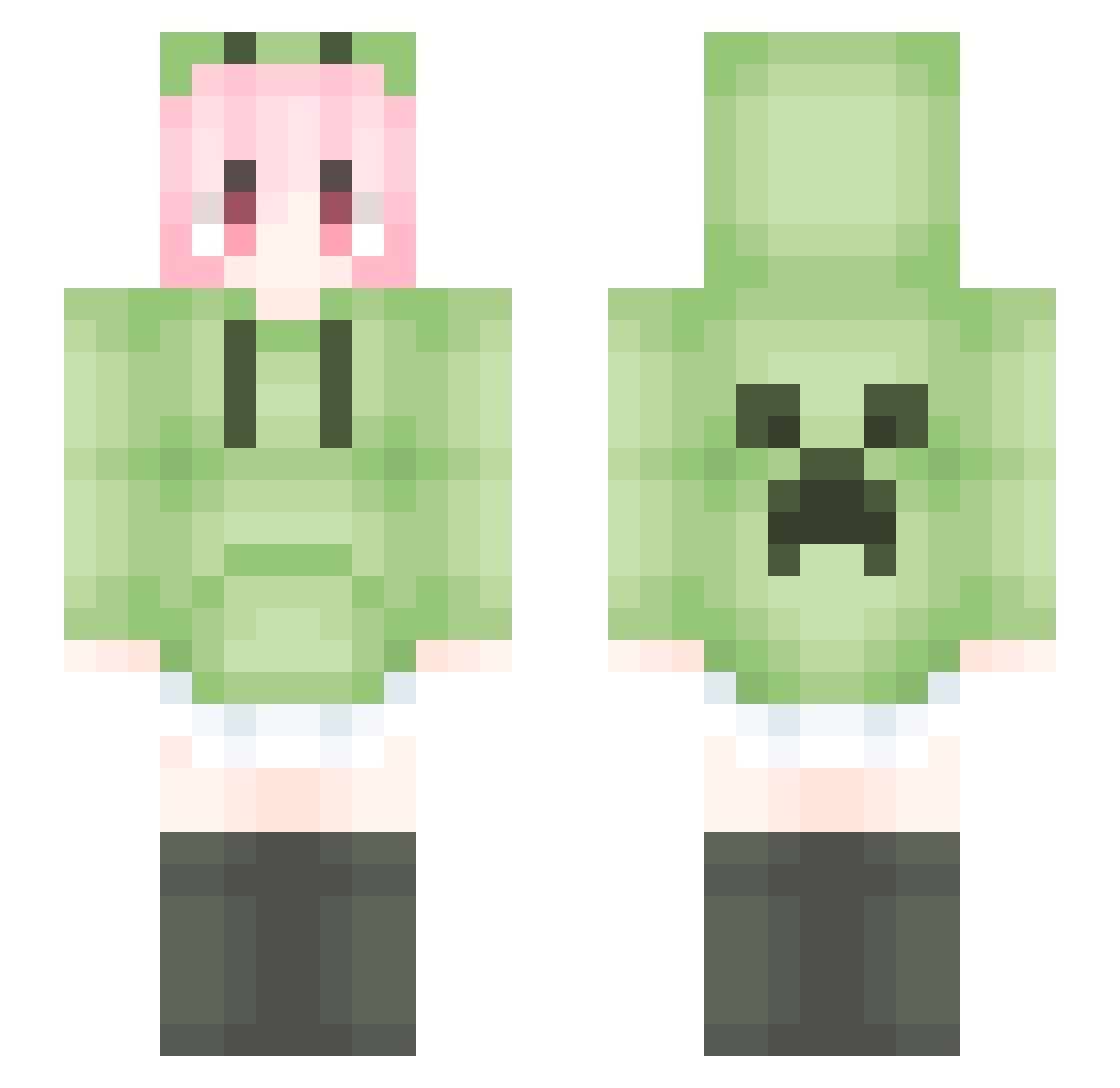
Current Minecraft skin of the player 2333iii, loaded from the official Mojang API. Rotate the 3D model with your mouse or finger, then download the skin as a PNG file and use it in Minecraft: Bedrock Edition or Java Edition for free. When 2333iii changes their skin, this page updates automatically and the old skin stays in the history below.
Other players with this skin (1463)
2333iii was the 665th player we have seen with this skin, first spotted on 05.09.2026. The same skin was seen on these players. Open a nickname to see their current skin and skin history.
 xiaowudadae DANKING_233 91QianQiu Player1234562 ybhzs Aliexer Sakii11 Riddler1996 Vmfd aowul like2008 ahbbuj _Dave0_ JunLI3 LeonardMitchell_ Ouxanzn buhnc Arids_1 Proditio_ penglei2004 jjhjhx xuejiesang XiaoEMo12345 Bampoem JUD_Y wodefumosile V_ICEY_V Undtaker Ernest_li yuhanggg MC_xiaoleya bellnorizu weiba123
 AE_KIT SunFlower312 AlbertEinstein66 hemogenesis 67imfrt Lkzmxcz zhangweiheng0813 FXking3
 Lyan_Desu LiquidBounceB82 Nokelia Wxjw XFS39 ACLE_M rankplz YanBaGeng Salmon_Poi TaiYF HADFS Ho_Tao Ryanzz111 Aayyd Ktuyxv The_first_circle tmd233 octom10 mingchen233
More Anime Girl Minecraft skins
See all 11707 Anime Girl skins
How to install the 2333iii skin
- Press the Download button above to save the skin as a PNG file.
- Minecraft: Bedrock Edition (PE): open the Dressing Room from the main menu (or tap your character → Edit Character), go to Classic Skins → Owned, press the + (new skin) button, choose the downloaded PNG and pick the Slim (Alex) model. Works on PC and mobile; consoles cannot import custom skins.
- Minecraft: Java Edition: open the Minecraft Launcher, go to the Skins tab, click New Skin, load the PNG, pick the Slim (Alex) model and press Save & Use. You can also upload it at minecraft.net → Profile → Change Skin.
The skin does not show up after import - what should I do?
Restart Minecraft and open the Dressing Room again - imported skins sometimes appear only after a restart. Also make sure you selected the imported skin and picked the Slim (Alex) model.
Which model should I choose, Classic or Slim?
This skin is designed for the Slim (Alex) model. If you pick the wrong model, the arms of the skin will look stretched or squeezed.
Is the skin of 2333iii free to download?
Yes. Press Download, save the PNG file and use it in Minecraft: Bedrock Edition or Java Edition - no payment or registration needed. The skin also works on multiplayer servers and Realms.
More skins
Looking for more? Go back to all Minecraft skins and check the top skins of the week, month and all time, or find any player's skin by nickname.