
19Hooper - Minecraft Skins & Skin History
Current Minecraft skin of the player 19Hooper, loaded from the official Mojang API. Rotate the 3D model with your mouse or finger, then download the skin as a PNG file and use it in Minecraft: Bedrock Edition or Java Edition for free. When 19Hooper changes their skin, this page updates automatically and the old skin stays in the history below.
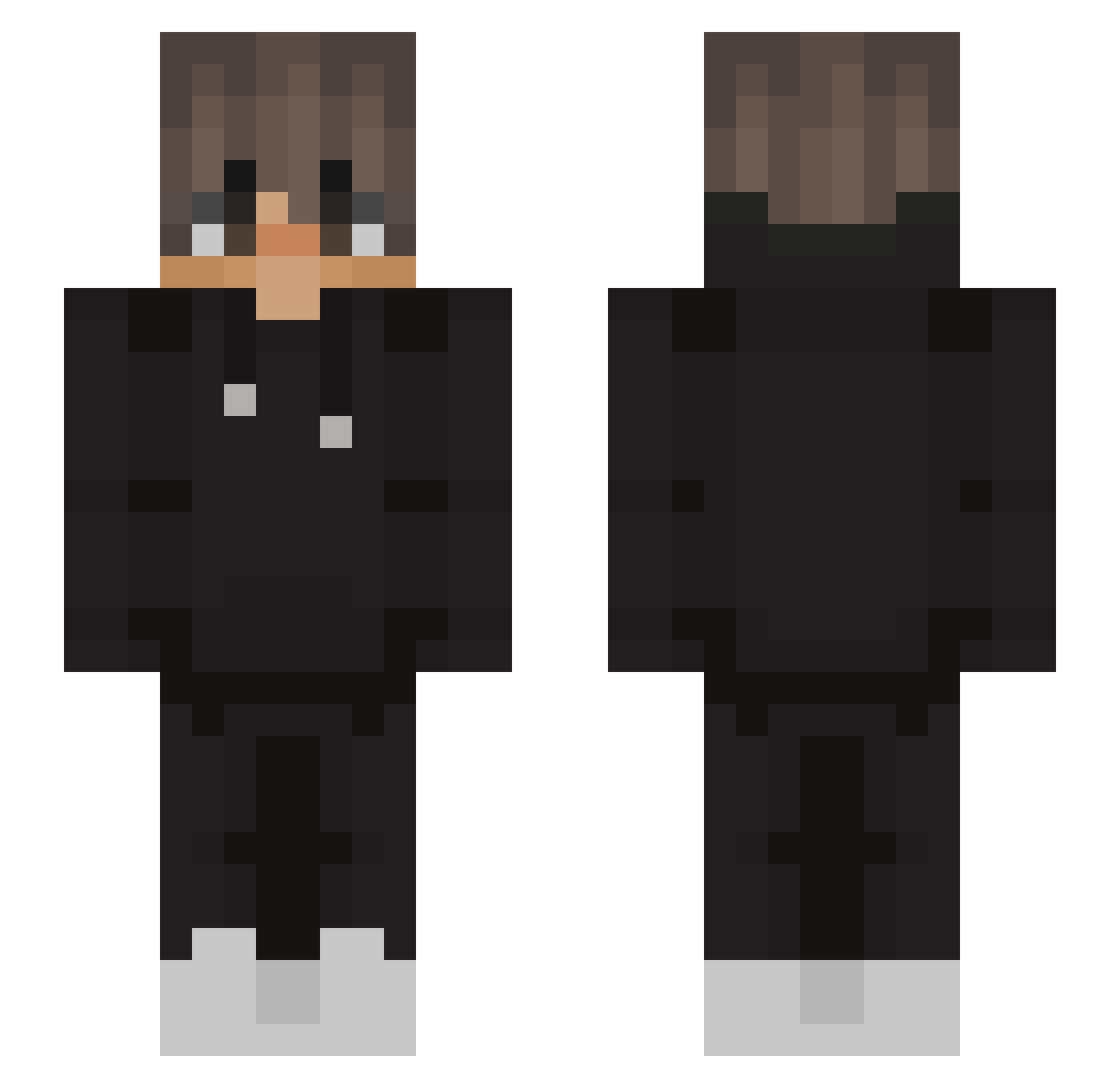
Other players with this skin (563)
19Hooper was the 95th player we have seen with this skin, first spotted on 13.08.2026. The same skin was seen on these players. Open a nickname to see their current skin and skin history.
 Snaffe00 Rainbowshit deafpenguin ojohh orvar2003 ByFlooz ORKELOSS Davih_Henri KLSLinx aliynn tobnat0r MrLino23 Andreas4422 LittleGamer069 SSRIJAL9876 K_J215
 CraftingBenny Kater8787 Shadow_521 Asbestine Lasocik CatEmpiree Nocturnerift Jensdeakleine ImDaniux hamseojin David2889 DampedChair1491 ParallelBlackkk notrazvan2k Teraforce333 VolimSamoDinamo Jugo_2004 _Snowdie_ Emsix_X Lurgrid Rai_1205 maaaaksik BigMeatFella John08W1ck Jaybird334 Grosso_mano Scxmk BA_LA_ Neteroo azureheights4675 Deodred Lazll The_fallenRiseup Jaayyb vxhelper Emek_Gaming RockPlum420 LeRider Etrnl_ SNOWFOX009 Xtruster SteveMasterYoda I_Buritos_I cthrift13
More Streetwear Minecraft skins
How to install the 19Hooper skin
- Press the Download button above to save the skin as a PNG file.
- Minecraft: Bedrock Edition (PE): open the Dressing Room from the main menu (or tap your character → Edit Character), go to Classic Skins → Owned, press the + (new skin) button, choose the downloaded PNG and pick the Slim (Alex) model. Works on PC and mobile; consoles cannot import custom skins.
- Minecraft: Java Edition: open the Minecraft Launcher, go to the Skins tab, click New Skin, load the PNG, pick the Slim (Alex) model and press Save & Use. You can also upload it at minecraft.net → Profile → Change Skin.
The skin does not show up after import - what should I do?
Restart Minecraft and open the Dressing Room again - imported skins sometimes appear only after a restart. Also make sure you selected the imported skin and picked the Slim (Alex) model.
Which model should I choose, Classic or Slim?
This skin is designed for the Slim (Alex) model. If you pick the wrong model, the arms of the skin will look stretched or squeezed.
Is the skin of 19Hooper free to download?
Yes. Press Download, save the PNG file and use it in Minecraft: Bedrock Edition or Java Edition - no payment or registration needed. The skin also works on multiplayer servers and Realms.
More skins
Looking for more? Go back to all Minecraft skins and check the top skins of the week, month and all time, or find any player's skin by nickname.