
13_S3TS_0F_T33TH - Minecraft Skins & Skin History
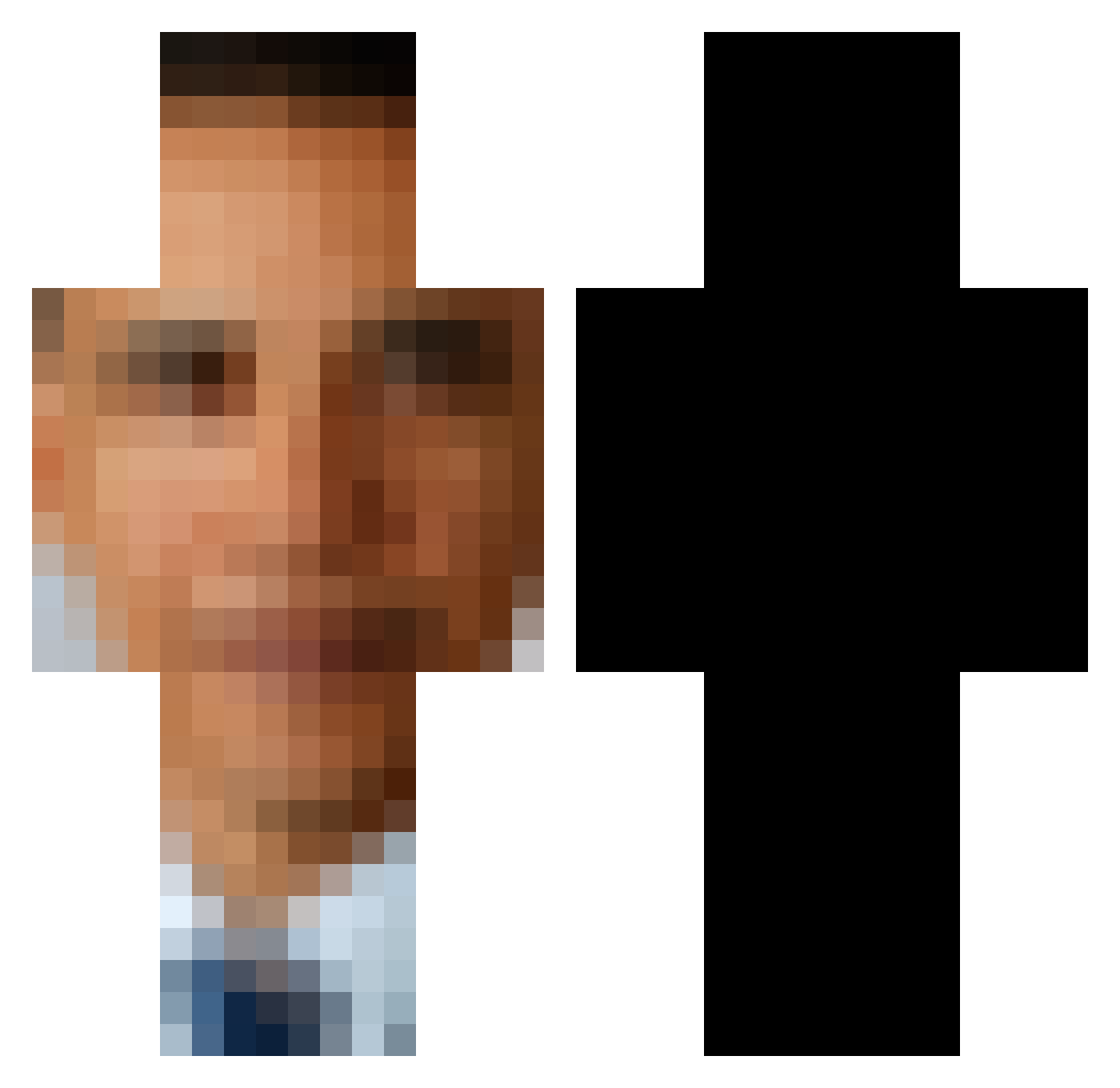
Current Minecraft skin of the player 13_S3TS_0F_T33TH, loaded from the official Mojang API. Rotate the 3D model with your mouse or finger, then download the skin as a PNG file and use it in Minecraft: Bedrock Edition or Java Edition for free. When 13_S3TS_0F_T33TH changes their skin, this page updates automatically and the old skin stays in the history below.
Other players with this skin (593)
13_S3TS_0F_T33TH was the 457th player we have seen with this skin, first spotted on 13.10.2026. The same skin was seen on these players. Open a nickname to see their current skin and skin history.
 I_have_a_waifu sinisterstink67 MediBirb autumnnnnnnnnnn TheMightyRoyal Swagmasta240 Deegs_2025 Evilapple246 the_scrungle GeorgeWBushDidIt tfishfish Meat_Benjo Duck_Milk Adrnspnu WOOWOWW Kibbble StintClevens TacticalBacon_99 Odin22476 imabigtree Amogus_Imposter_ mustaaardmango67 TributeJar SlimeyGamer772 tokyo_drift09 Echo_Kniqht Melon__Muncher MasterLeroy7 BentoBotXD ghostgoat72 suelfuta KUROMAME7778 mossytoe sigmapingollo Bacon_LoL Kiwee_4_life ChrisTheEllipsis epicgamer2684 1__Pablo_1 __XFighter__ huskyblue7 TwistedZombie00 BenTheDudeman ThicccObunga bilbobel jasta10 Smleme Rpm218 Bleub100 jharrisnorton dvir35 zer0thegreat cgburner1 raisinedout ChefVengeful bermardoo bEAM812 Melodibidon Matthew220613 BlockzWWW
More Barack Obama Minecraft skins
See all 258 Barack Obama skins
How to install the 13_S3TS_0F_T33TH skin
- Press the Download button above to save the skin as a PNG file.
- Minecraft: Bedrock Edition (PE): open the Dressing Room from the main menu (or tap your character → Edit Character), go to Classic Skins → Owned, press the + (new skin) button, choose the downloaded PNG and pick the Classic (Steve) model. Works on PC and mobile; consoles cannot import custom skins.
- Minecraft: Java Edition: open the Minecraft Launcher, go to the Skins tab, click New Skin, load the PNG, pick the Classic (Steve) model and press Save & Use. You can also upload it at minecraft.net → Profile → Change Skin.
The skin does not show up after import - what should I do?
Restart Minecraft and open the Dressing Room again - imported skins sometimes appear only after a restart. Also make sure you selected the imported skin and picked the Classic (Steve) model.
Which model should I choose, Classic or Slim?
This skin is designed for the Classic (Steve) model. If you pick the wrong model, the arms of the skin will look stretched or squeezed.
Is the skin of 13_S3TS_0F_T33TH free to download?
Yes. Press Download, save the PNG file and use it in Minecraft: Bedrock Edition or Java Edition - no payment or registration needed. The skin also works on multiplayer servers and Realms.
More skins
Looking for more? Go back to all Minecraft skins and check the top skins of the week, month and all time, or find any player's skin by nickname.