
zuttin01 - Minecraft Skins & Skin History
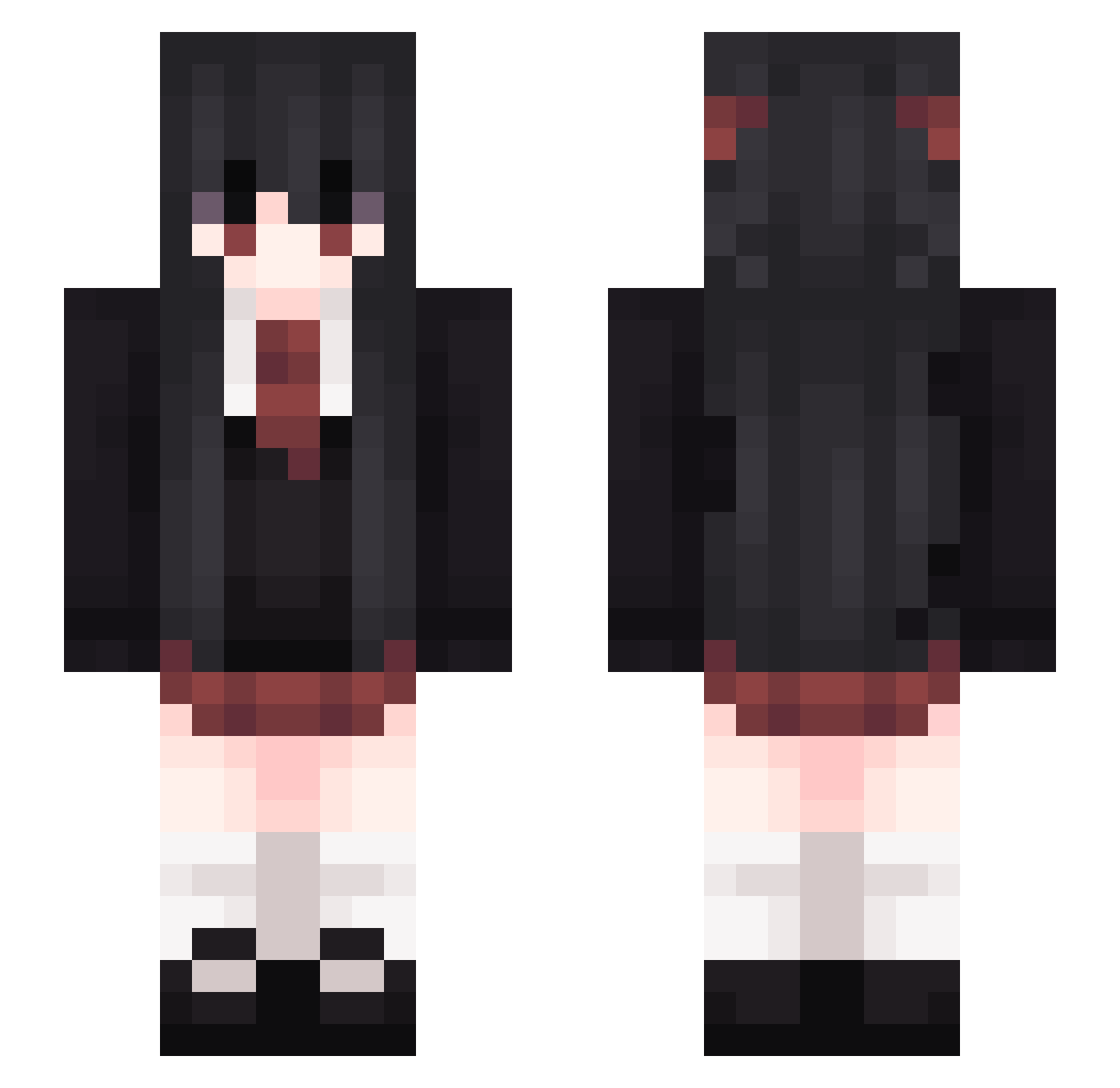
Current Minecraft skin of the player zuttin01, loaded from the official Mojang API. Rotate the 3D model with your mouse or finger, then download the skin as a PNG file and use it in Minecraft: Bedrock Edition or Java Edition for free. When zuttin01 changes their skin, this page updates automatically and the old skin stays in the history below.
Other players with this skin (265)
zuttin01 was the 152nd player we have seen with this skin, first spotted on 26.09.2026. The same skin was seen on these players. Open a nickname to see their current skin and skin history.
 Fenris2113 Tan__Ran xpwq astarafix Pau4ok BANjour_ calumsmillie BanS_G alllmonds 2F_cute 4ma9ry DDuck10 MENGHUAN_sb Evangeline666 NF_49 BennySn jimin322 LayRyo TrueLol1 WhiteInkEX ya_zone ISICE IcosahedronSQRD qwaszx0711 StrangerTina St_LemoN Lvl40Pikachu Dat_Gamerr Yagonshino qwer233 KoutaLilium MrVivek1M SavageWolf808 deathlyOG ShuShuPaNa_Gnar BadMoXi Makka_Pakka741 Julijka ScarletMegu rigidlyscare iruz_ WitharryQwQ BadCenFans abstraCT198 sundayred Kurt_TaoZi laaamppp Aich017 GoYangYi_ Southend9923 xuebi103 CsLizarder dorongrong Moinkandy Hanakei Yzyinrsy_ misskm drinkchant RedJoker_ Machii__
More School Uniform Minecraft skins
See all 6647 School Uniform skins
How to install the zuttin01 skin
- Press the Download button above to save the skin as a PNG file.
- Minecraft: Bedrock Edition (PE): open the Dressing Room from the main menu (or tap your character → Edit Character), go to Classic Skins → Owned, press the + (new skin) button, choose the downloaded PNG and pick the Slim (Alex) model. Works on PC and mobile; consoles cannot import custom skins.
- Minecraft: Java Edition: open the Minecraft Launcher, go to the Skins tab, click New Skin, load the PNG, pick the Slim (Alex) model and press Save & Use. You can also upload it at minecraft.net → Profile → Change Skin.
The skin does not show up after import - what should I do?
Restart Minecraft and open the Dressing Room again - imported skins sometimes appear only after a restart. Also make sure you selected the imported skin and picked the Slim (Alex) model.
Which model should I choose, Classic or Slim?
This skin is designed for the Slim (Alex) model. If you pick the wrong model, the arms of the skin will look stretched or squeezed.
Is the skin of zuttin01 free to download?
Yes. Press Download, save the PNG file and use it in Minecraft: Bedrock Edition or Java Edition - no payment or registration needed. The skin also works on multiplayer servers and Realms.
More skins
Looking for more? Go back to all Minecraft skins and check the top skins of the week, month and all time, or find any player's skin by nickname.