
yumiuly - Minecraft Skins & Skin History
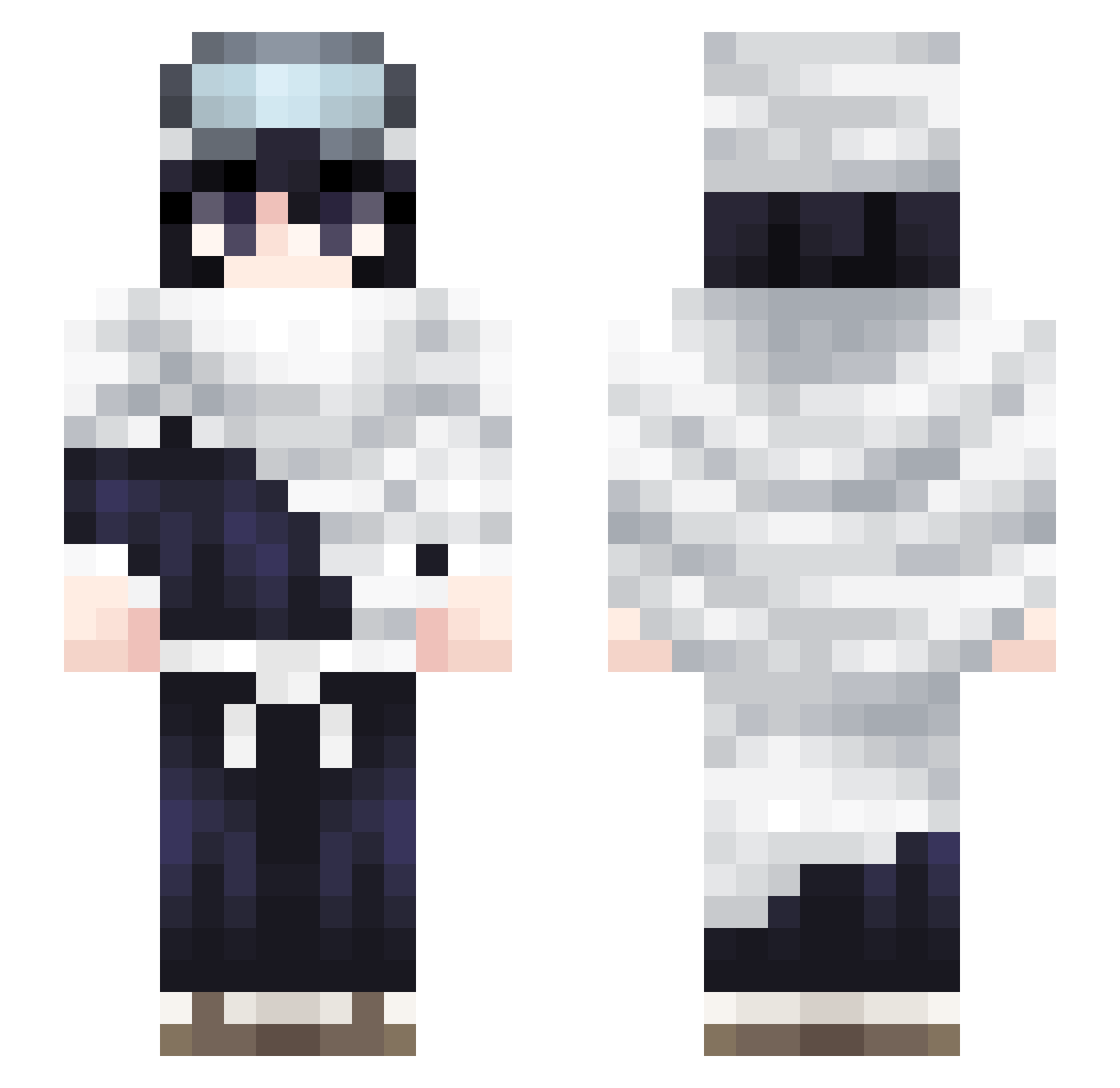
Current Minecraft skin of the player yumiuly, loaded from the official Mojang API. Rotate the 3D model with your mouse or finger, then download the skin as a PNG file and use it in Minecraft: Bedrock Edition or Java Edition for free. When yumiuly changes their skin, this page updates automatically and the old skin stays in the history below.
Other players with this skin (63)
yumiuly was the 9th player we have seen with this skin, first spotted on 10.08.2026. The same skin was seen on these players. Open a nickname to see their current skin and skin history.
 dejanuts MrBepisCola icecool08 skyphire_
 SWIFTBLAZE09
 Rukia Starr6104
 ruqin k1renn breadstiick tinmaster5 noport xSwifter eokaK27 Singularr losnoyt Vitue Mr_Daddy21 DiDi_watchbleach Casort iago_pecados heyycollin Yoruichii_H2 simonscool2 kiwily3 FPSw MoDzai AllVisored migratedd 7verin7 N4mzzz sunstead screent bxin kauehenryque Ebro126 4zuurr marieewd 0_SIN_0 TheBaconMaker lxving Malpey Lego209 Feeling_face Kaasbroodman temperanced L3GG_end Beelzebuul chvrge_ 4rDown amxyzz Heliocentryzm Vualx_ callistocloud vaquna viku7 c4ennn coodon interlude_a 1r1ss
More Shota Aizawa Minecraft skins
How to install the yumiuly skin
- Press the Download button above to save the skin as a PNG file.
- Minecraft: Bedrock Edition (PE): open the Dressing Room from the main menu (or tap your character → Edit Character), go to Classic Skins → Owned, press the + (new skin) button, choose the downloaded PNG and pick the Slim (Alex) model. Works on PC and mobile; consoles cannot import custom skins.
- Minecraft: Java Edition: open the Minecraft Launcher, go to the Skins tab, click New Skin, load the PNG, pick the Slim (Alex) model and press Save & Use. You can also upload it at minecraft.net → Profile → Change Skin.
The skin does not show up after import - what should I do?
Restart Minecraft and open the Dressing Room again - imported skins sometimes appear only after a restart. Also make sure you selected the imported skin and picked the Slim (Alex) model.
Which model should I choose, Classic or Slim?
This skin is designed for the Slim (Alex) model. If you pick the wrong model, the arms of the skin will look stretched or squeezed.
Is the skin of yumiuly free to download?
Yes. Press Download, save the PNG file and use it in Minecraft: Bedrock Edition or Java Edition - no payment or registration needed. The skin also works on multiplayer servers and Realms.
More skins
Looking for more? Go back to all Minecraft skins and check the top skins of the week, month and all time, or find any player's skin by nickname.