
youngbangare - Minecraft Skins & Skin History
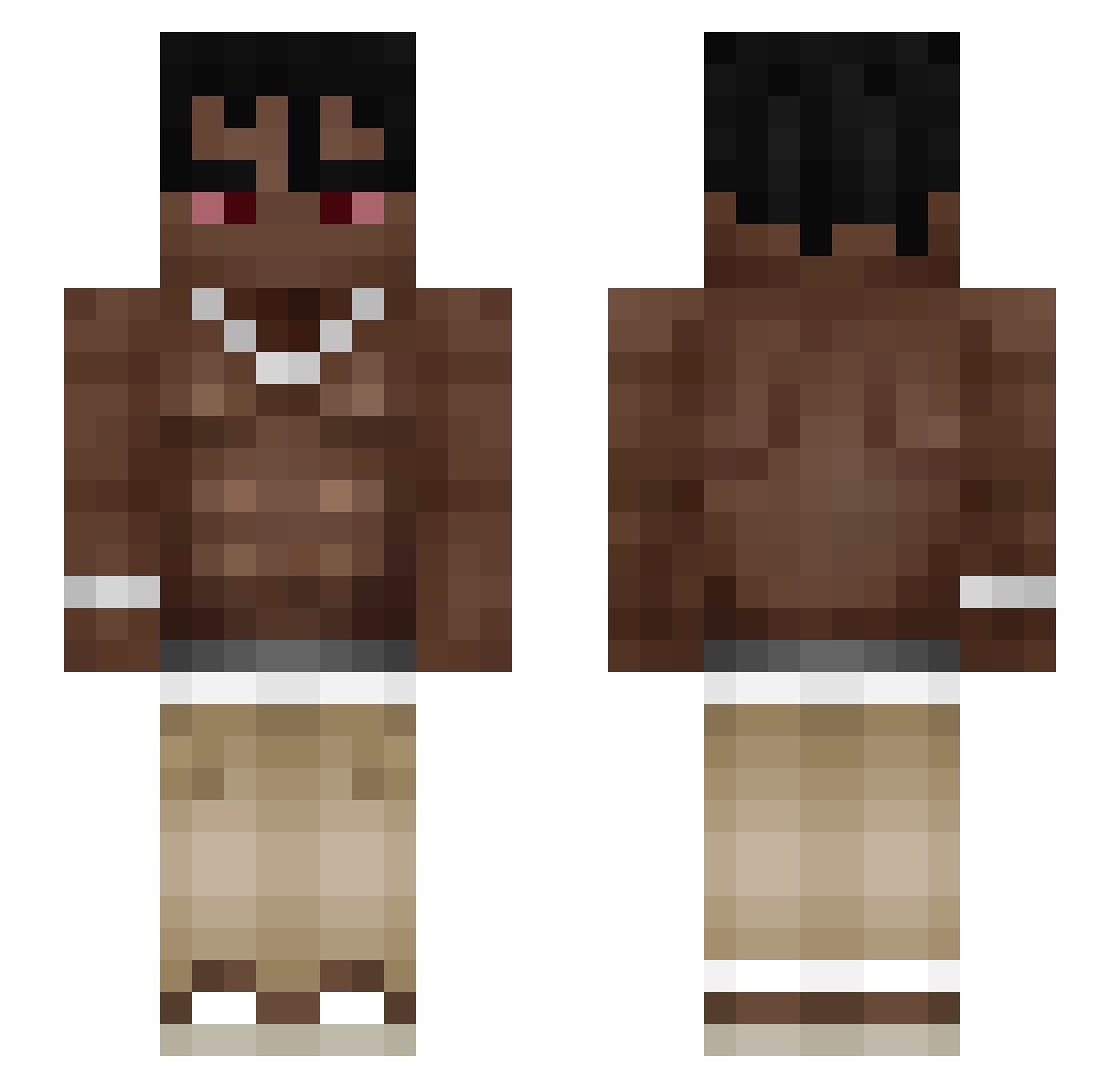
Current Minecraft skin of the player youngbangare, loaded from the official Mojang API. Rotate the 3D model with your mouse or finger, then download the skin as a PNG file and use it in Minecraft: Bedrock Edition or Java Edition for free. When youngbangare changes their skin, this page updates automatically and the old skin stays in the history below.
Other players with this skin (137)
youngbangare was the 41st player we have seen with this skin, first spotted on 28.08.2026. The same skin was seen on these players. Open a nickname to see their current skin and skin history.
 dsxyo
dsxyo Zerodr_go Americandld
 nadavh 7thh ItsJoeWigga RomeoDev krysolox zSendi Time0ute Tarnat11 gxtor1 VibronicElm PolishMeJaja wiktorropele ghettoboy_ _978k_ hubbi12 dollar_ged Zerlanight SednaGod NoahOnSlurpjuice Szympanss LittleShaq yukselflexin Clapped_by_hugo Danyx27 A37Q LvY00 Krgnm
 Fadeom zEmilio_ Warszawiaku Yahel502 Giac18 BBenny10 diego11hq GunsDrawn ItzElement DezeHaze denshhi Melfeeker Bniswaffle TechnicalGuy TSANCHEZL Momoforti HINBYE Potato4825 yan4ik_music Michael1144 kogosiek pvonly Krunker_pro_alt Grezy_ Nicoroyel 3moBelox zSxolar wrapZZZ hj_LPM 6sadyx
More Shirtless Minecraft skins
How to install the youngbangare skin
- Press the Download button above to save the skin as a PNG file.
- Minecraft: Bedrock Edition (PE): open the Dressing Room from the main menu (or tap your character → Edit Character), go to Classic Skins → Owned, press the + (new skin) button, choose the downloaded PNG and pick the Slim (Alex) model. Works on PC and mobile; consoles cannot import custom skins.
- Minecraft: Java Edition: open the Minecraft Launcher, go to the Skins tab, click New Skin, load the PNG, pick the Slim (Alex) model and press Save & Use. You can also upload it at minecraft.net → Profile → Change Skin.
The skin does not show up after import - what should I do?
Restart Minecraft and open the Dressing Room again - imported skins sometimes appear only after a restart. Also make sure you selected the imported skin and picked the Slim (Alex) model.
Which model should I choose, Classic or Slim?
This skin is designed for the Slim (Alex) model. If you pick the wrong model, the arms of the skin will look stretched or squeezed.
Is the skin of youngbangare free to download?
Yes. Press Download, save the PNG file and use it in Minecraft: Bedrock Edition or Java Edition - no payment or registration needed. The skin also works on multiplayer servers and Realms.
More skins
Looking for more? Go back to all Minecraft skins and check the top skins of the week, month and all time, or find any player's skin by nickname.