
xxion_ - Minecraft Skins & Skin History
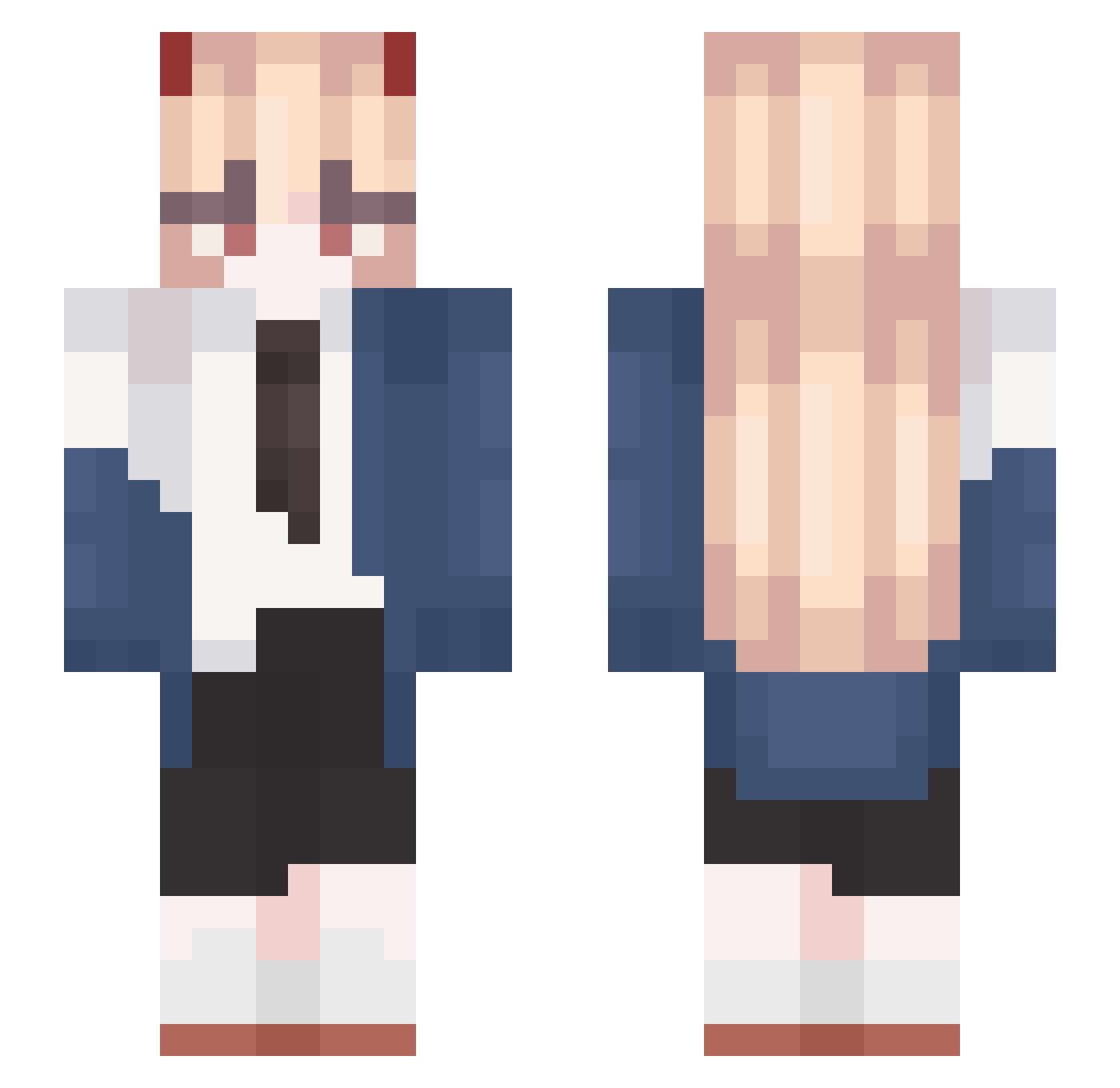
Current Minecraft skin of the player xxion_, loaded from the official Mojang API. Rotate the 3D model with your mouse or finger, then download the skin as a PNG file and use it in Minecraft: Bedrock Edition or Java Edition for free. When xxion_ changes their skin, this page updates automatically and the old skin stays in the history below.
Other players with this skin (603)
xxion_ was the 108th player we have seen with this skin, first spotted on 11.08.2026. The same skin was seen on these players. Open a nickname to see their current skin and skin history.
 Thebestof911 Blanaca Kiryu__Kazuma iakoban22888 Lyraxis_ Billinka heitong1 KelAbdiel K_Le_KL punchyOFFket cool_skull666 koomi0728 Lezold Vuvuzelo4ka Knickman andre2669 BOLIHAITAI Princeddd TheCarlkitecht JackDoorsey Chiharu21 iluvcandice CATAHA_ r1sLvd saKURA_sws le_fer_ abyssdeveloper so1hana
 pimpstinator eppi339 WJSGYCA ArataNo2 Badawee needsmctherapy07 yjs456 IWOMIX Smidy_ Sihuaaka87 Slithice_LiB Noato82 ValentinOdT gawawa0826 HASH69_ Masuzu15 MAXTXX SKYWHYWALKER1231 jerapahbiru pucyoo SpecMyReach Pandita11 superdandanman AriiRiver 354drec6tvyfdfwe s_a_i_t_a_m_a__ _wo00o Dusik02 daonxd RuneBramblepelt Piliuu unkclxwn
More Power Minecraft skins
How to install the xxion_ skin
- Press the Download button above to save the skin as a PNG file.
- Minecraft: Bedrock Edition (PE): open the Dressing Room from the main menu (or tap your character → Edit Character), go to Classic Skins → Owned, press the + (new skin) button, choose the downloaded PNG and pick the Slim (Alex) model. Works on PC and mobile; consoles cannot import custom skins.
- Minecraft: Java Edition: open the Minecraft Launcher, go to the Skins tab, click New Skin, load the PNG, pick the Slim (Alex) model and press Save & Use. You can also upload it at minecraft.net → Profile → Change Skin.
The skin does not show up after import - what should I do?
Restart Minecraft and open the Dressing Room again - imported skins sometimes appear only after a restart. Also make sure you selected the imported skin and picked the Slim (Alex) model.
Which model should I choose, Classic or Slim?
This skin is designed for the Slim (Alex) model. If you pick the wrong model, the arms of the skin will look stretched or squeezed.
Is the skin of xxion_ free to download?
Yes. Press Download, save the PNG file and use it in Minecraft: Bedrock Edition or Java Edition - no payment or registration needed. The skin also works on multiplayer servers and Realms.
More skins
Looking for more? Go back to all Minecraft skins and check the top skins of the week, month and all time, or find any player's skin by nickname.