
xXJaspa0088Xx - Minecraft Skins & Skin History
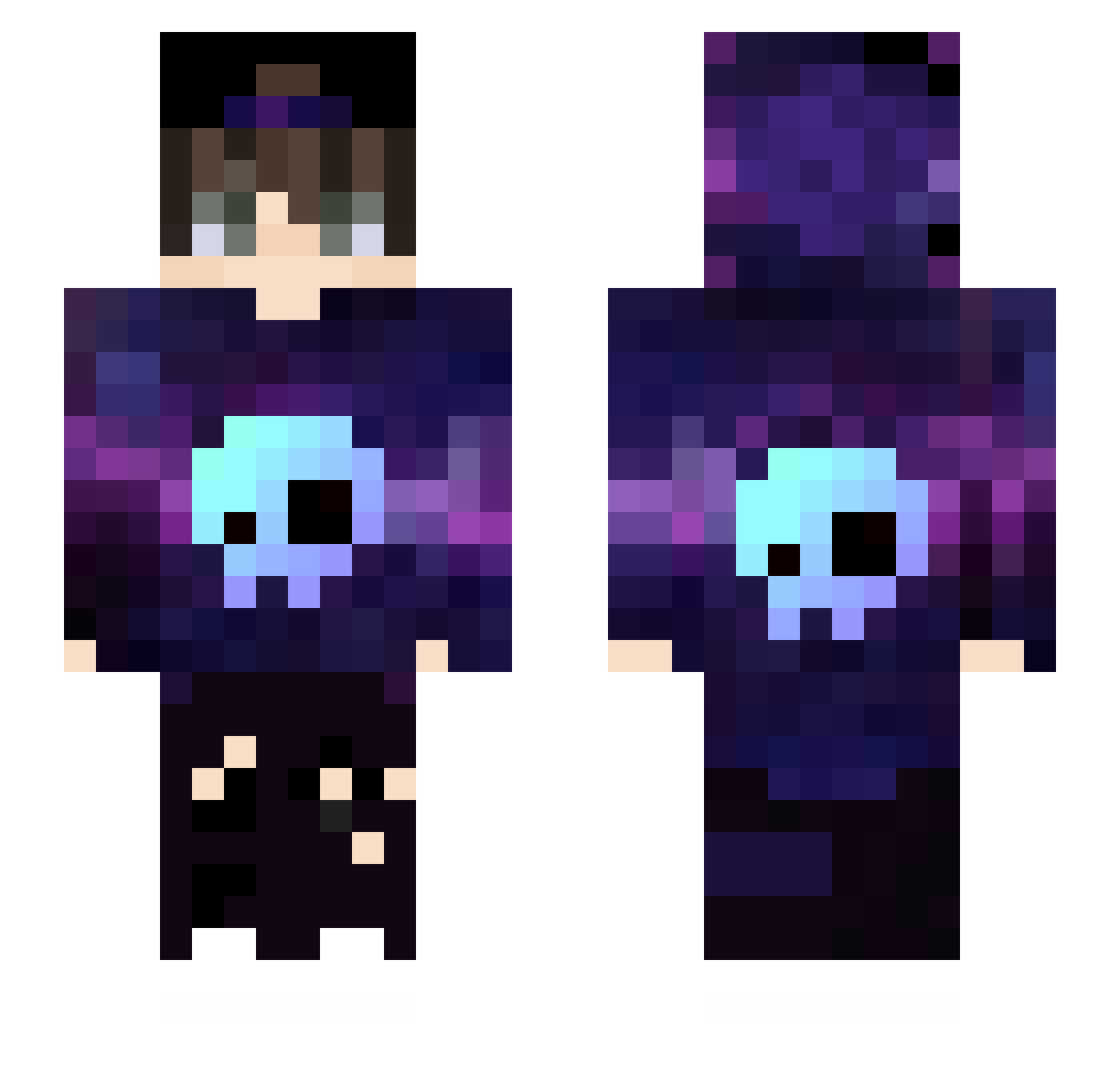
Current Minecraft skin of the player xXJaspa0088Xx, loaded from the official Mojang API. Rotate the 3D model with your mouse or finger, then download the skin as a PNG file and use it in Minecraft: Bedrock Edition or Java Edition for free. When xXJaspa0088Xx changes their skin, this page updates automatically and the old skin stays in the history below.
Other players with this skin (48)
xXJaspa0088Xx was the 26th player we have seen with this skin, first spotted on 16.09.2026. The same skin was seen on these players. Open a nickname to see their current skin and skin history.
 jackaboy1182 alux9 _Bloody69 AntonioRd2 jupa90 luminous0627 xJefEnzoYT Altopon kcudeo Illuminarew xKillerKeKz MELHORDETODOS SrCavalito Benetti03 _BarryStyles_ Cpt_Slayweapon GustavShesocrazy IIMaRTinII Dix0Ss_Yt Z2Dark2Z EliasXD_ Jwozinho_ RaefGaming_YT KOL_SaRu _Jamers_ Laftgol StefanD18 ThatMusicalDog joaofhhh Disconect_ TheKingAET calilneves VinhNer parkbedic Miisset Spok0077_Gamer Noel_is_back ChapadoDeBatata Worset Biscuit28 axially Picolo2009 Luis_Gustavo RazVina_Tor24 PassivesNils 0tta flash22218 Skybear72
More Skull Minecraft skins
How to install the xXJaspa0088Xx skin
- Press the Download button above to save the skin as a PNG file.
- Minecraft: Bedrock Edition (PE): open the Dressing Room from the main menu (or tap your character → Edit Character), go to Classic Skins → Owned, press the + (new skin) button, choose the downloaded PNG and pick the Slim (Alex) model. Works on PC and mobile; consoles cannot import custom skins.
- Minecraft: Java Edition: open the Minecraft Launcher, go to the Skins tab, click New Skin, load the PNG, pick the Slim (Alex) model and press Save & Use. You can also upload it at minecraft.net → Profile → Change Skin.
The skin does not show up after import - what should I do?
Restart Minecraft and open the Dressing Room again - imported skins sometimes appear only after a restart. Also make sure you selected the imported skin and picked the Slim (Alex) model.
Which model should I choose, Classic or Slim?
This skin is designed for the Slim (Alex) model. If you pick the wrong model, the arms of the skin will look stretched or squeezed.
Is the skin of xXJaspa0088Xx free to download?
Yes. Press Download, save the PNG file and use it in Minecraft: Bedrock Edition or Java Edition - no payment or registration needed. The skin also works on multiplayer servers and Realms.
More skins
Looking for more? Go back to all Minecraft skins and check the top skins of the week, month and all time, or find any player's skin by nickname.