
vwdragon1 - Minecraft Skins & Skin History
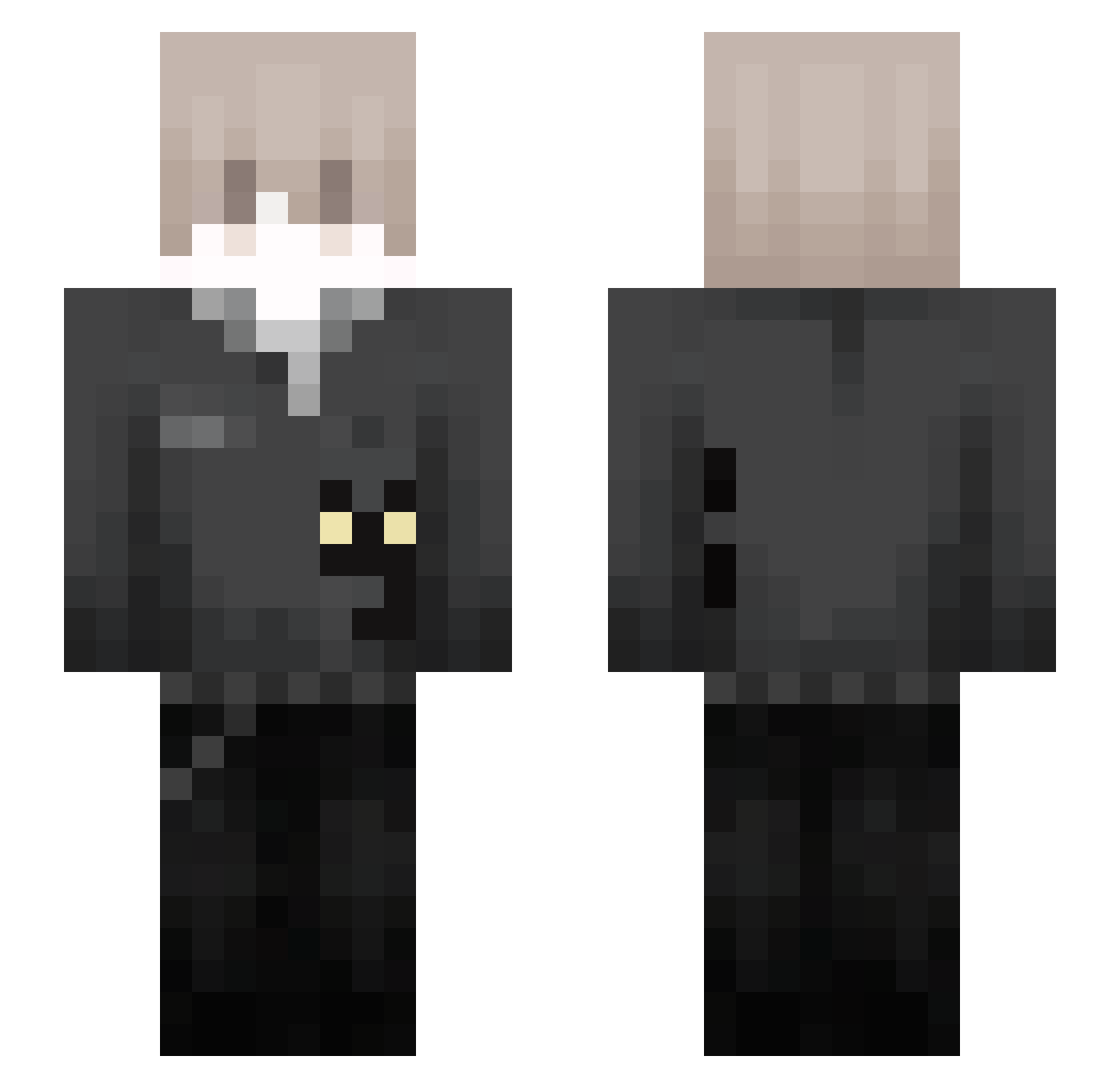
Current Minecraft skin of the player vwdragon1, loaded from the official Mojang API. Rotate the 3D model with your mouse or finger, then download the skin as a PNG file and use it in Minecraft: Bedrock Edition or Java Edition for free. When vwdragon1 changes their skin, this page updates automatically and the old skin stays in the history below.
Other players with this skin (100)
vwdragon1 was the 35th player we have seen with this skin, first spotted on 23.08.2026. The same skin was seen on these players. Open a nickname to see their current skin and skin history.
 KhanhMcs0311 xAceey xFlameVoid kaiHayBuon WolfboyConnor aktheking01 arkq_ IKUN_CX xineux
 Procutter_sage lingrainx AluminiumBottle huihui822 unliveable SeabiscuitBro Moji_Snow zinkkxd Cz4rny420 FRQuax Shie1dBroken Alan_6716 spinjuzu
 _Deqth_ mghirelli Moonshine_night mostdesired RomanCake8325
 sharkbig
 TheNoobHan oofisonfire MVmuvex Deliberat3 kapusniak_71 ZeroDurability B2K_Reaper Baruxh Fabious_MC Searchhh
 sOrrowd4ark Maci_Laci123 UsefulWorld DiegoDVM EnesGG2121
 90pi qNirvana ekittentywa LostMind2465 LocNguyen_VN cmikalek
 realvisper PoolCm0091 alston001 kulsyYt_ Li4mx appleofyoureye 767837444 Charlieskid Skyuprxy AmUrFather JasiuMorderca4
How to install the vwdragon1 skin
- Press the Download button above to save the skin as a PNG file.
- Minecraft: Bedrock Edition (PE): open the Dressing Room from the main menu (or tap your character → Edit Character), go to Classic Skins → Owned, press the + (new skin) button, choose the downloaded PNG and pick the Slim (Alex) model. Works on PC and mobile; consoles cannot import custom skins.
- Minecraft: Java Edition: open the Minecraft Launcher, go to the Skins tab, click New Skin, load the PNG, pick the Slim (Alex) model and press Save & Use. You can also upload it at minecraft.net → Profile → Change Skin.
The skin does not show up after import - what should I do?
Restart Minecraft and open the Dressing Room again - imported skins sometimes appear only after a restart. Also make sure you selected the imported skin and picked the Slim (Alex) model.
Which model should I choose, Classic or Slim?
This skin is designed for the Slim (Alex) model. If you pick the wrong model, the arms of the skin will look stretched or squeezed.
Is the skin of vwdragon1 free to download?
Yes. Press Download, save the PNG file and use it in Minecraft: Bedrock Edition or Java Edition - no payment or registration needed. The skin also works on multiplayer servers and Realms.
More skins
Looking for more? Go back to all Minecraft skins and check the top skins of the week, month and all time, or find any player's skin by nickname.