
underworld312 - Minecraft Skins & Skin History
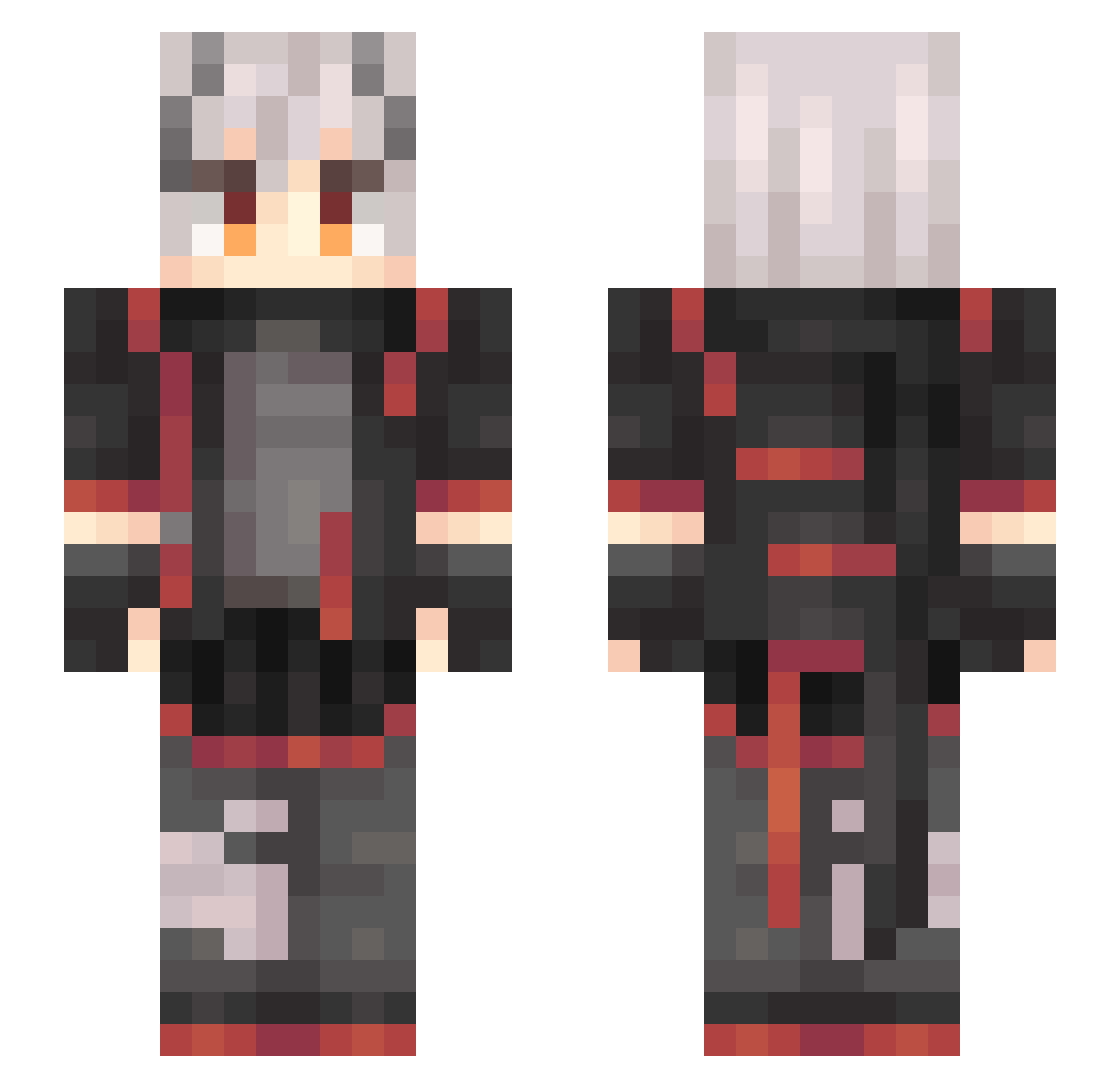
Current Minecraft skin of the player underworld312, loaded from the official Mojang API. Rotate the 3D model with your mouse or finger, then download the skin as a PNG file and use it in Minecraft: Bedrock Edition or Java Edition for free. When underworld312 changes their skin, this page updates automatically and the old skin stays in the history below.
Other players with this skin (734)
underworld312 was the 727th player we have seen with this skin, first spotted on 18.11.2026. The same skin was seen on these players. Open a nickname to see their current skin and skin history.
 wjianke rmjs666 Chaotic_Monk3y lanyibo Azusa12260 tangblb baikejiang ztttwei YakumoInaka Lucky_Snake HDis1080p KieLJ22 wzcm mintexa Crystalliz3 ANONTIANJIN BangbangQAQ Dovelets GAJack SmokGamingPL XIAOBI_XL bongraal marvelousyou Superlun2333 Saitohimea0524 Onigiryaa titor404 waitdive Diodaaaaaaaaaa Ikariya_ Revel1014 Waste_Jag shooterW KeikIiIii Pandadada asahi0222 Nana_Ha MaoMi_ya vliuye Cxilaraffy huangjijingshi jinglinling LuckyShigure Doremifaso301 comfortless233 Poi_Luo AKA10068 DBXiaoDa yukikaze916 DarkAsh114 Schwarzzzzz QA71 Quack_LinS yinxuanqi SameCreationPain Wangyueying renhongye TigerQAQ ShimmersX huiyisdcd13
More Cyberpunk Minecraft skins
How to install the underworld312 skin
- Press the Download button above to save the skin as a PNG file.
- Minecraft: Bedrock Edition (PE): open the Dressing Room from the main menu (or tap your character → Edit Character), go to Classic Skins → Owned, press the + (new skin) button, choose the downloaded PNG and pick the Slim (Alex) model. Works on PC and mobile; consoles cannot import custom skins.
- Minecraft: Java Edition: open the Minecraft Launcher, go to the Skins tab, click New Skin, load the PNG, pick the Slim (Alex) model and press Save & Use. You can also upload it at minecraft.net → Profile → Change Skin.
The skin does not show up after import - what should I do?
Restart Minecraft and open the Dressing Room again - imported skins sometimes appear only after a restart. Also make sure you selected the imported skin and picked the Slim (Alex) model.
Which model should I choose, Classic or Slim?
This skin is designed for the Slim (Alex) model. If you pick the wrong model, the arms of the skin will look stretched or squeezed.
Is the skin of underworld312 free to download?
Yes. Press Download, save the PNG file and use it in Minecraft: Bedrock Edition or Java Edition - no payment or registration needed. The skin also works on multiplayer servers and Realms.
More skins
Looking for more? Go back to all Minecraft skins and check the top skins of the week, month and all time, or find any player's skin by nickname.