
thelilviking - Minecraft Skins & Skin History
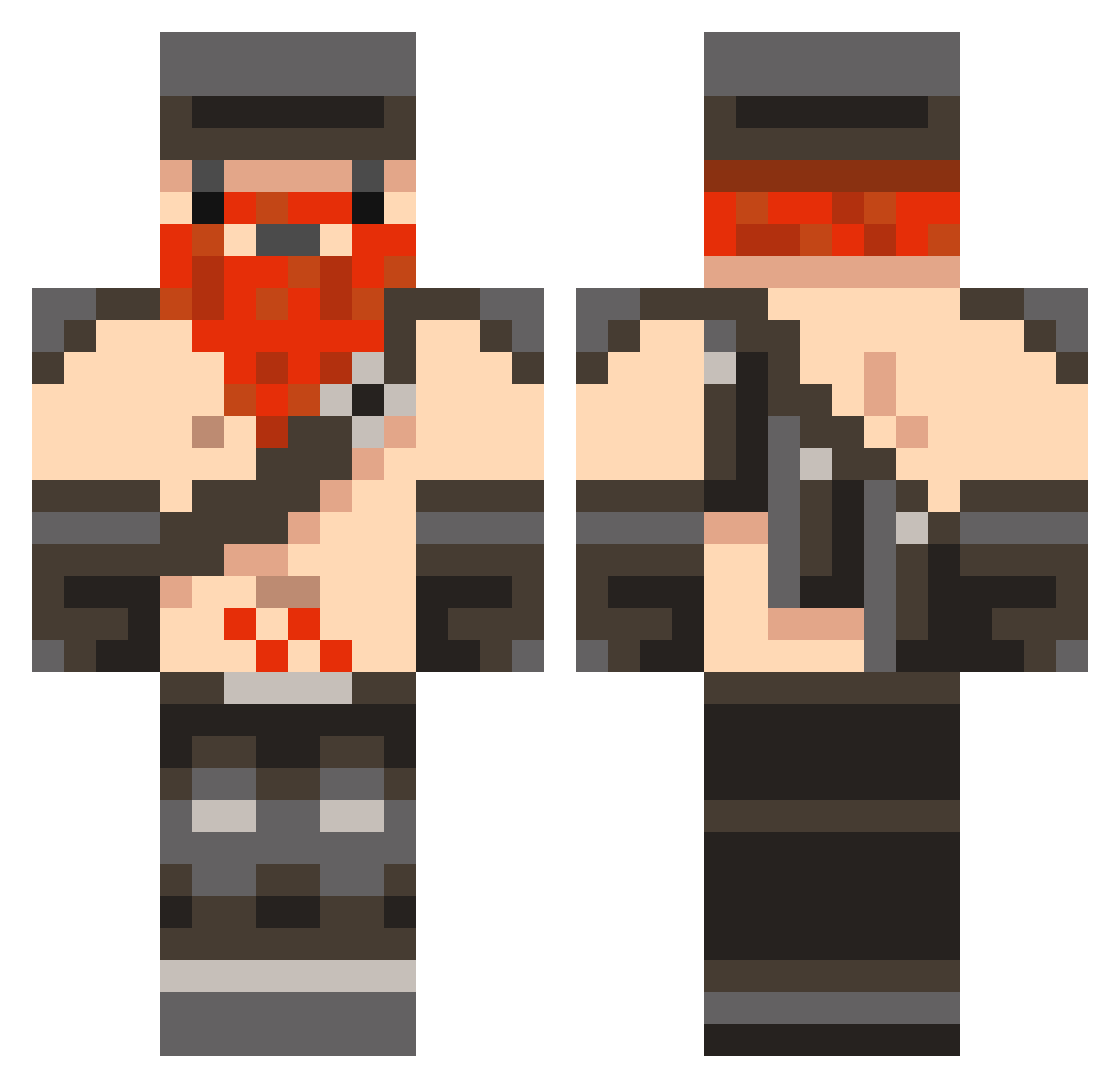
Current Minecraft skin of the player thelilviking, loaded from the official Mojang API. Rotate the 3D model with your mouse or finger, then download the skin as a PNG file and use it in Minecraft: Bedrock Edition or Java Edition for free. When thelilviking changes their skin, this page updates automatically and the old skin stays in the history below.
Other players with this skin (846)
thelilviking was the 792nd player we have seen with this skin, first spotted on 27.10.2026. The same skin was seen on these players. Open a nickname to see their current skin and skin history.
 JustSteve MickeyTheMan Skaterjoe123 lolhey47 Yggdrasi11 millsyboi101 coolethan79 mistermoney98 Kernel_Kreeper BearDay BomPiampinset Kieran_Moran Nurnee Jackprevite megabuilder345 Numerousk zirouk Saki232 Elvenoke tdizzle0011 purge145 dylan2003creeper Jadamss Matt011002 HCC3231 sheldonrussel4 Merlijndh Lontaus derpychaz XxUSATODAYxX Eduardo021999 WalshWeep Nicolaimelchior MrMcWiggy kalamees BackarAk rhodlew jason_087 Honeydew_ ShadowLord96 sonicpwn harryogden CarterMesker Darko59 Ttypo12 building808 Emchtastic all_sham_no_wow Changemann jackson25294 TF19 MadHatter45 smash735 Nuwey Lionize Azrethoc chromedead1 olakefield SmurfSnubbe j4m35ac
More Dwarf Minecraft skins
How to install the thelilviking skin
- Press the Download button above to save the skin as a PNG file.
- Minecraft: Bedrock Edition (PE): open the Dressing Room from the main menu (or tap your character → Edit Character), go to Classic Skins → Owned, press the + (new skin) button, choose the downloaded PNG and pick the Classic (Steve) model. Works on PC and mobile; consoles cannot import custom skins.
- Minecraft: Java Edition: open the Minecraft Launcher, go to the Skins tab, click New Skin, load the PNG, pick the Classic (Steve) model and press Save & Use. You can also upload it at minecraft.net → Profile → Change Skin.
The skin does not show up after import - what should I do?
Restart Minecraft and open the Dressing Room again - imported skins sometimes appear only after a restart. Also make sure you selected the imported skin and picked the Classic (Steve) model.
Which model should I choose, Classic or Slim?
This skin is designed for the Classic (Steve) model. If you pick the wrong model, the arms of the skin will look stretched or squeezed.
Is the skin of thelilviking free to download?
Yes. Press Download, save the PNG file and use it in Minecraft: Bedrock Edition or Java Edition - no payment or registration needed. The skin also works on multiplayer servers and Realms.
More skins
Looking for more? Go back to all Minecraft skins and check the top skins of the week, month and all time, or find any player's skin by nickname.