
sxnth7 - Minecraft Skins & Skin History
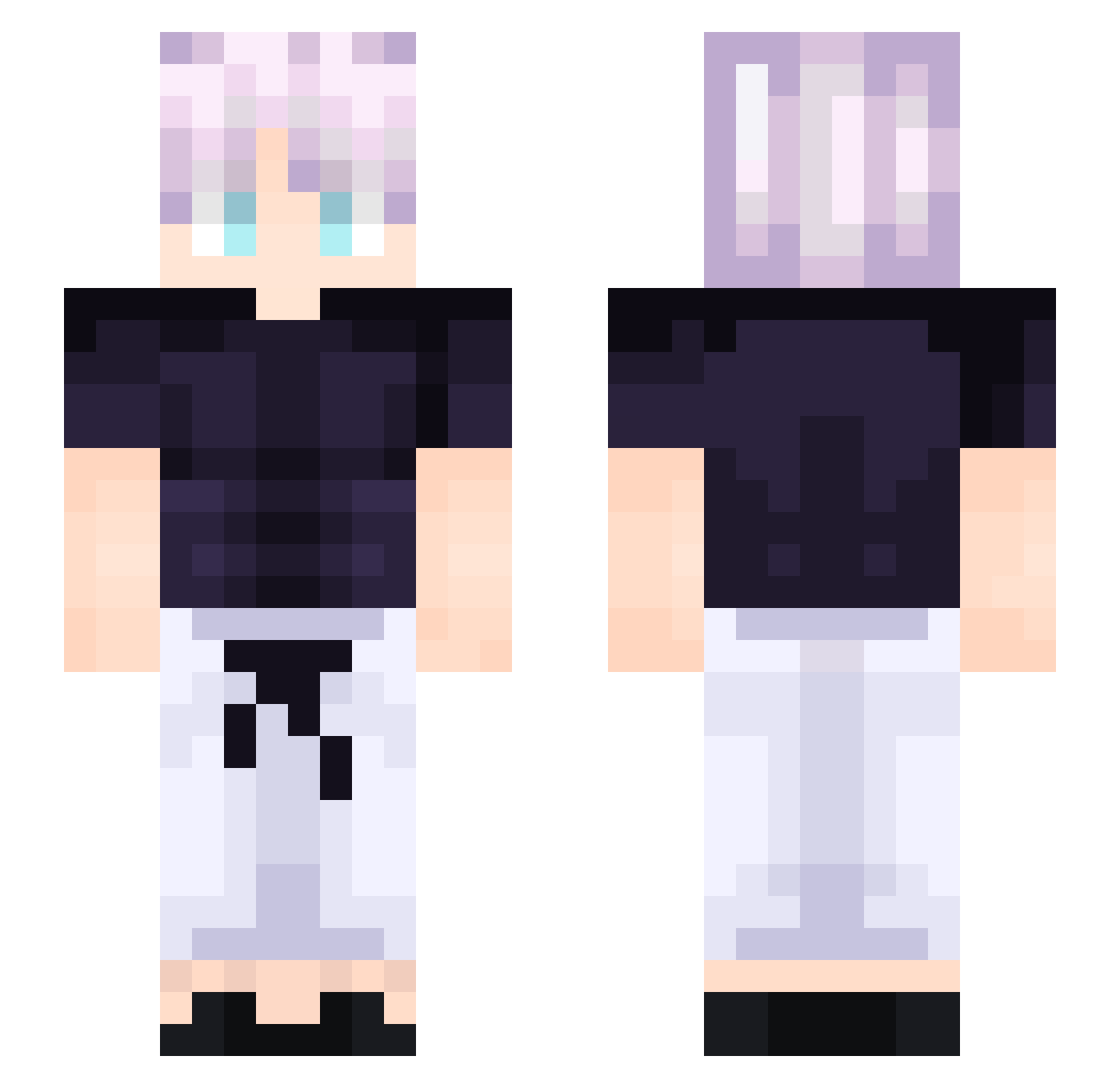
Current Minecraft skin of the player sxnth7, loaded from the official Mojang API. Rotate the 3D model with your mouse or finger, then download the skin as a PNG file and use it in Minecraft: Bedrock Edition or Java Edition for free. When sxnth7 changes their skin, this page updates automatically and the old skin stays in the history below.
Other players with this skin (198)
sxnth7 was the 111th player we have seen with this skin, first spotted on 19.09.2026. The same skin was seen on these players. Open a nickname to see their current skin and skin history.
 lucifer05249 Saskatchewautch hzs hi33890 lc_cpvp Colludes gnarlynar GHOSTBOY0906 0xFemto 520rap Elite101 Mhongoctm Big_Bert56 Quba147 Mgamingguy _Ryuuzaki GagaGucci DrNewtonsoft Maymunoldo itzKioshi Ycchxn03 Yunuszd_ ppaasa Flippers99 cs376672 Abel_R yaya334 Goezito Dynami_Theos Baumstumpf008 STUPIDKI Pa_ran namiiiizo FranDumb ankyu77 Blendw Elloburger GeonGoCrazy qrtzt RUTASEN XazazelTheJester Leonbern Jaxx430 SIgmaTitus980 Issac5376 SeySo MEGALODON905 Tafofa jaywilliams1219 rustybigandyt boozah_00 Rift_Icy Darulloooo Lahoe bji77 GooseWRLD_ brentheturtle_yt Fazurion oSpark Donigocrazy
More Anime Boy Minecraft skins
How to install the sxnth7 skin
- Press the Download button above to save the skin as a PNG file.
- Minecraft: Bedrock Edition (PE): open the Dressing Room from the main menu (or tap your character → Edit Character), go to Classic Skins → Owned, press the + (new skin) button, choose the downloaded PNG and pick the Slim (Alex) model. Works on PC and mobile; consoles cannot import custom skins.
- Minecraft: Java Edition: open the Minecraft Launcher, go to the Skins tab, click New Skin, load the PNG, pick the Slim (Alex) model and press Save & Use. You can also upload it at minecraft.net → Profile → Change Skin.
The skin does not show up after import - what should I do?
Restart Minecraft and open the Dressing Room again - imported skins sometimes appear only after a restart. Also make sure you selected the imported skin and picked the Slim (Alex) model.
Which model should I choose, Classic or Slim?
This skin is designed for the Slim (Alex) model. If you pick the wrong model, the arms of the skin will look stretched or squeezed.
Is the skin of sxnth7 free to download?
Yes. Press Download, save the PNG file and use it in Minecraft: Bedrock Edition or Java Edition - no payment or registration needed. The skin also works on multiplayer servers and Realms.
More skins
Looking for more? Go back to all Minecraft skins and check the top skins of the week, month and all time, or find any player's skin by nickname.