
swagerrman446 - Minecraft Skins & Skin History
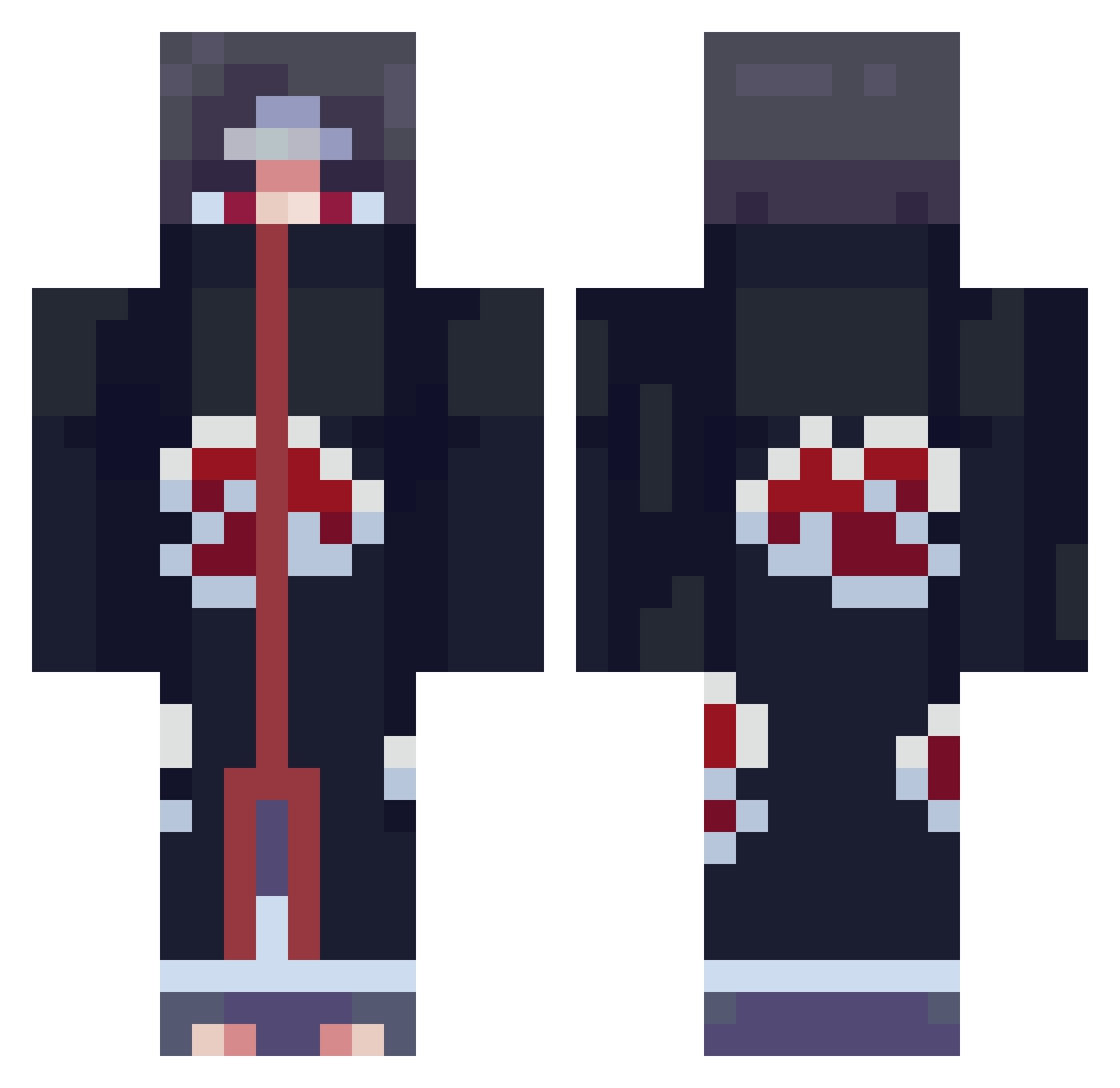
Current Minecraft skin of the player swagerrman446, loaded from the official Mojang API. Rotate the 3D model with your mouse or finger, then download the skin as a PNG file and use it in Minecraft: Bedrock Edition or Java Edition for free. When swagerrman446 changes their skin, this page updates automatically and the old skin stays in the history below.
Other players with this skin (663)
swagerrman446 was the 166th player we have seen with this skin, first spotted on 17.08.2026. The same skin was seen on these players. Open a nickname to see their current skin and skin history.
 CHUNCHUNCHUN21 Rindezz siremmarald qoryyy MojoWhite kinglamar JacobWel lymey Sir_Grascelot ChaoticFFA Yo_Halo BSqueek R0uge22 Its0kan vQART TEMUJEN269 _hamoodi Mosayu MilitantViking 1babybelle YETIUSZ ChaseMeDownn KoalaHQ Jurneyz LilSessel MalacTRAJADO Ichigo_Kumorosak TAOJINKE HAPPYCS168168 PAWLPILUVR GRL2 FastBlow Mr_Fredsticks Arbalest0623 RAHD97 lowdigo DamienAO26 RipItachi Dormire UNJIIIII0523 druedrengen2005 Cjbrehh passion769 Akira_yt ILoveZylu 87Dong str1xXD MCYellowJelly _Foolish_ jvy555 Tomaso05 FacZz tkChills KISASISA xBusybx zero__zero yahirzzz Pur3Mist Benu_Raijin PU55YDESTORYER69
More Itachi Uchiha Minecraft skins
See all 307 Itachi Uchiha skins
How to install the swagerrman446 skin
- Press the Download button above to save the skin as a PNG file.
- Minecraft: Bedrock Edition (PE): open the Dressing Room from the main menu (or tap your character → Edit Character), go to Classic Skins → Owned, press the + (new skin) button, choose the downloaded PNG and pick the Classic (Steve) model. Works on PC and mobile; consoles cannot import custom skins.
- Minecraft: Java Edition: open the Minecraft Launcher, go to the Skins tab, click New Skin, load the PNG, pick the Classic (Steve) model and press Save & Use. You can also upload it at minecraft.net → Profile → Change Skin.
The skin does not show up after import - what should I do?
Restart Minecraft and open the Dressing Room again - imported skins sometimes appear only after a restart. Also make sure you selected the imported skin and picked the Classic (Steve) model.
Which model should I choose, Classic or Slim?
This skin is designed for the Classic (Steve) model. If you pick the wrong model, the arms of the skin will look stretched or squeezed.
Is the skin of swagerrman446 free to download?
Yes. Press Download, save the PNG file and use it in Minecraft: Bedrock Edition or Java Edition - no payment or registration needed. The skin also works on multiplayer servers and Realms.
More skins
Looking for more? Go back to all Minecraft skins and check the top skins of the week, month and all time, or find any player's skin by nickname.