
solidrock03 - Minecraft Skins & Skin History
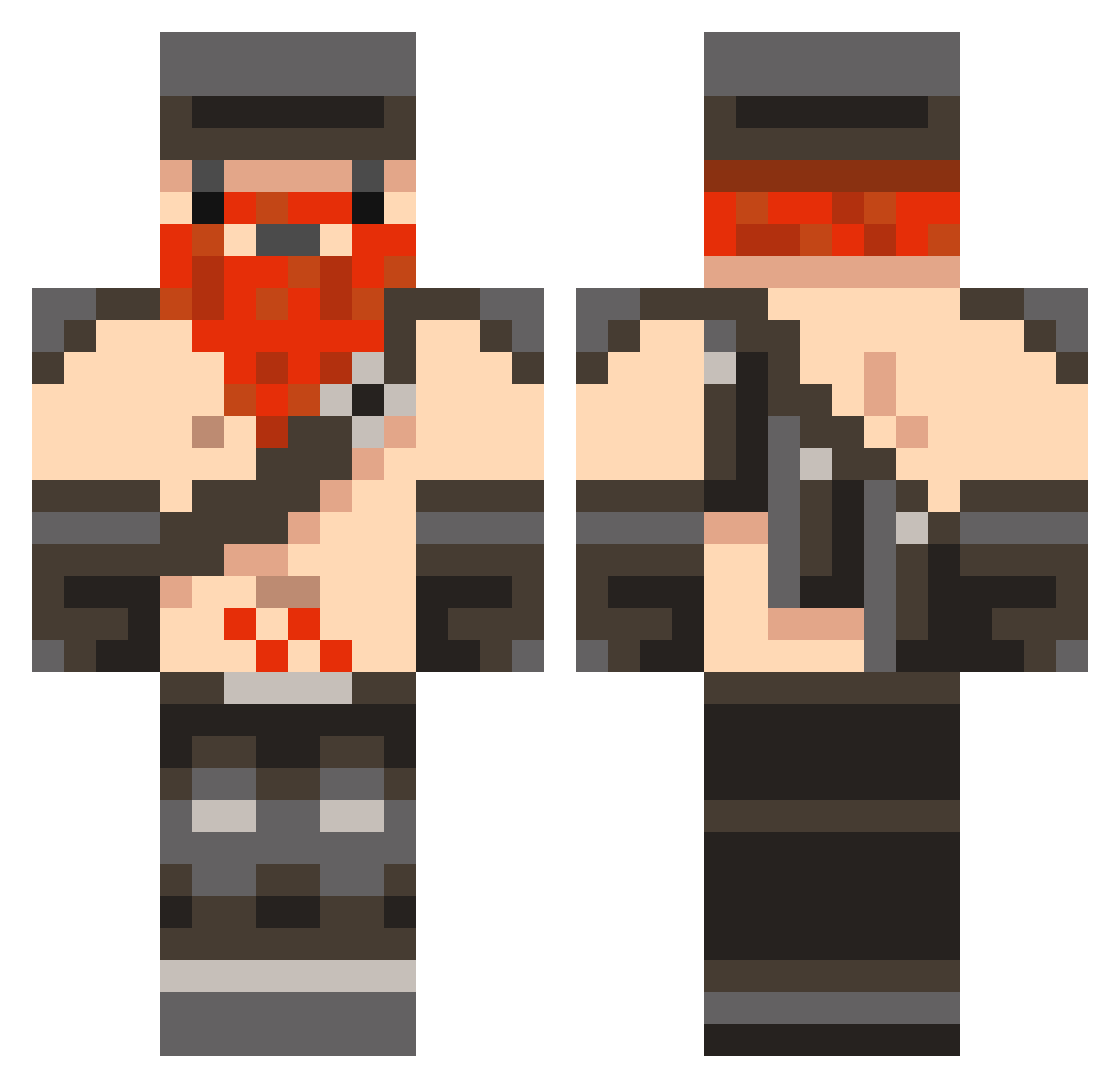
Current Minecraft skin of the player solidrock03, loaded from the official Mojang API. Rotate the 3D model with your mouse or finger, then download the skin as a PNG file and use it in Minecraft: Bedrock Edition or Java Edition for free. When solidrock03 changes their skin, this page updates automatically and the old skin stays in the history below.
Other players with this skin (846)
solidrock03 was the 693rd player we have seen with this skin, first spotted on 18.10.2026. The same skin was seen on these players. Open a nickname to see their current skin and skin history.
 andywooo Chanso jakemay heavychevy Mr_Ford_1 JAMPIZZA Slycat99 Greatdame darkskills sienRAWR Giggof Sscia tylercmillion slash247 Hotdog_120 GrimSounds ET201 cosmicfear Perseus60 Seriihn ambitioushare gavin3000 Vellenash Cherub_98 steefman1234 Employee_0384 TheMarcDavison Chlichind jackk12345 guyser123 WeirdAsf Freedan48 DylDog000 tarekazzam atomicnexus punit77 Nick_Sylvester Xiogyn SJagg56 Jedi_Don iJoeeee AuRaNocturnal timkb junior_honeydew Fissenkaj Paulipal TheOnlySutton Victor901 Biggie_Scratch Charlieosb slycoop99 christeal gdmerrills Slipperypickle77 marioluke mikebotttt Grummar joe665 Ale_Suave joseywails
More Dwarf Minecraft skins
How to install the solidrock03 skin
- Press the Download button above to save the skin as a PNG file.
- Minecraft: Bedrock Edition (PE): open the Dressing Room from the main menu (or tap your character → Edit Character), go to Classic Skins → Owned, press the + (new skin) button, choose the downloaded PNG and pick the Classic (Steve) model. Works on PC and mobile; consoles cannot import custom skins.
- Minecraft: Java Edition: open the Minecraft Launcher, go to the Skins tab, click New Skin, load the PNG, pick the Classic (Steve) model and press Save & Use. You can also upload it at minecraft.net → Profile → Change Skin.
The skin does not show up after import - what should I do?
Restart Minecraft and open the Dressing Room again - imported skins sometimes appear only after a restart. Also make sure you selected the imported skin and picked the Classic (Steve) model.
Which model should I choose, Classic or Slim?
This skin is designed for the Classic (Steve) model. If you pick the wrong model, the arms of the skin will look stretched or squeezed.
Is the skin of solidrock03 free to download?
Yes. Press Download, save the PNG file and use it in Minecraft: Bedrock Edition or Java Edition - no payment or registration needed. The skin also works on multiplayer servers and Realms.
More skins
Looking for more? Go back to all Minecraft skins and check the top skins of the week, month and all time, or find any player's skin by nickname.