
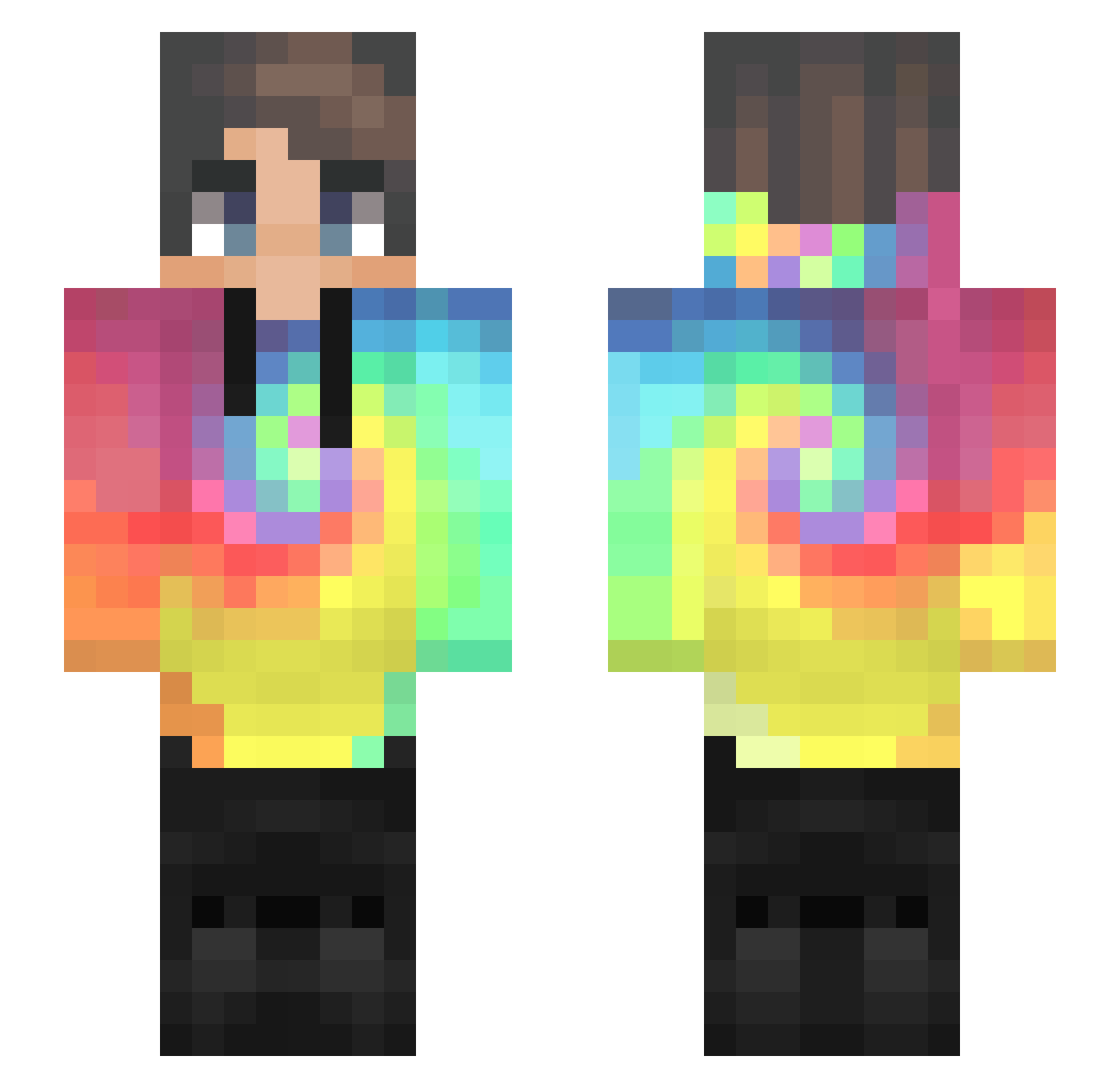
Current Minecraft skin of the player skaper2115, loaded from the official Mojang API. Rotate the 3D model with your mouse or finger, then download the skin as a PNG file and use it in Minecraft: Bedrock Edition or Java Edition for free. When skaper2115 changes their skin, this page updates automatically and the old skin stays in the history below.
Other players with this skin (343)
skaper2115 was the 299th player we have seen with this skin, first spotted on 30.09.2026. The same skin was seen on these players. Open a nickname to see their current skin and skin history.
 BobbyC1999 M1hon Samer123 JuanJoVein Orzech777 Lucario4games Gabriewl BrokeCaesar DylanTing LynxSideris Psychism noovato21 TiagoCardosoo notDaraell ALEKS1211 BoTypeI chenxi233 Jrydan RaynKeiko Charlesxs91 Mc_Wind Patyczek_YT random_key Sandvan ZY___123 MBXPro ItsssJacky Michal_TM_YT RichKush SP_CO_Sh4doWCI4p Simix430 derheine GolBolinha_ RaviKzs FlorianHsp_ cmanhou Antos1981 Owde1 Chifronesio TaylanX2903 efeings1 TJLibert UwUlquiorra Mika_Milk Peritio0 Crimetos YoCsusu Prona67 CallMeMasterLAI hai_cspy Elisniper98 Woollyyyyy haidi69 Rudiks UnkownUser420 Weird_crxfter yousef_RG qiranKing Krasher_Pro YoshiGreenHero64
How to install the skaper2115 skin
- Press the Download button above to save the skin as a PNG file.
- Minecraft: Bedrock Edition (PE): open the Dressing Room from the main menu (or tap your character → Edit Character), go to Classic Skins → Owned, press the + (new skin) button, choose the downloaded PNG and pick the Slim (Alex) model. Works on PC and mobile; consoles cannot import custom skins.
- Minecraft: Java Edition: open the Minecraft Launcher, go to the Skins tab, click New Skin, load the PNG, pick the Slim (Alex) model and press Save & Use. You can also upload it at minecraft.net → Profile → Change Skin.
The skin does not show up after import - what should I do?
Restart Minecraft and open the Dressing Room again - imported skins sometimes appear only after a restart. Also make sure you selected the imported skin and picked the Slim (Alex) model.
Which model should I choose, Classic or Slim?
This skin is designed for the Slim (Alex) model. If you pick the wrong model, the arms of the skin will look stretched or squeezed.
Is the skin of skaper2115 free to download?
Yes. Press Download, save the PNG file and use it in Minecraft: Bedrock Edition or Java Edition - no payment or registration needed. The skin also works on multiplayer servers and Realms.
More skins
Looking for more? Go back to all Minecraft skins and check the top skins of the week, month and all time, or find any player's skin by nickname.