
sindrij - Minecraft Skins & Skin History
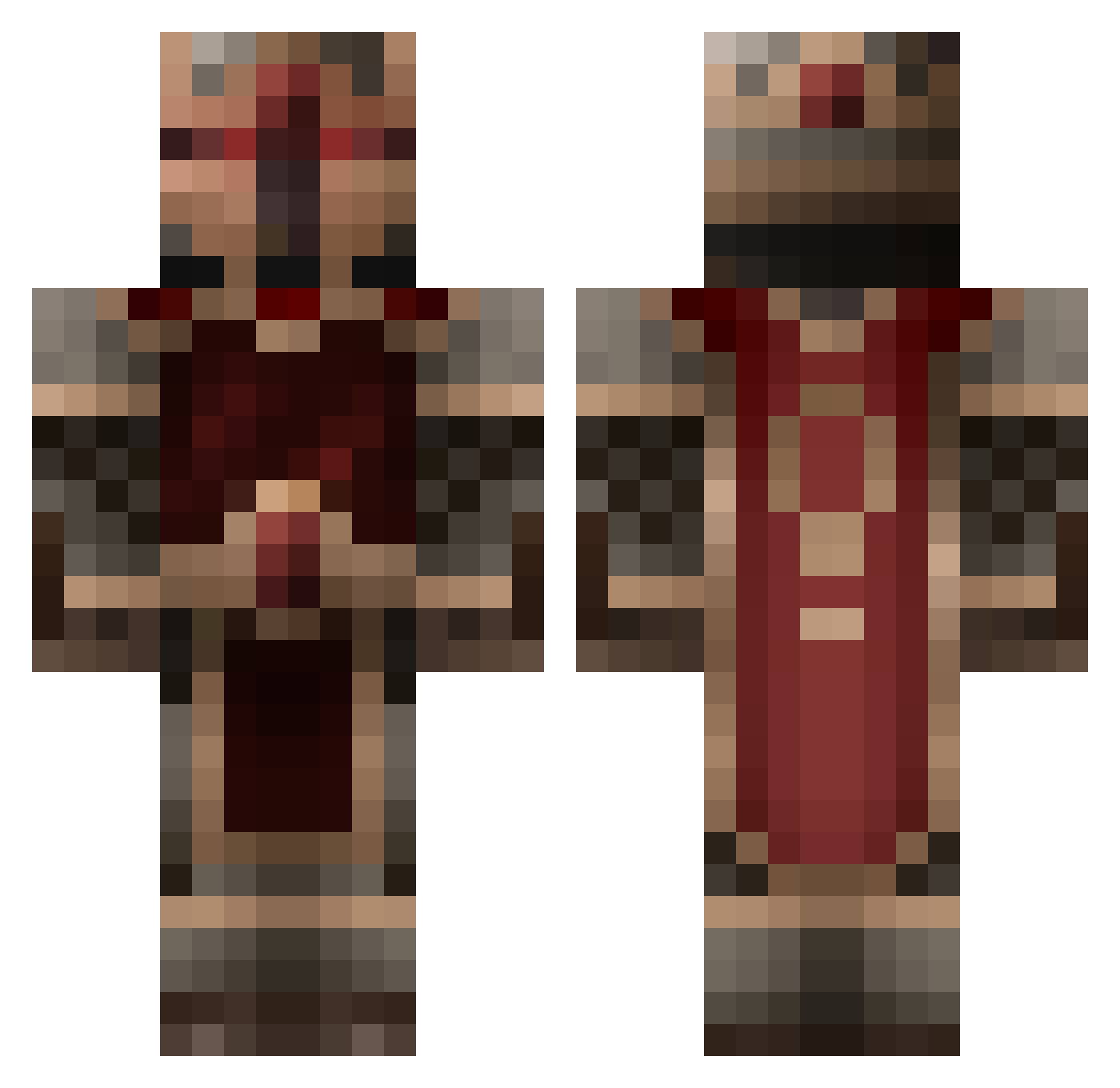
Current Minecraft skin of the player sindrij, loaded from the official Mojang API. Rotate the 3D model with your mouse or finger, then download the skin as a PNG file and use it in Minecraft: Bedrock Edition or Java Edition for free. When sindrij changes their skin, this page updates automatically and the old skin stays in the history below.
Other players with this skin (855)
sindrij was the 786th player we have seen with this skin, first spotted on 02.11.2026. The same skin was seen on these players. Open a nickname to see their current skin and skin history.
 RaikoCraft Bryce_C Sitenr Er_sie_esrik DragonAJNC szlachcic95 sasquatch49 JonathanXlaw ELZGrance IRabbes Lamares mathies204 ViniFPDM PlaZa39 StarWraith CmdrLegion Thee_Peculiar Dagerius PzkfSwagen Longangels KStapes mega_fist Richii112 NICKLUKE123 Kajimisu Sharkbone Ben426042 Miauer King_Lionheart football5329 iceman55555 Daksterthe101 mastermind15 fimsenbak FastALASTOR Memnon25 UbermeisterFU master_daximus caspychua GOD94 Max_Minin Solave N05K1R3 coco_powa jaxiscoo taco1024 redburst XSkeletonCandy maeligsene BakudanSama owl94 crazyenzo880 Jaybird0109 ugchamp Micide Ehrendorf seelsa Volkrun bucktoothbunny TyrantR
More Knight Minecraft skins
How to install the sindrij skin
- Press the Download button above to save the skin as a PNG file.
- Minecraft: Bedrock Edition (PE): open the Dressing Room from the main menu (or tap your character → Edit Character), go to Classic Skins → Owned, press the + (new skin) button, choose the downloaded PNG and pick the Classic (Steve) model. Works on PC and mobile; consoles cannot import custom skins.
- Minecraft: Java Edition: open the Minecraft Launcher, go to the Skins tab, click New Skin, load the PNG, pick the Classic (Steve) model and press Save & Use. You can also upload it at minecraft.net → Profile → Change Skin.
The skin does not show up after import - what should I do?
Restart Minecraft and open the Dressing Room again - imported skins sometimes appear only after a restart. Also make sure you selected the imported skin and picked the Classic (Steve) model.
Which model should I choose, Classic or Slim?
This skin is designed for the Classic (Steve) model. If you pick the wrong model, the arms of the skin will look stretched or squeezed.
Is the skin of sindrij free to download?
Yes. Press Download, save the PNG file and use it in Minecraft: Bedrock Edition or Java Edition - no payment or registration needed. The skin also works on multiplayer servers and Realms.
More skins
Looking for more? Go back to all Minecraft skins and check the top skins of the week, month and all time, or find any player's skin by nickname.