
shiro_orange520 - Minecraft Skins & Skin History
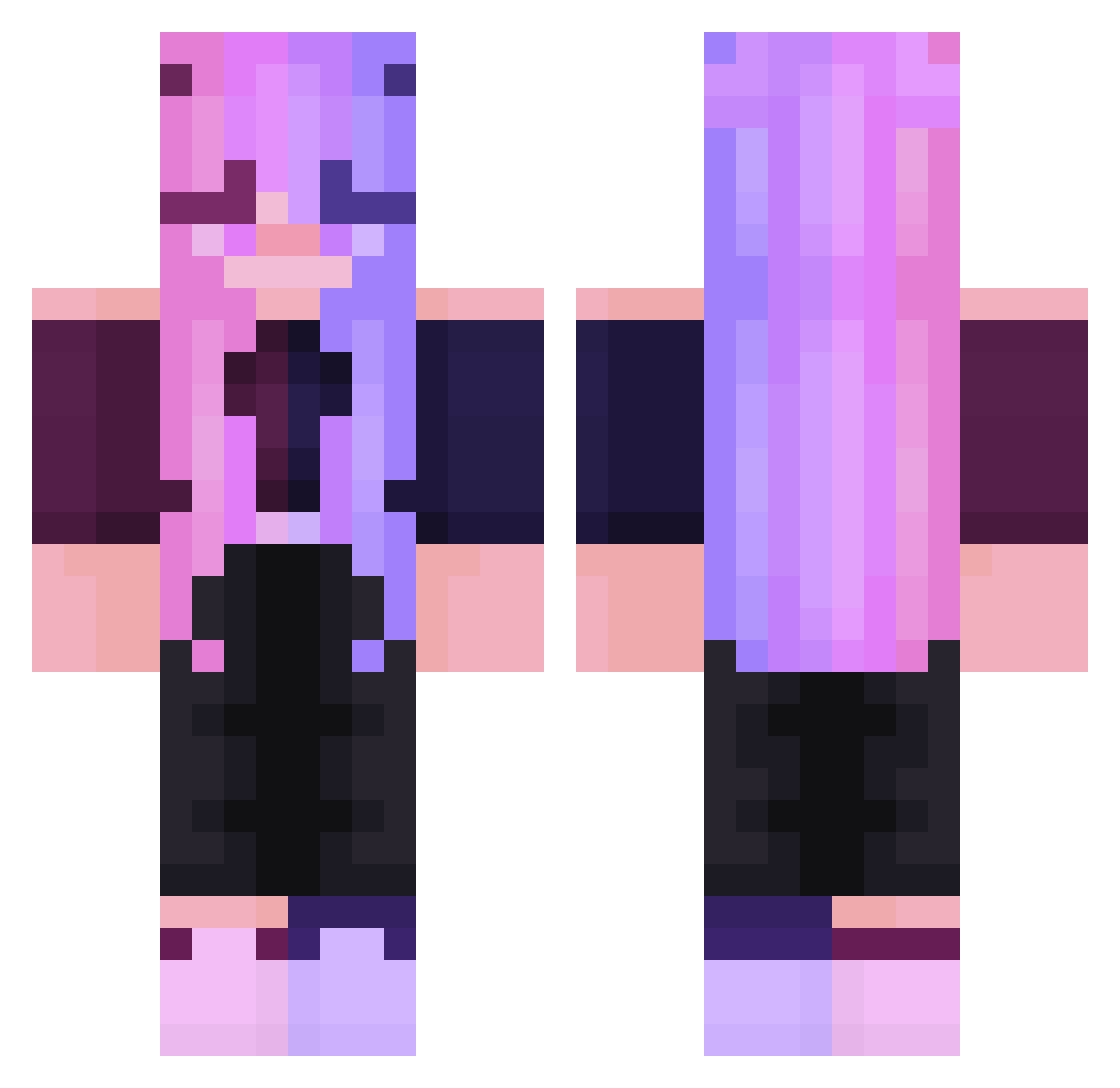
Current Minecraft skin of the player shiro_orange520, loaded from the official Mojang API. Rotate the 3D model with your mouse or finger, then download the skin as a PNG file and use it in Minecraft: Bedrock Edition or Java Edition for free. When shiro_orange520 changes their skin, this page updates automatically and the old skin stays in the history below.
Other players with this skin (308)
shiro_orange520 was the 291st player we have seen with this skin, first spotted on 14.11.2026. The same skin was seen on these players. Open a nickname to see their current skin and skin history.
 ongbass xxrochetxx Jinx9657 YuhjiUMR SofiGamer_UWU Perf0rator4 JennyJTG Jatzga claire406 mk209littlemedic Egirlgamer34 MrsFrida DieDevilS crafta209 Charl3sthegr3at zinho SalCri18 Pandad0uu CallMeTris2 smallblack07 AzraelRavenheart Te4ran Schleifen AuxyPlays GoldMeme xinC11 abysmus45 Panic009 Levathein ErikaxDP_ FrostHF Vixaxeen Ka1LuN K8Nicole LillithArtStuffs banana7484 HY3RI popinato Neotopia Creepeery Chelle339n thatistt 1Ykrop4ik1 mamba_negra1 scftlustuwu IchiMiyu Honeybonbun KAPECITO NIOOOMY zesty_nugget BBlack45 gamingauflauf CandyHorse1128 MissBzh56 EKINOOX KathrynSmith XDarkLugia clane94 cuttiecat kikisayshayy
More Off Shoulder Minecraft skins
See all 502 Off Shoulder skins
How to install the shiro_orange520 skin
- Press the Download button above to save the skin as a PNG file.
- Minecraft: Bedrock Edition (PE): open the Dressing Room from the main menu (or tap your character → Edit Character), go to Classic Skins → Owned, press the + (new skin) button, choose the downloaded PNG and pick the Classic (Steve) model. Works on PC and mobile; consoles cannot import custom skins.
- Minecraft: Java Edition: open the Minecraft Launcher, go to the Skins tab, click New Skin, load the PNG, pick the Classic (Steve) model and press Save & Use. You can also upload it at minecraft.net → Profile → Change Skin.
The skin does not show up after import - what should I do?
Restart Minecraft and open the Dressing Room again - imported skins sometimes appear only after a restart. Also make sure you selected the imported skin and picked the Classic (Steve) model.
Which model should I choose, Classic or Slim?
This skin is designed for the Classic (Steve) model. If you pick the wrong model, the arms of the skin will look stretched or squeezed.
Is the skin of shiro_orange520 free to download?
Yes. Press Download, save the PNG file and use it in Minecraft: Bedrock Edition or Java Edition - no payment or registration needed. The skin also works on multiplayer servers and Realms.
More skins
Looking for more? Go back to all Minecraft skins and check the top skins of the week, month and all time, or find any player's skin by nickname.