
sharkgremlin - Minecraft Skins & Skin History
Current Minecraft skin of the player sharkgremlin, loaded from the official Mojang API. Rotate the 3D model with your mouse or finger, then download the skin as a PNG file and use it in Minecraft: Bedrock Edition or Java Edition for free. When sharkgremlin changes their skin, this page updates automatically and the old skin stays in the history below.
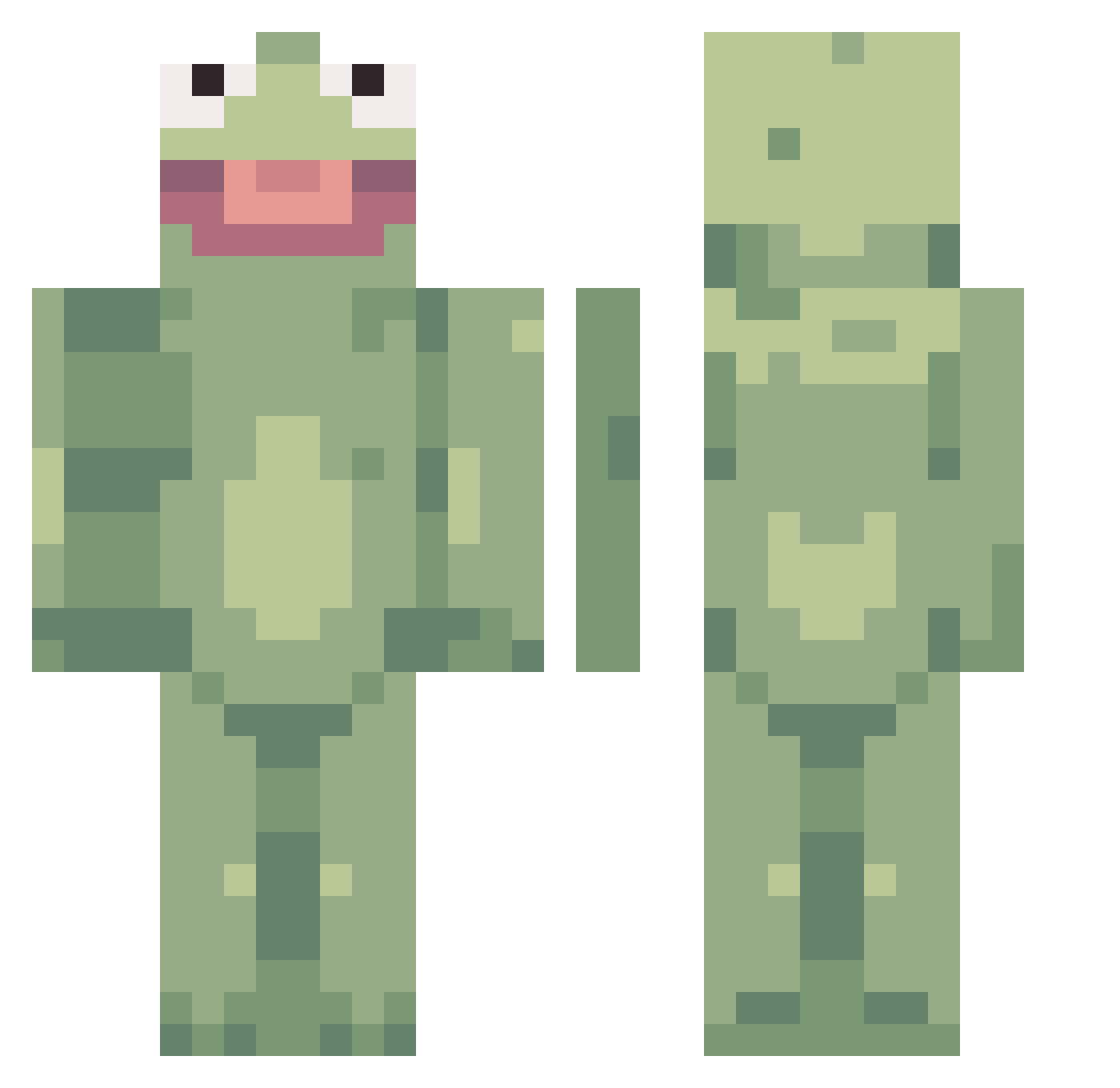
Other players with this skin (359)
sharkgremlin was the 39th player we have seen with this skin, first spotted on 07.08.2026. The same skin was seen on these players. Open a nickname to see their current skin and skin history.
 DeeHoser Sayhann zeldkite jukonaut JanDerKann joco_play GreyHunter21 BigBoyHeaders Piratedcopy nisayen Poopydooks Zackisnotok BorkBookPro dramallama23 GauzysLilBrother Shadeuce XeoTurbo Wiederling Jaaarn SnapbackZodiack Lilyejowen Resultedshark56 callixx PoobLube KomSalamander the_Feebz potatoo_guurl _logabagaba_ Redeaglee ThornFrog randomness6789 nootjepootje11 Raptor919 TyranidFan DetectiveScoot NukaRat99 EicherPower3066 uwu_ostrich _Ad7m_ Shrig777 UglyCookie Drukark4 xav707 ThcGamble MOOMIN_e KingBeanIV DatCoder AlapTheFrog OloPanicky Allstar13 Teddy04 JazHandzs eld347 ItsMeBorris SpegMerbs SovietRabbit EatBreakfast27 Xelox22 Sanaake DelvG
More Kermit The Frog Minecraft skins
See all 395 Kermit The Frog skins
How to install the sharkgremlin skin
- Press the Download button above to save the skin as a PNG file.
- Minecraft: Bedrock Edition (PE): open the Dressing Room from the main menu (or tap your character → Edit Character), go to Classic Skins → Owned, press the + (new skin) button, choose the downloaded PNG and pick the Classic (Steve) model. Works on PC and mobile; consoles cannot import custom skins.
- Minecraft: Java Edition: open the Minecraft Launcher, go to the Skins tab, click New Skin, load the PNG, pick the Classic (Steve) model and press Save & Use. You can also upload it at minecraft.net → Profile → Change Skin.
The skin does not show up after import - what should I do?
Restart Minecraft and open the Dressing Room again - imported skins sometimes appear only after a restart. Also make sure you selected the imported skin and picked the Classic (Steve) model.
Which model should I choose, Classic or Slim?
This skin is designed for the Classic (Steve) model. If you pick the wrong model, the arms of the skin will look stretched or squeezed.
Is the skin of sharkgremlin free to download?
Yes. Press Download, save the PNG file and use it in Minecraft: Bedrock Edition or Java Edition - no payment or registration needed. The skin also works on multiplayer servers and Realms.
More skins
Looking for more? Go back to all Minecraft skins and check the top skins of the week, month and all time, or find any player's skin by nickname.