
seamus812 - Minecraft Skins & Skin History
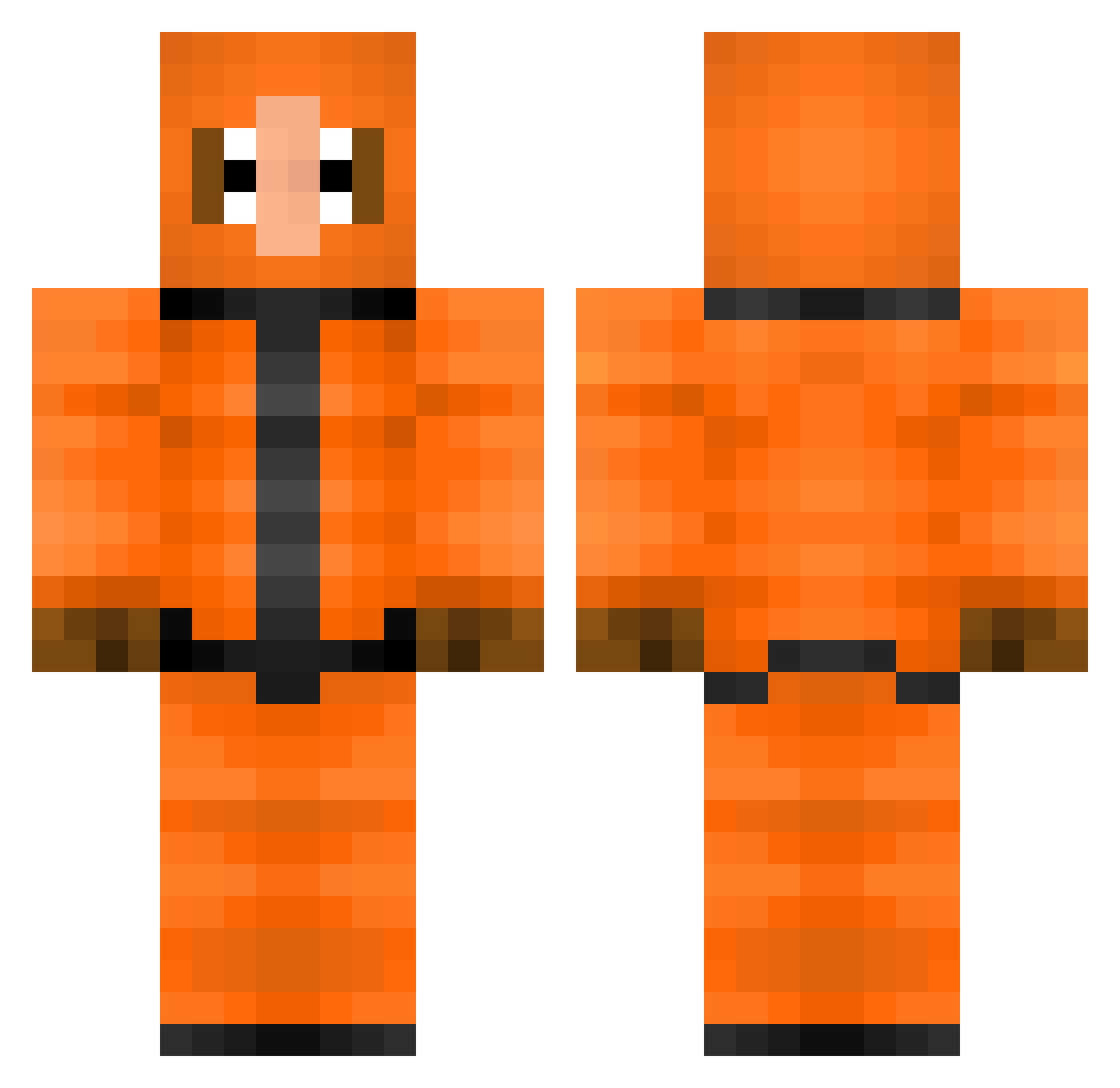
Current Minecraft skin of the player seamus812, loaded from the official Mojang API. Rotate the 3D model with your mouse or finger, then download the skin as a PNG file and use it in Minecraft: Bedrock Edition or Java Edition for free. When seamus812 changes their skin, this page updates automatically and the old skin stays in the history below.
Other players with this skin (200)
seamus812 was the 57th player we have seen with this skin, first spotted on 19.08.2026. The same skin was seen on these players. Open a nickname to see their current skin and skin history.
 Fuuit GenCore2008 Knevoe Masedogg01 marmar420 Simbalebg Mazihno2137 Mcapsule KkL164 Mortem72
 DARK_LINE618 mattindahat5 EggAlice MajorSoapy Skia172 El_Goose LOK_KC xamassa b4llenohneb4ll headhunter2k3 Exer7001 micka1506 oVinisz anywaysjess Finnboroboy Ch1ENN
 DanJr9000 Jayfrtm tictac994 sl33piii Shanksssz antixvossis Pakohaitham Seeg foveacapitus Kiermein Fribs Jeccccc TomTomLaMoule TwizzJr11 YaBoiEdgar kennywiwi jervw oddworldmaniac saddycat3344 lyssa0 Inkza siennah17 neffirg MaxFromRemax Velutix bonsai_spookie EMRGames Mahou_Donatsu GNLL Joshie0104 Naduerlich jojoig charlit0o BackOnFreakyGram
More Kenny Mccormick Minecraft skins
See all 59 Kenny Mccormick skins
How to install the seamus812 skin
- Press the Download button above to save the skin as a PNG file.
- Minecraft: Bedrock Edition (PE): open the Dressing Room from the main menu (or tap your character → Edit Character), go to Classic Skins → Owned, press the + (new skin) button, choose the downloaded PNG and pick the Classic (Steve) model. Works on PC and mobile; consoles cannot import custom skins.
- Minecraft: Java Edition: open the Minecraft Launcher, go to the Skins tab, click New Skin, load the PNG, pick the Classic (Steve) model and press Save & Use. You can also upload it at minecraft.net → Profile → Change Skin.
The skin does not show up after import - what should I do?
Restart Minecraft and open the Dressing Room again - imported skins sometimes appear only after a restart. Also make sure you selected the imported skin and picked the Classic (Steve) model.
Which model should I choose, Classic or Slim?
This skin is designed for the Classic (Steve) model. If you pick the wrong model, the arms of the skin will look stretched or squeezed.
Is the skin of seamus812 free to download?
Yes. Press Download, save the PNG file and use it in Minecraft: Bedrock Edition or Java Edition - no payment or registration needed. The skin also works on multiplayer servers and Realms.
More skins
Looking for more? Go back to all Minecraft skins and check the top skins of the week, month and all time, or find any player's skin by nickname.