
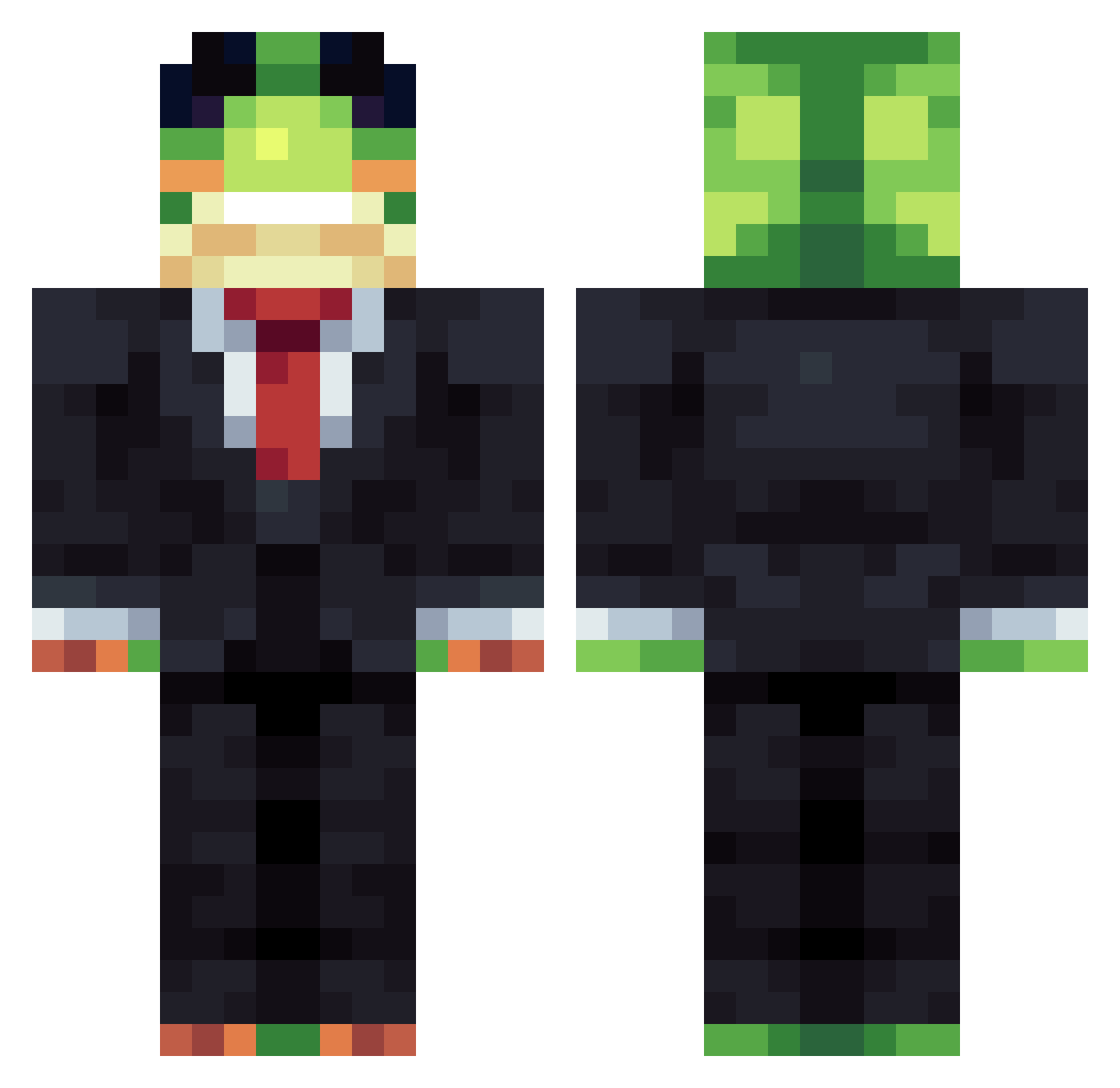
Current Minecraft skin of the player roy_100, loaded from the official Mojang API. Rotate the 3D model with your mouse or finger, then download the skin as a PNG file and use it in Minecraft: Bedrock Edition or Java Edition for free. When roy_100 changes their skin, this page updates automatically and the old skin stays in the history below.
Other players with this skin (1088)
roy_100 was the 50th player we have seen with this skin, first spotted on 29.07.2026. The same skin was seen on these players. Open a nickname to see their current skin and skin history.
 smurfgambler T0XIC3S
 lucas__pvp MiguelAE sandymangina81 twistedyoshi aid09m sugar_cookie1234 rabidrabii
 Lukiezer
 ovww sharkstone101 Godplayees
 kanqxe daddy_desmond ChickenWarrior13
 EvoJ14
 doyoon_1007 WERRFFF adthepad
 JustDripONPC Thomas929er Madnitroninja LVPLeo MrPoteflon Cralius WXD1208 sinwoo1020
 HermYT_ Dorrz TiagoGoncalves LoganSSS
 NGC_yanzz
 Spxdder Chucky5212688 Loll12323132 hicksyjr22
 falsifiable Bigmanok65 Headshoot34562 ItzCracken_ DeY_MouRne Siruf15 brudzy lokinclara diab2330 shadowkingxD suckonmyballs Derry10
 AquaNGA TooAfraidToFall
 akira2003 Joninhas3671 Contra_abierta Marsbar08 BAKAOYDER min0327love _FREE_BIRD_ gngeorgiev MrSnakeMaster
More Frog Minecraft skins
How to install the roy_100 skin
- Press the Download button above to save the skin as a PNG file.
- Minecraft: Bedrock Edition (PE): open the Dressing Room from the main menu (or tap your character → Edit Character), go to Classic Skins → Owned, press the + (new skin) button, choose the downloaded PNG and pick the Classic (Steve) model. Works on PC and mobile; consoles cannot import custom skins.
- Minecraft: Java Edition: open the Minecraft Launcher, go to the Skins tab, click New Skin, load the PNG, pick the Classic (Steve) model and press Save & Use. You can also upload it at minecraft.net → Profile → Change Skin.
The skin does not show up after import - what should I do?
Restart Minecraft and open the Dressing Room again - imported skins sometimes appear only after a restart. Also make sure you selected the imported skin and picked the Classic (Steve) model.
Which model should I choose, Classic or Slim?
This skin is designed for the Classic (Steve) model. If you pick the wrong model, the arms of the skin will look stretched or squeezed.
Is the skin of roy_100 free to download?
Yes. Press Download, save the PNG file and use it in Minecraft: Bedrock Edition or Java Edition - no payment or registration needed. The skin also works on multiplayer servers and Realms.
More skins
Looking for more? Go back to all Minecraft skins and check the top skins of the week, month and all time, or find any player's skin by nickname.