
riwyFai - Minecraft Skins & Skin History
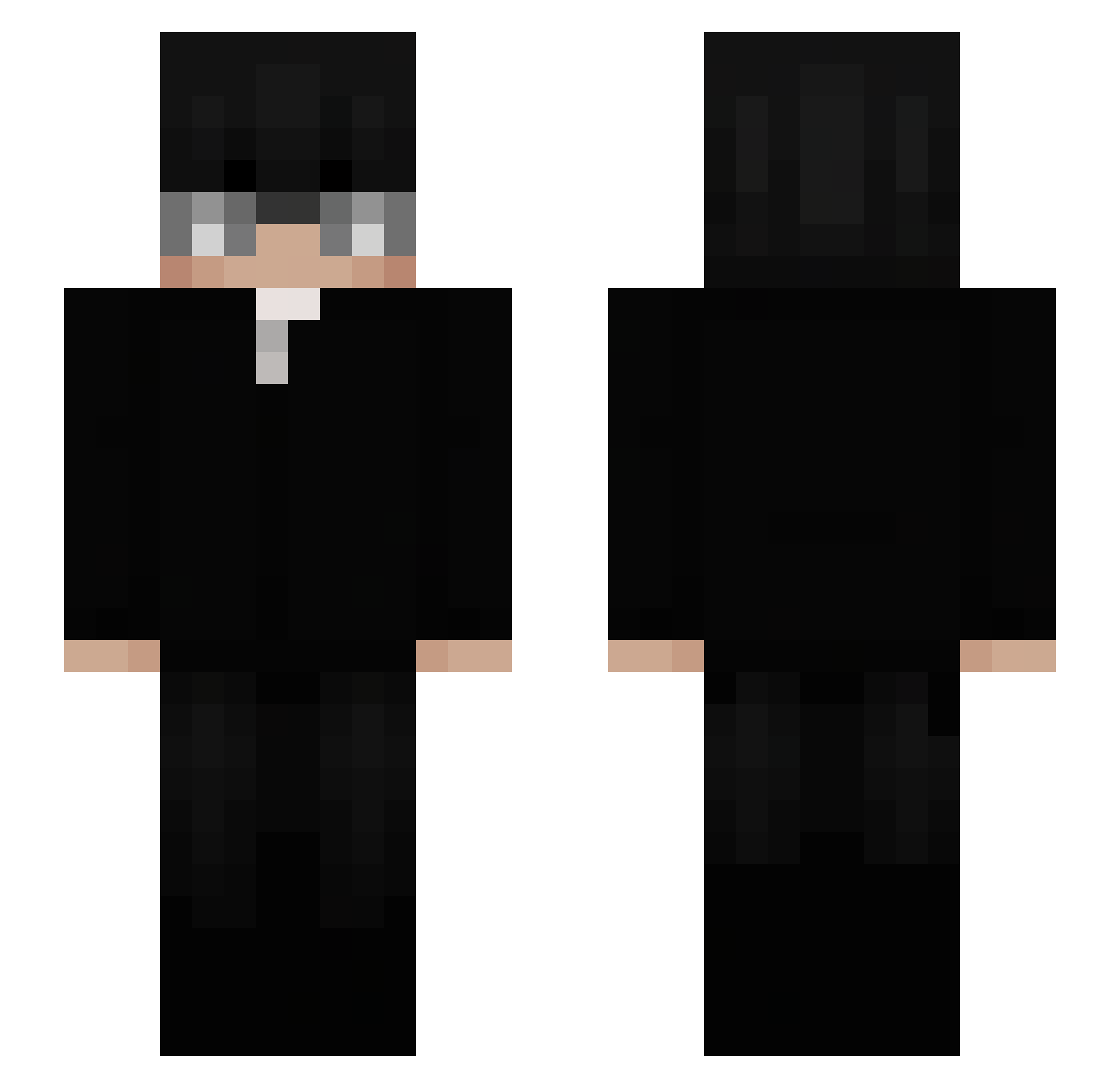
Current Minecraft skin of the player riwyFai, loaded from the official Mojang API. Rotate the 3D model with your mouse or finger, then download the skin as a PNG file and use it in Minecraft: Bedrock Edition or Java Edition for free. When riwyFai changes their skin, this page updates automatically and the old skin stays in the history below.
Other players with this skin (73)
riwyFai was the 28th player we have seen with this skin, first spotted on 09.09.2026. The same skin was seen on these players. Open a nickname to see their current skin and skin history.
 ZetadeK thbtmt JceeXyooj Davee_0 _Pterodaktyl_31 microtabs Vicento_Bento Wnsseo_ BOOMBU_ thiagpo KaLangow Yejin0528 SoyJacob Matysekk2 Habbib J0BKA
 vJulik Joski_bluxr Kiroxu qx_Vetax1 Maimatti TheSatanKaos PEDROPONI33 jozzefi Papiscot merl124 L4mpka_ ItzRealMak kenai1_ isaacrxz Pol_peep chadzxcc XeraCrazy1 ComparatorsOnTop WithnessSKS villixian NoNaMe5027 Itz_Lucka ThornnyX 10ax zRobertFT Out54321 Eduarxhr xXjustJOKEXx rayanalj
 Sebas_0418 BossToJa_ Moon1ighted SolarissXT AzamiyaMono EBniK0 Ale6633 c56c Casu_023 EdinhoXL mikxxs eS_777 FernandoMaffei ThMtzzz Zu4lx
More Businessman Minecraft skins
See all 6301 Businessman skins
How to install the riwyFai skin
- Press the Download button above to save the skin as a PNG file.
- Minecraft: Bedrock Edition (PE): open the Dressing Room from the main menu (or tap your character → Edit Character), go to Classic Skins → Owned, press the + (new skin) button, choose the downloaded PNG and pick the Slim (Alex) model. Works on PC and mobile; consoles cannot import custom skins.
- Minecraft: Java Edition: open the Minecraft Launcher, go to the Skins tab, click New Skin, load the PNG, pick the Slim (Alex) model and press Save & Use. You can also upload it at minecraft.net → Profile → Change Skin.
The skin does not show up after import - what should I do?
Restart Minecraft and open the Dressing Room again - imported skins sometimes appear only after a restart. Also make sure you selected the imported skin and picked the Slim (Alex) model.
Which model should I choose, Classic or Slim?
This skin is designed for the Slim (Alex) model. If you pick the wrong model, the arms of the skin will look stretched or squeezed.
Is the skin of riwyFai free to download?
Yes. Press Download, save the PNG file and use it in Minecraft: Bedrock Edition or Java Edition - no payment or registration needed. The skin also works on multiplayer servers and Realms.
More skins
Looking for more? Go back to all Minecraft skins and check the top skins of the week, month and all time, or find any player's skin by nickname.