
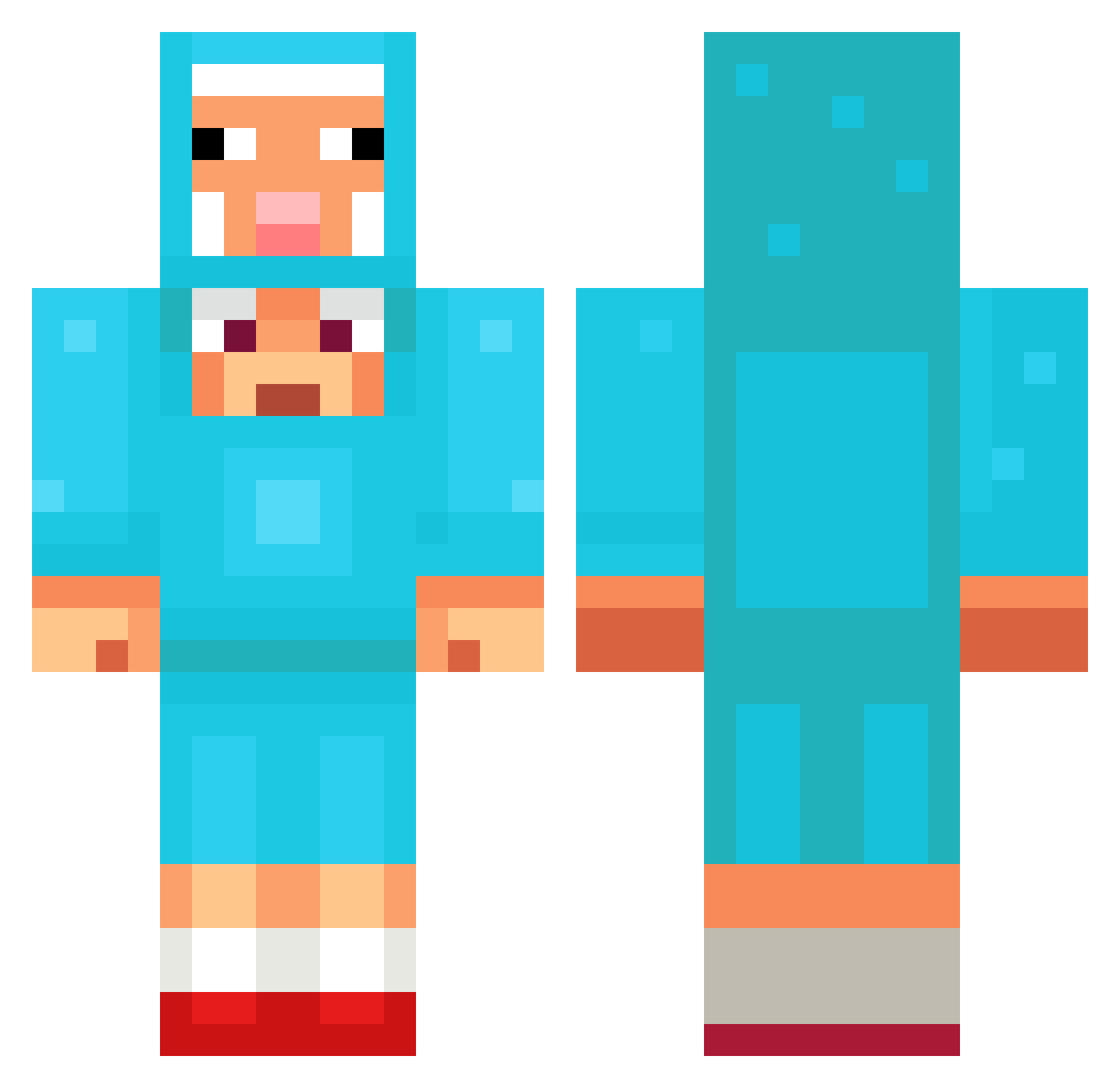
Current Minecraft skin of the player qingyuan27, loaded from the official Mojang API. Rotate the 3D model with your mouse or finger, then download the skin as a PNG file and use it in Minecraft: Bedrock Edition or Java Edition for free. When qingyuan27 changes their skin, this page updates automatically and the old skin stays in the history below.
Other players with this skin (1028)
qingyuan27 was the 222nd player we have seen with this skin, first spotted on 13.08.2026. The same skin was seen on these players. Open a nickname to see their current skin and skin history.
 Thunderfred lim111112 GanzMitSchwanz
 greenchnion3 miaopasilsc Dwabea_1 Baud3la1r3 kit0ra147 Senpai131 jl765 Accorn24 AKSgamer10
 Fearnot59 Xterminator3232 TACOMANISDAGOAT Kaffie_ Taz84700 jerrybruh
 Bobaroba_ 4KTMinty Twinkami Sir_Viva_ IcYCherry9381 FinerBasil37301 kkomaenge nmx46 Petis9999 Paslos BAZBOGAMING
 ChannelNO5 OverRank
 cozypack seum777 OmerGamer24 Hyuk_burger oguzhan44 DSchatt NINACH22 Catgirl_u_6 procyrus1031 cookieandcheese Cherrylady43 fartisia43 Llanww Bauskis__ Mo3OH rodolfo99 19989 BlueCow96 Motorrad_ TheoM2007 SpicyMantis189 forestfriend666 oxlongg rodnototomas Jumbaaaa poonpompo1
 big_duck_boy
 LiwKu
LiwKu inturnz_
More Sheep Minecraft skins
How to install the qingyuan27 skin
- Press the Download button above to save the skin as a PNG file.
- Minecraft: Bedrock Edition (PE): open the Dressing Room from the main menu (or tap your character → Edit Character), go to Classic Skins → Owned, press the + (new skin) button, choose the downloaded PNG and pick the Classic (Steve) model. Works on PC and mobile; consoles cannot import custom skins.
- Minecraft: Java Edition: open the Minecraft Launcher, go to the Skins tab, click New Skin, load the PNG, pick the Classic (Steve) model and press Save & Use. You can also upload it at minecraft.net → Profile → Change Skin.
The skin does not show up after import - what should I do?
Restart Minecraft and open the Dressing Room again - imported skins sometimes appear only after a restart. Also make sure you selected the imported skin and picked the Classic (Steve) model.
Which model should I choose, Classic or Slim?
This skin is designed for the Classic (Steve) model. If you pick the wrong model, the arms of the skin will look stretched or squeezed.
Is the skin of qingyuan27 free to download?
Yes. Press Download, save the PNG file and use it in Minecraft: Bedrock Edition or Java Edition - no payment or registration needed. The skin also works on multiplayer servers and Realms.
More skins
Looking for more? Go back to all Minecraft skins and check the top skins of the week, month and all time, or find any player's skin by nickname.