
prince_3z - Minecraft Skins & Skin History
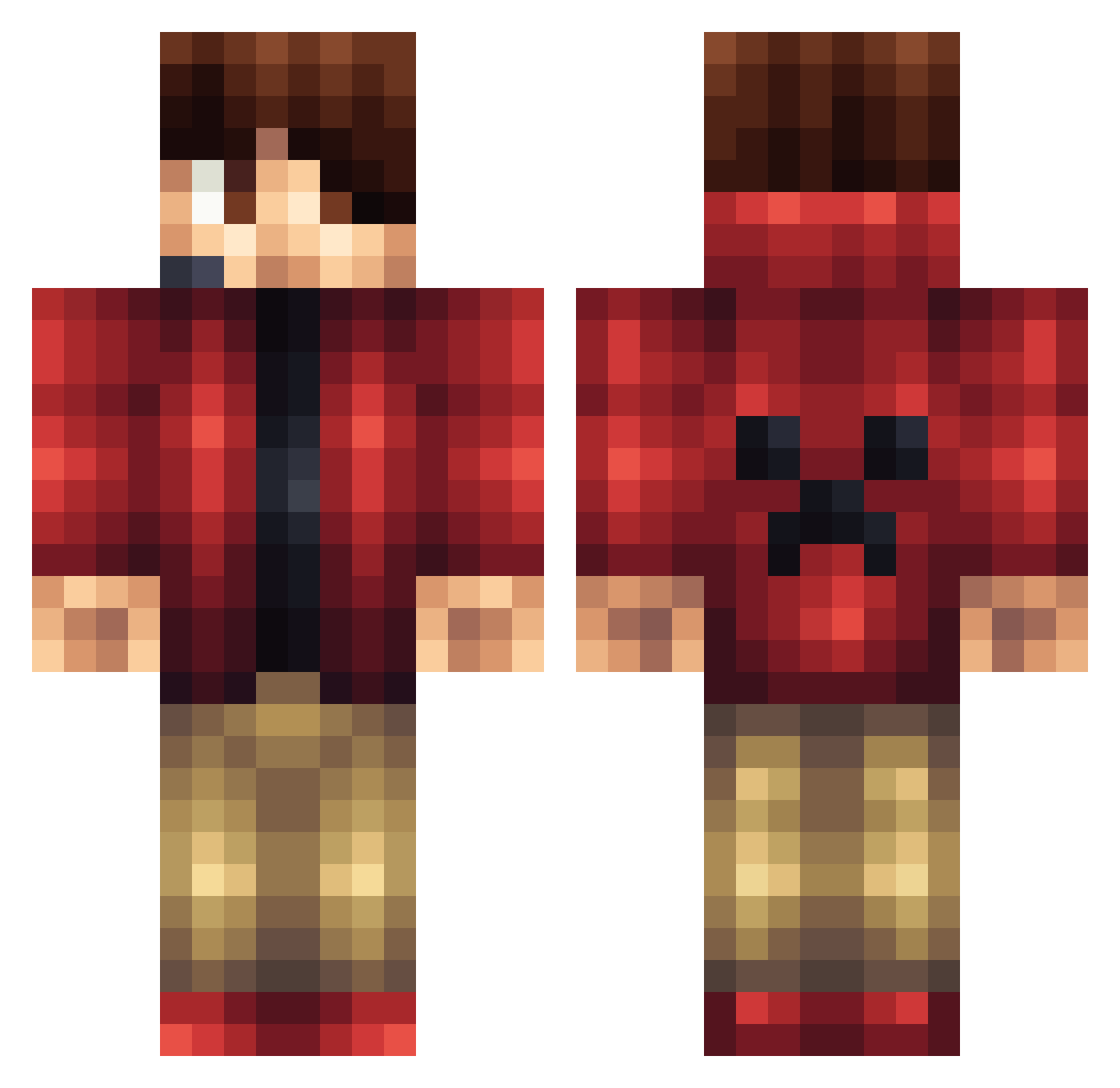
Current Minecraft skin of the player prince_3z, loaded from the official Mojang API. Rotate the 3D model with your mouse or finger, then download the skin as a PNG file and use it in Minecraft: Bedrock Edition or Java Edition for free. When prince_3z changes their skin, this page updates automatically and the old skin stays in the history below.
Other players with this skin (1162)
prince_3z was the 91st player we have seen with this skin, first spotted on 02.08.2026. The same skin was seen on these players. Open a nickname to see their current skin and skin history.
 jack701 tres_ton CSR_0400 mikie432 Snike66789 jacko5321 Surof FIxRe Alecta1 Sharkbaitlewis Icy_Fresh36 roko0508 Rami11144 andydpeck NiffKceb Alpha_Ali motorcycle06 Akame165 aethalmous KingWilliamThe1 BannanaSolid ItzBigJerm momono75 FILTGRANAT susi1997 thunder730 DreamForward Ya_Mobai Poupi14 Bensamkli ExpanderOfficial Timothythemuffin Goldskull321 SanoLee BlitzBawz Guppie04 matt123me bryan01123 Jakethedog906 iTzZ_Pro mankid20012 Toujou ZimmerMatrix rygold03 mocjoc1 wolverine1010 Blackmango15 ZARerxy BlackFalcon04 JackPoolMaster vmlizar RowanKeltizar okram23 gabesepps HeroBrineRules10 Industruktable Facundojp blanwill ColossalTiger03 Spazdude2
More Headset Minecraft skins
How to install the prince_3z skin
- Press the Download button above to save the skin as a PNG file.
- Minecraft: Bedrock Edition (PE): open the Dressing Room from the main menu (or tap your character → Edit Character), go to Classic Skins → Owned, press the + (new skin) button, choose the downloaded PNG and pick the Classic (Steve) model. Works on PC and mobile; consoles cannot import custom skins.
- Minecraft: Java Edition: open the Minecraft Launcher, go to the Skins tab, click New Skin, load the PNG, pick the Classic (Steve) model and press Save & Use. You can also upload it at minecraft.net → Profile → Change Skin.
The skin does not show up after import - what should I do?
Restart Minecraft and open the Dressing Room again - imported skins sometimes appear only after a restart. Also make sure you selected the imported skin and picked the Classic (Steve) model.
Which model should I choose, Classic or Slim?
This skin is designed for the Classic (Steve) model. If you pick the wrong model, the arms of the skin will look stretched or squeezed.
Is the skin of prince_3z free to download?
Yes. Press Download, save the PNG file and use it in Minecraft: Bedrock Edition or Java Edition - no payment or registration needed. The skin also works on multiplayer servers and Realms.
More skins
Looking for more? Go back to all Minecraft skins and check the top skins of the week, month and all time, or find any player's skin by nickname.