
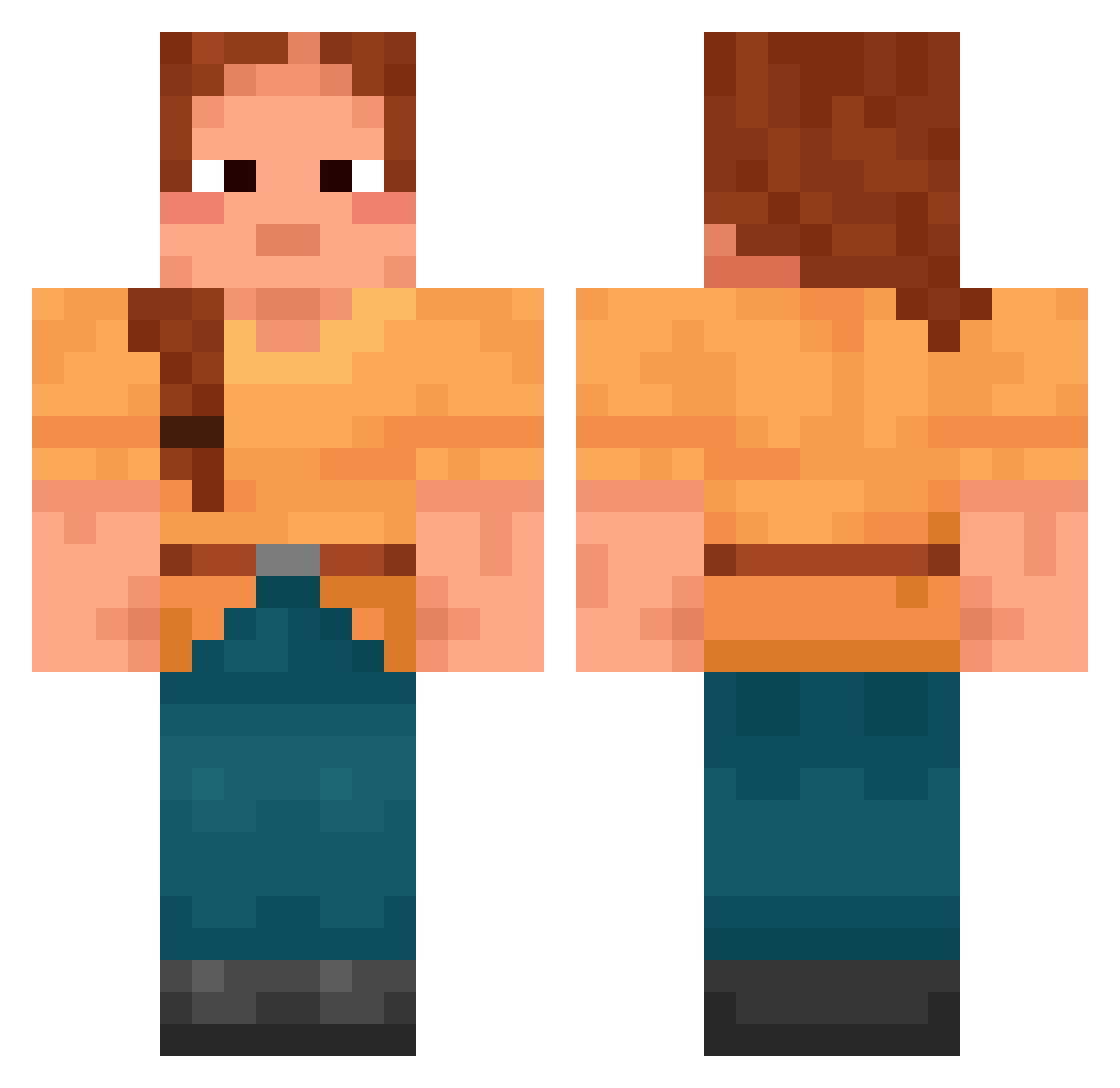
Current Minecraft skin of the player polytope, loaded from the official Mojang API. Rotate the 3D model with your mouse or finger, then download the skin as a PNG file and use it in Minecraft: Bedrock Edition or Java Edition for free. When polytope changes their skin, this page updates automatically and the old skin stays in the history below.
Other players with this skin (1392)
polytope was the 45th player we have seen with this skin, first spotted on 24.07.2026. The same skin was seen on these players. Open a nickname to see their current skin and skin history.
 Foutre Master810 Reginald_2nd atlanticpostcard Ochery Runa2009 Catcream28 gilten Cheesehead BlackTormenta Minsoo_Kim Wenlock Osamaa_Bin_Laden Kazoos IronJesus RICKSD Arrlie YEONKUN RUS1A Izzi67 Ubangi Bargol Zane1999 Honer
 Gaggatrondra Abatis iamthatguyiamhim layhoo ELA312 Snerg_Burglar sundays Stepway Derminz Madokei LinhxMiVS0116
 VV0JCI3CH piggiest shpilled
 R_Steezyy urmommm69 Gryllidae jackcreep tomoulis_xapo dandiest Queres khuzi
 Simon003 gruziskozydzisko dd6790 Secular Anyelit98 brauna brickbat WizzerTwizzer jay_bluebird1 double0ice mountebanks feufollet_ Fr1D4yS
 sellywin
More Cottagecore Minecraft skins
See all 5483 Cottagecore skins
How to install the polytope skin
- Press the Download button above to save the skin as a PNG file.
- Minecraft: Bedrock Edition (PE): open the Dressing Room from the main menu (or tap your character → Edit Character), go to Classic Skins → Owned, press the + (new skin) button, choose the downloaded PNG and pick the Classic (Steve) model. Works on PC and mobile; consoles cannot import custom skins.
- Minecraft: Java Edition: open the Minecraft Launcher, go to the Skins tab, click New Skin, load the PNG, pick the Classic (Steve) model and press Save & Use. You can also upload it at minecraft.net → Profile → Change Skin.
The skin does not show up after import - what should I do?
Restart Minecraft and open the Dressing Room again - imported skins sometimes appear only after a restart. Also make sure you selected the imported skin and picked the Classic (Steve) model.
Which model should I choose, Classic or Slim?
This skin is designed for the Classic (Steve) model. If you pick the wrong model, the arms of the skin will look stretched or squeezed.
Is the skin of polytope free to download?
Yes. Press Download, save the PNG file and use it in Minecraft: Bedrock Edition or Java Edition - no payment or registration needed. The skin also works on multiplayer servers and Realms.
More skins
Looking for more? Go back to all Minecraft skins and check the top skins of the week, month and all time, or find any player's skin by nickname.