
pedroxtarr - Minecraft Skins & Skin History
Current Minecraft skin of the player pedroxtarr, loaded from the official Mojang API. Rotate the 3D model with your mouse or finger, then download the skin as a PNG file and use it in Minecraft: Bedrock Edition or Java Edition for free. When pedroxtarr changes their skin, this page updates automatically and the old skin stays in the history below.
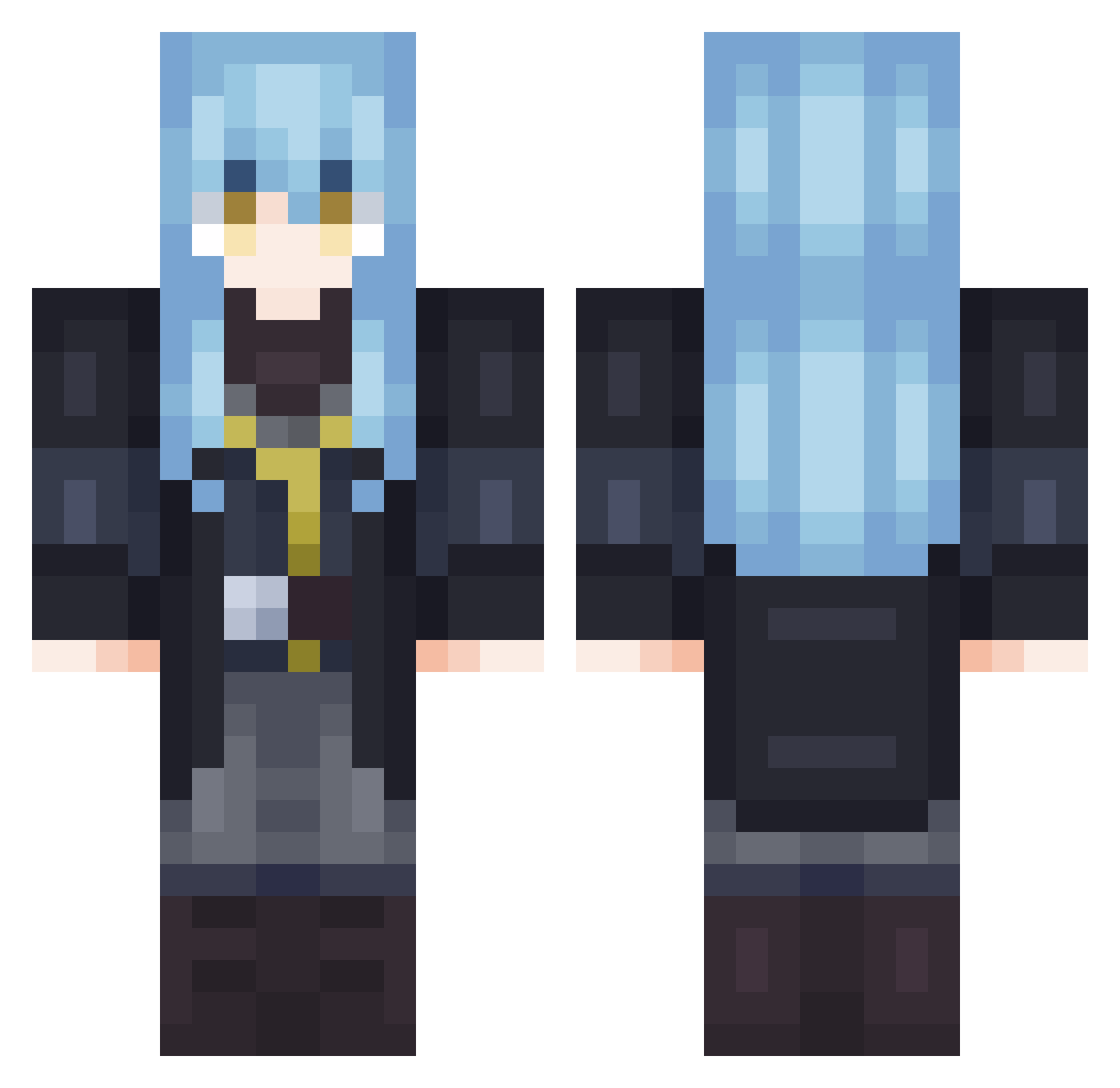
Other players with this skin (702)
pedroxtarr was the 187th player we have seen with this skin, first spotted on 22.08.2026. The same skin was seen on these players. Open a nickname to see their current skin and skin history.
 Saitamafan1 BountifulHeart TheMagmaBot Karma_Asc Yanzhao_ Peeoya02 terabasa pepitinho Mr_Bear101 HiKatakana KikooBuster86 Cresent_Moon12 AkunosTempest88 Casius15 Rimuru_T_P ParZivalone1 PolishedWipe Odin_Yggdrasil02 SeanBenZum709 Serlupomannaro bastibastito Kristerk90 kanteKIM LMNTRIXD Krokanman Jhanzelt Arma7513 dark_yk Remi_uwu mindforvulcano SquidCo42
 Lilifid
 zegrwar
 GreatRimuru0 luisBR123x Pluzid Ramka_
 1vwl7e9 Aruh08 Chaosemperator Mianekok Nicopacu23 wmn520 LittleAmmo Chmura_44 SUNSUNROOFL4 Ehnaan ziggtempest ChocoMJ1 Renzirito Ahtan1109 noobfish666 TheNonProphet Calvao55 Rimest SakuyaGX FeldeQQ Cabellos SosukeVR12 MisterKnight80
More Rimuru Tempest Minecraft skins
See all 251 Rimuru Tempest skins
How to install the pedroxtarr skin
- Press the Download button above to save the skin as a PNG file.
- Minecraft: Bedrock Edition (PE): open the Dressing Room from the main menu (or tap your character → Edit Character), go to Classic Skins → Owned, press the + (new skin) button, choose the downloaded PNG and pick the Classic (Steve) model. Works on PC and mobile; consoles cannot import custom skins.
- Minecraft: Java Edition: open the Minecraft Launcher, go to the Skins tab, click New Skin, load the PNG, pick the Classic (Steve) model and press Save & Use. You can also upload it at minecraft.net → Profile → Change Skin.
The skin does not show up after import - what should I do?
Restart Minecraft and open the Dressing Room again - imported skins sometimes appear only after a restart. Also make sure you selected the imported skin and picked the Classic (Steve) model.
Which model should I choose, Classic or Slim?
This skin is designed for the Classic (Steve) model. If you pick the wrong model, the arms of the skin will look stretched or squeezed.
Is the skin of pedroxtarr free to download?
Yes. Press Download, save the PNG file and use it in Minecraft: Bedrock Edition or Java Edition - no payment or registration needed. The skin also works on multiplayer servers and Realms.
More skins
Looking for more? Go back to all Minecraft skins and check the top skins of the week, month and all time, or find any player's skin by nickname.