
pEnder_Dragonp - Minecraft Skins & Skin History
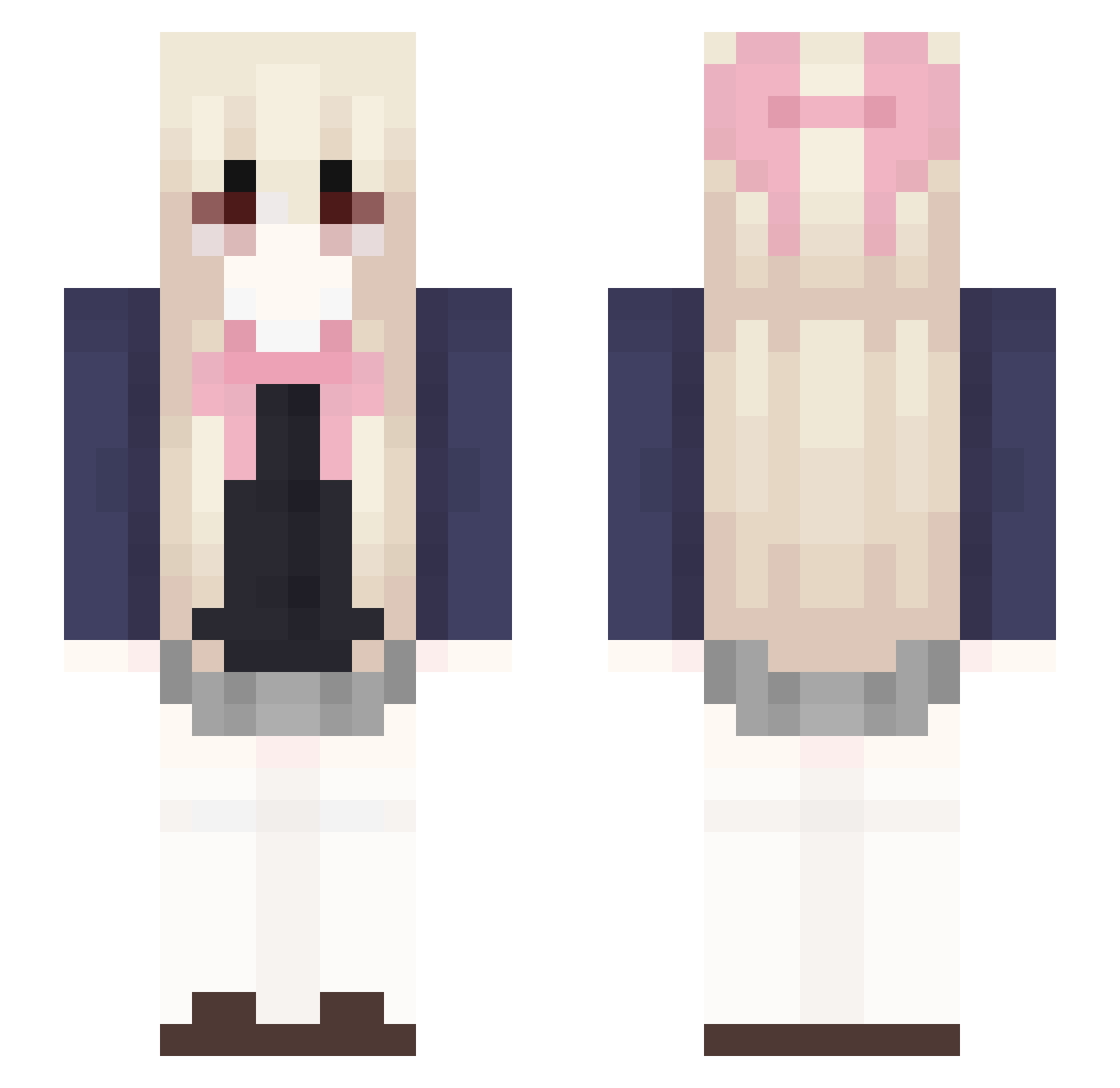
Current Minecraft skin of the player pEnder_Dragonp, loaded from the official Mojang API. Rotate the 3D model with your mouse or finger, then download the skin as a PNG file and use it in Minecraft: Bedrock Edition or Java Edition for free. When pEnder_Dragonp changes their skin, this page updates automatically and the old skin stays in the history below.
Other players with this skin (66)
pEnder_Dragonp was the 34th player we have seen with this skin, first spotted on 27.09.2026. The same skin was seen on these players. Open a nickname to see their current skin and skin history.
 HaYa427 BuYHou hikittyq violetbyte yunrong10 femboyW Fulling_star JanistheRasin yamanekotyann Thedaike MaiCang NeedronE BaobhanSithOvO Denisshh crazytiny ShayIsTaken Equinochrome Bucketll Lillyssss Spirithh Sigmanon Shada Antxscha Mirafa_Psalm w6nters cho_YM ilhdmine misxhy Ponksilus RainVLR Jyal11 cbh077 Mian_Mian 123nb Kariin NazunaHiwa Mandykk2005 HanaKitsu_ ninissie MOdawan inventers Lucaasss CiaCalinaa CCHANNN qtyy_alt pouasse lvn4ever BlvckPhnx YuXuan_I iomichi 1235252 Peachhotter_2 wdecember sushiitop
 Aranelie yizae 1gui1 JeorJeor meohyn
 kawaiiipuppy
More Anime School Uniform Minecraft skins
See all 237 Anime School Uniform skins
How to install the pEnder_Dragonp skin
- Press the Download button above to save the skin as a PNG file.
- Minecraft: Bedrock Edition (PE): open the Dressing Room from the main menu (or tap your character → Edit Character), go to Classic Skins → Owned, press the + (new skin) button, choose the downloaded PNG and pick the Slim (Alex) model. Works on PC and mobile; consoles cannot import custom skins.
- Minecraft: Java Edition: open the Minecraft Launcher, go to the Skins tab, click New Skin, load the PNG, pick the Slim (Alex) model and press Save & Use. You can also upload it at minecraft.net → Profile → Change Skin.
The skin does not show up after import - what should I do?
Restart Minecraft and open the Dressing Room again - imported skins sometimes appear only after a restart. Also make sure you selected the imported skin and picked the Slim (Alex) model.
Which model should I choose, Classic or Slim?
This skin is designed for the Slim (Alex) model. If you pick the wrong model, the arms of the skin will look stretched or squeezed.
Is the skin of pEnder_Dragonp free to download?
Yes. Press Download, save the PNG file and use it in Minecraft: Bedrock Edition or Java Edition - no payment or registration needed. The skin also works on multiplayer servers and Realms.
More skins
Looking for more? Go back to all Minecraft skins and check the top skins of the week, month and all time, or find any player's skin by nickname.