
osakana_83 - Minecraft Skins & Skin History
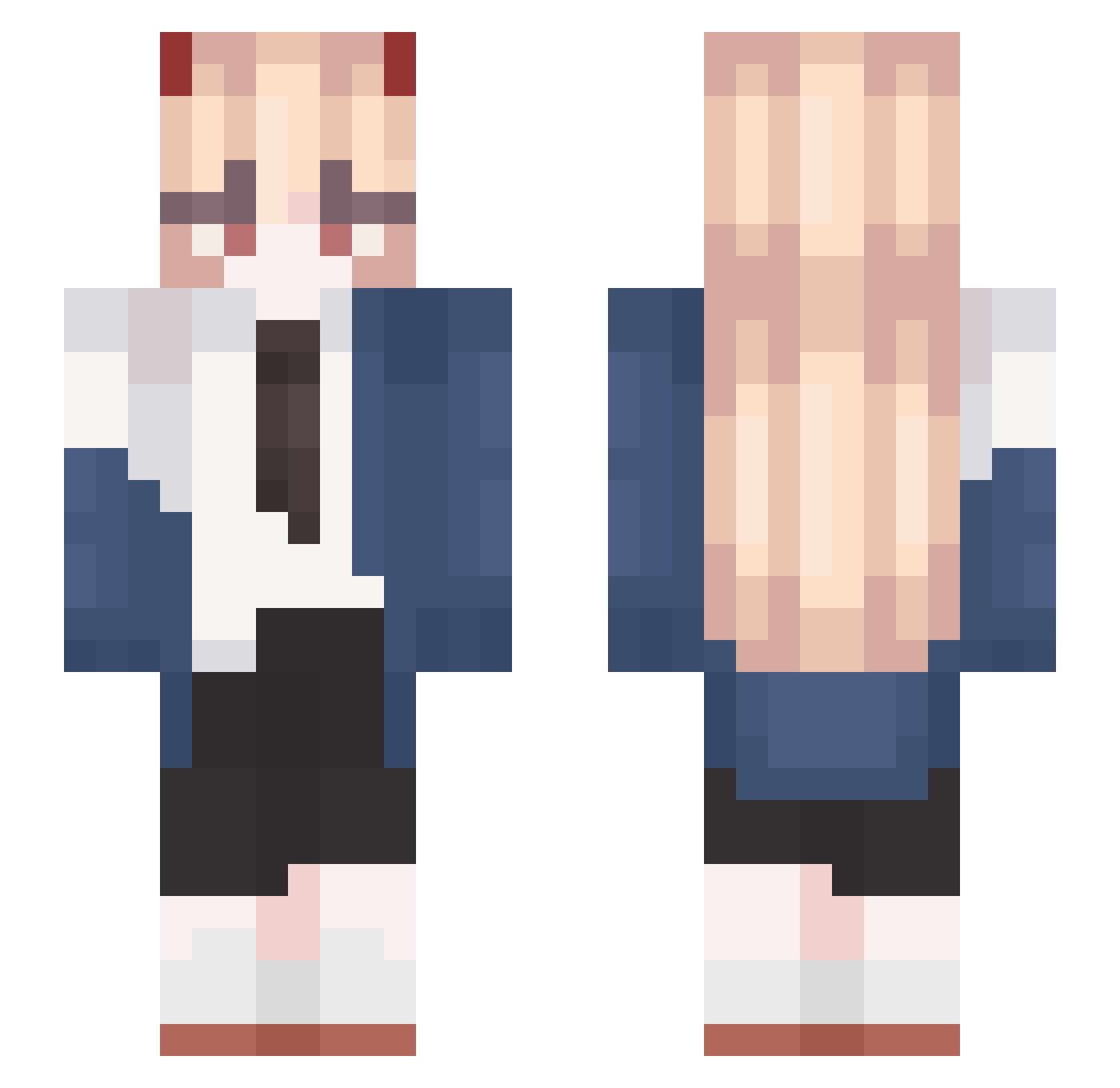
Current Minecraft skin of the player osakana_83, loaded from the official Mojang API. Rotate the 3D model with your mouse or finger, then download the skin as a PNG file and use it in Minecraft: Bedrock Edition or Java Edition for free. When osakana_83 changes their skin, this page updates automatically and the old skin stays in the history below.
Other players with this skin (603)
osakana_83 was the 74th player we have seen with this skin, first spotted on 04.08.2026. The same skin was seen on these players. Open a nickname to see their current skin and skin history.
 Clarkichu chuhang nokia0901 lickmyangus Wangxx373_ MiyaMiya1107 LaziliYin Leaf_Lucus Killua191 Kiuby69 MaryJenny Hendelfut mano888 unkclxwn RuneBramblepelt asvtnnn1 AK47RI Dusik02 Rulu_6 daero4491 HIRORORIKON _wo00o 354drec6tvyfdfwe superdandanman Pandita11 ChoKeoHayBiGheo SpecMyReach haneum03 Shike30 Masuzu15 linw4931 Qfinium gawawa0826 Noato82 nela__ Sihuaaka87
 Lyqx Smidy_ Qian_yuuu Badawee ArataNo2 grainesombre99 eppi339 Ponska Katka_xx
 pimpstinator TastyJuices Lederstiefel2246
 HasDryth
 Rice0323 Bartutitu saKURA_sws OceanMan907 NuttiestNutofNut leave0015 iluvcandice laomao688 Chiharu21 JackDoorsey Kizaa_
More Power Minecraft skins
How to install the osakana_83 skin
- Press the Download button above to save the skin as a PNG file.
- Minecraft: Bedrock Edition (PE): open the Dressing Room from the main menu (or tap your character → Edit Character), go to Classic Skins → Owned, press the + (new skin) button, choose the downloaded PNG and pick the Slim (Alex) model. Works on PC and mobile; consoles cannot import custom skins.
- Minecraft: Java Edition: open the Minecraft Launcher, go to the Skins tab, click New Skin, load the PNG, pick the Slim (Alex) model and press Save & Use. You can also upload it at minecraft.net → Profile → Change Skin.
The skin does not show up after import - what should I do?
Restart Minecraft and open the Dressing Room again - imported skins sometimes appear only after a restart. Also make sure you selected the imported skin and picked the Slim (Alex) model.
Which model should I choose, Classic or Slim?
This skin is designed for the Slim (Alex) model. If you pick the wrong model, the arms of the skin will look stretched or squeezed.
Is the skin of osakana_83 free to download?
Yes. Press Download, save the PNG file and use it in Minecraft: Bedrock Edition or Java Edition - no payment or registration needed. The skin also works on multiplayer servers and Realms.
More skins
Looking for more? Go back to all Minecraft skins and check the top skins of the week, month and all time, or find any player's skin by nickname.