
ordinary_things - Minecraft Skins & Skin History
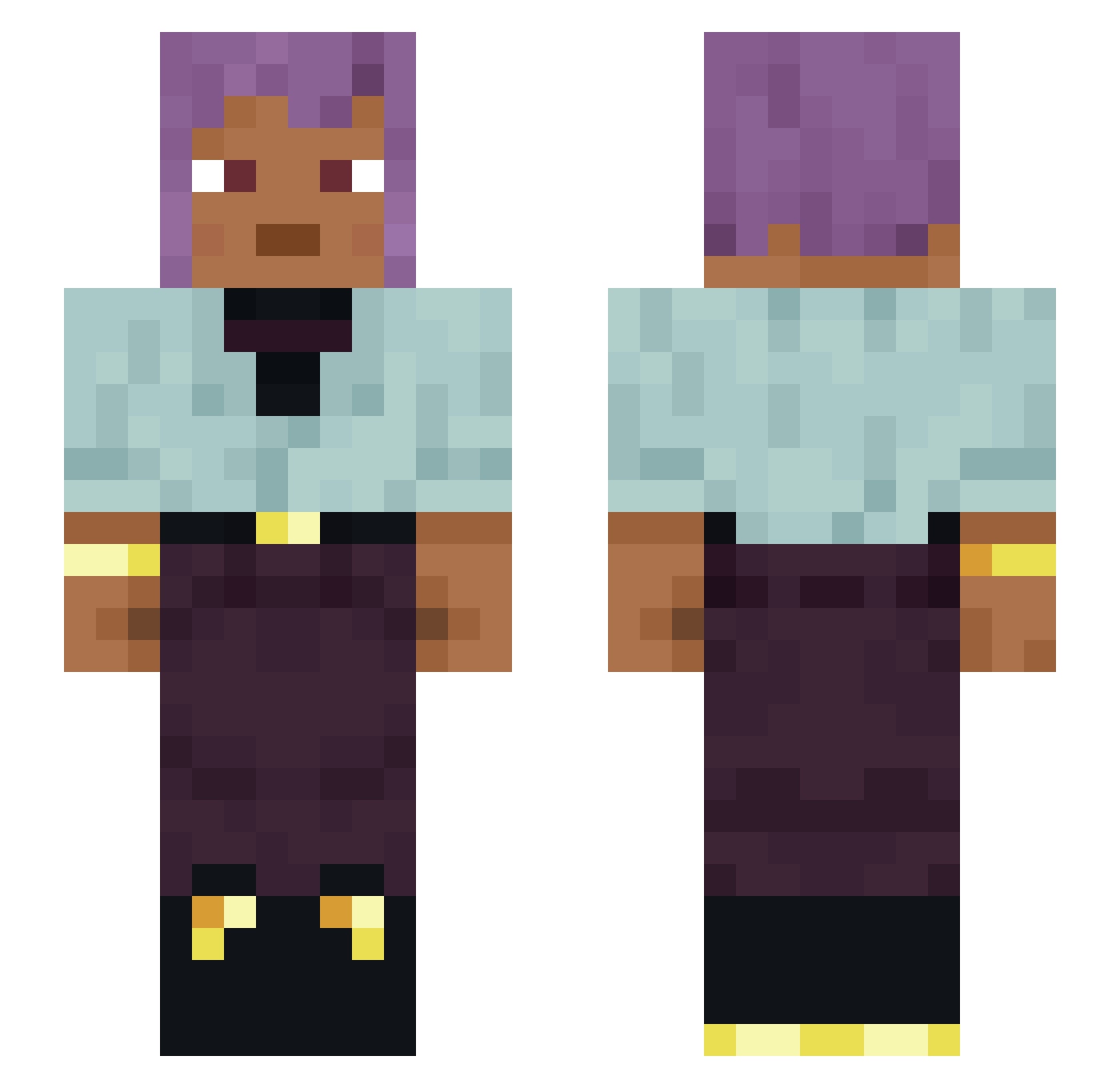
Current Minecraft skin of the player ordinary_things, loaded from the official Mojang API. Rotate the 3D model with your mouse or finger, then download the skin as a PNG file and use it in Minecraft: Bedrock Edition or Java Edition for free. When ordinary_things changes their skin, this page updates automatically and the old skin stays in the history below.
Other players with this skin (1120)
ordinary_things was the 117th player we have seen with this skin, first spotted on 05.08.2026. The same skin was seen on these players. Open a nickname to see their current skin and skin history.
 yorpps Axolotl1098 Latewood Doc Dhurrie maechtighunter sojoboo
 SatouOkyo offfecan Jojo_Siwa22 jazzyjosie 7uan25 Acototojest InCage Curiologic Zenolinck Apothems Beltene Amaas Rattlebones QuinnCute _Kaptain_Kush Rikkipen Romancing HassassinatoR ancientswag DynozorBoss beamedbyscale20 RiddleOfRocks JaydenReed Aladdin_Pink MarThizzle OnePrcOneKid Permutations mitral oRhys31 LucienGrey ALEX_BOOM_BOOM _Prettylongname_ WMSMLTM45 Thumbprint Z1RZY Belcher taffies FazeSoulx nontarget HairBeard MachaBerry
 not_koks andycookie
 xLUx77 Polariscope TheAedZ manifestations aftersong ToramaNYTS deskire hoodwinker oowjazaka Nehoio
How to install the ordinary_things skin
- Press the Download button above to save the skin as a PNG file.
- Minecraft: Bedrock Edition (PE): open the Dressing Room from the main menu (or tap your character → Edit Character), go to Classic Skins → Owned, press the + (new skin) button, choose the downloaded PNG and pick the Slim (Alex) model. Works on PC and mobile; consoles cannot import custom skins.
- Minecraft: Java Edition: open the Minecraft Launcher, go to the Skins tab, click New Skin, load the PNG, pick the Slim (Alex) model and press Save & Use. You can also upload it at minecraft.net → Profile → Change Skin.
The skin does not show up after import - what should I do?
Restart Minecraft and open the Dressing Room again - imported skins sometimes appear only after a restart. Also make sure you selected the imported skin and picked the Slim (Alex) model.
Which model should I choose, Classic or Slim?
This skin is designed for the Slim (Alex) model. If you pick the wrong model, the arms of the skin will look stretched or squeezed.
Is the skin of ordinary_things free to download?
Yes. Press Download, save the PNG file and use it in Minecraft: Bedrock Edition or Java Edition - no payment or registration needed. The skin also works on multiplayer servers and Realms.
More skins
Looking for more? Go back to all Minecraft skins and check the top skins of the week, month and all time, or find any player's skin by nickname.