
onraj05 - Minecraft Skins & Skin History
Current Minecraft skin of the player onraj05, loaded from the official Mojang API. Rotate the 3D model with your mouse or finger, then download the skin as a PNG file and use it in Minecraft: Bedrock Edition or Java Edition for free. When onraj05 changes their skin, this page updates automatically and the old skin stays in the history below.
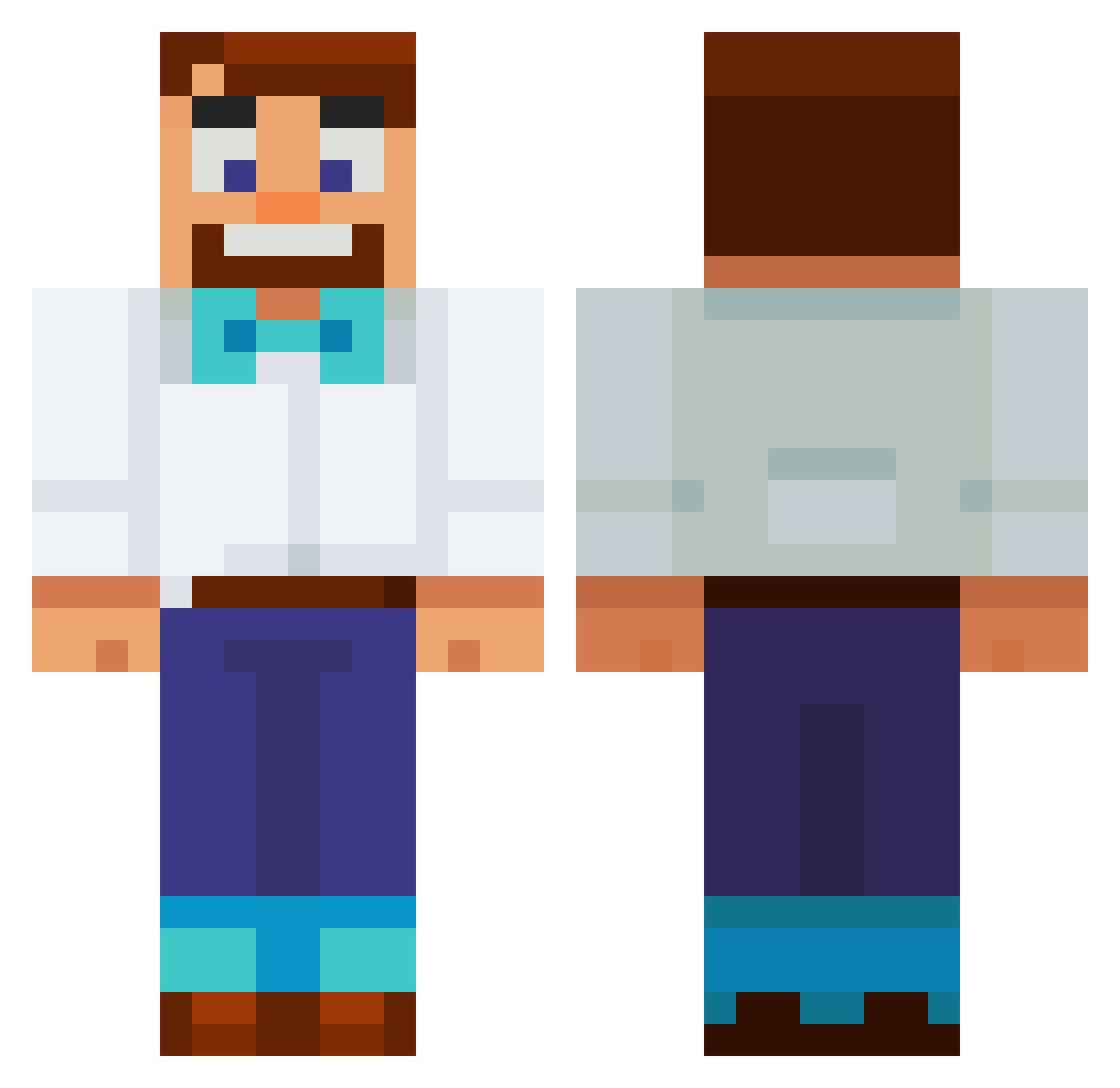
Other players with this skin (553)
onraj05 was the 55th player we have seen with this skin, first spotted on 03.08.2026. The same skin was seen on these players. Open a nickname to see their current skin and skin history.
 10elijah01 Thorvaar Ut3ligger1 xD_Dreams HenryDaSlayer nettinho91 CarlMcNugg
 Qeremy BirdsNest84 PrinceChis
 MrPoppis Bie019 Kinsto Kili3747 Ruben_2309
 Chuckwurst
 YannickGroteVis urmom246812 ELFS123 Cyastro LOLIINATOR williambennett7 Mordecai0722
 ahmett174 NovakVoj Onkeliroh
 TheAntrum billnyeishot1234 SteelDandelion swaggybob69 Iakim102
 __Showy__ georgiiee420 ShmeezMaster milos2766 hansfloh raynelizm shoechef Yolesauce Writeon Jacobus11 thesavileman Rahang DhanTheNub SecurityCamera_ zacharytamas AJ559
 Hitsuragiii Shiv_IWNL RafaelGamer15 elkiimi MauroLeal12 Hirschi0712 Barm88 Lukasz4171 Joemama244 The_Only_Atlas m1moe fishNchip44 GoldenLvs
More Bowtie Minecraft skins
How to install the onraj05 skin
- Press the Download button above to save the skin as a PNG file.
- Minecraft: Bedrock Edition (PE): open the Dressing Room from the main menu (or tap your character → Edit Character), go to Classic Skins → Owned, press the + (new skin) button, choose the downloaded PNG and pick the Classic (Steve) model. Works on PC and mobile; consoles cannot import custom skins.
- Minecraft: Java Edition: open the Minecraft Launcher, go to the Skins tab, click New Skin, load the PNG, pick the Classic (Steve) model and press Save & Use. You can also upload it at minecraft.net → Profile → Change Skin.
The skin does not show up after import - what should I do?
Restart Minecraft and open the Dressing Room again - imported skins sometimes appear only after a restart. Also make sure you selected the imported skin and picked the Classic (Steve) model.
Which model should I choose, Classic or Slim?
This skin is designed for the Classic (Steve) model. If you pick the wrong model, the arms of the skin will look stretched or squeezed.
Is the skin of onraj05 free to download?
Yes. Press Download, save the PNG file and use it in Minecraft: Bedrock Edition or Java Edition - no payment or registration needed. The skin also works on multiplayer servers and Realms.
More skins
Looking for more? Go back to all Minecraft skins and check the top skins of the week, month and all time, or find any player's skin by nickname.