
olciakkk - Minecraft Skins & Skin History
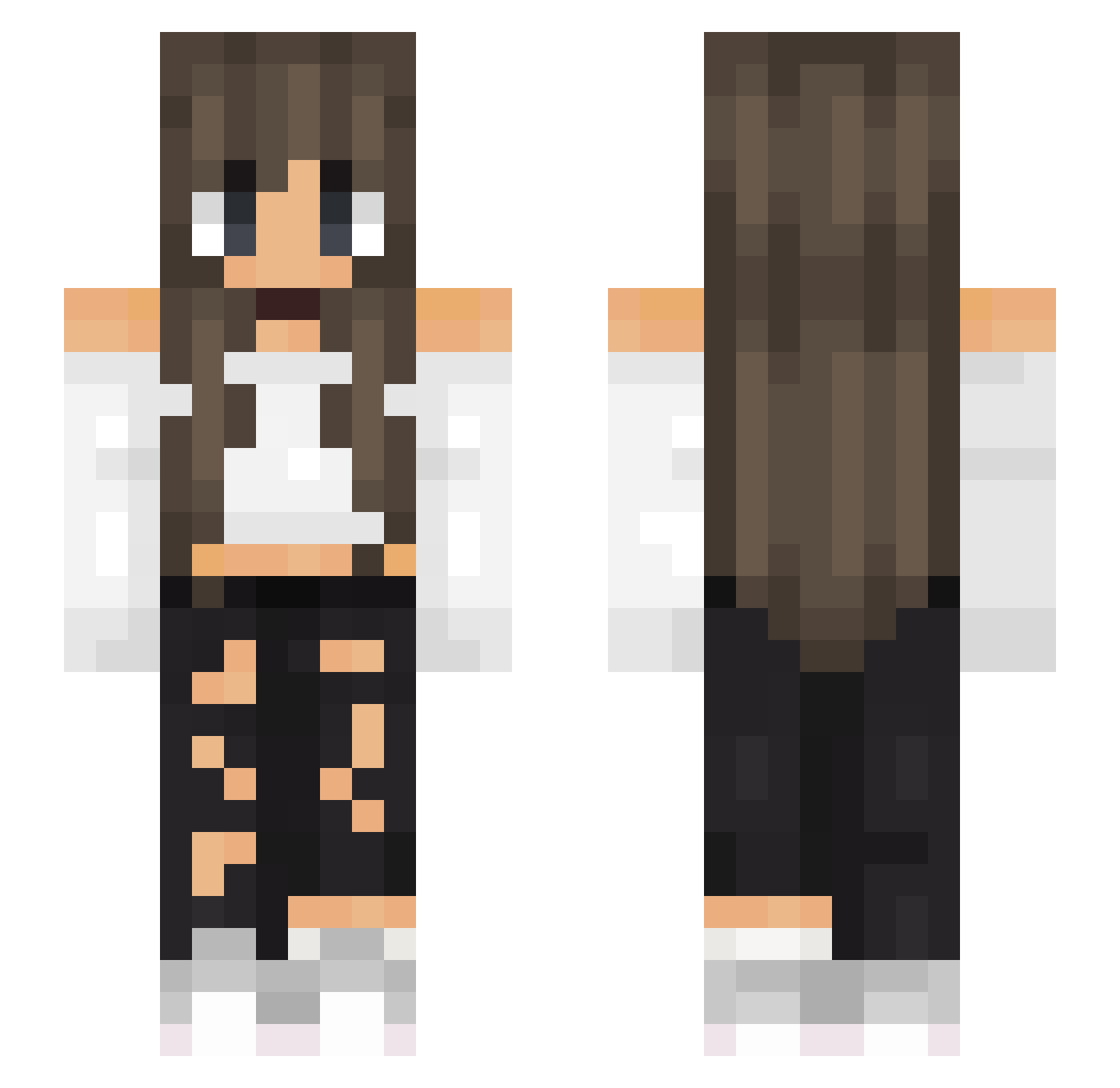
Current Minecraft skin of the player olciakkk, loaded from the official Mojang API. Rotate the 3D model with your mouse or finger, then download the skin as a PNG file and use it in Minecraft: Bedrock Edition or Java Edition for free. When olciakkk changes their skin, this page updates automatically and the old skin stays in the history below.
Other players with this skin (520)
olciakkk was the 53rd player we have seen with this skin, first spotted on 05.08.2026. The same skin was seen on these players. Open a nickname to see their current skin and skin history.
 Bongo1609 Nives2012 Lisa284 THBlockbyggare Karusiaa supa_sleepy Ghost06FR velipoeka Nellie_Artist lisiana800 rayyka_ Elorie_ calanis_ RainbowGirli OPapfeell LegendTube Nikos88 Karolin01 gwidella PAULA01160 Lune_12 NenntMichLeo Sofi_M Neve_Unsubmitted WURB_NBK Mepha Kynshas RobyXXtulipano Kyawaa FerRubi Gustinha28 Puffi2011 YoupiPaula PeacefulGirl_ FORTNITE52352352 EmmyErdbeere77 Sw33t_Frag Micki945 BerenisseStorm Twinkle001 Svphia1814 Jasminsbg5400 Golden_Cream squalaa _VickyBaby_ jxst_ange AnnCats01 Ladyrocket2021 hikawakoyuki Uchibai CarlottaC veliviaa ellabellabean15 MidnightFate therobingirl3 michlak Kroko_Hania ajbubba132 tanabanana123 Alexia27
More Off Shoulder Minecraft skins
See all 445 Off Shoulder skins
How to install the olciakkk skin
- Press the Download button above to save the skin as a PNG file.
- Minecraft: Bedrock Edition (PE): open the Dressing Room from the main menu (or tap your character → Edit Character), go to Classic Skins → Owned, press the + (new skin) button, choose the downloaded PNG and pick the Slim (Alex) model. Works on PC and mobile; consoles cannot import custom skins.
- Minecraft: Java Edition: open the Minecraft Launcher, go to the Skins tab, click New Skin, load the PNG, pick the Slim (Alex) model and press Save & Use. You can also upload it at minecraft.net → Profile → Change Skin.
The skin does not show up after import - what should I do?
Restart Minecraft and open the Dressing Room again - imported skins sometimes appear only after a restart. Also make sure you selected the imported skin and picked the Slim (Alex) model.
Which model should I choose, Classic or Slim?
This skin is designed for the Slim (Alex) model. If you pick the wrong model, the arms of the skin will look stretched or squeezed.
Is the skin of olciakkk free to download?
Yes. Press Download, save the PNG file and use it in Minecraft: Bedrock Edition or Java Edition - no payment or registration needed. The skin also works on multiplayer servers and Realms.
More skins
Looking for more? Go back to all Minecraft skins and check the top skins of the week, month and all time, or find any player's skin by nickname.