
ohFosho - Minecraft Skins & Skin History
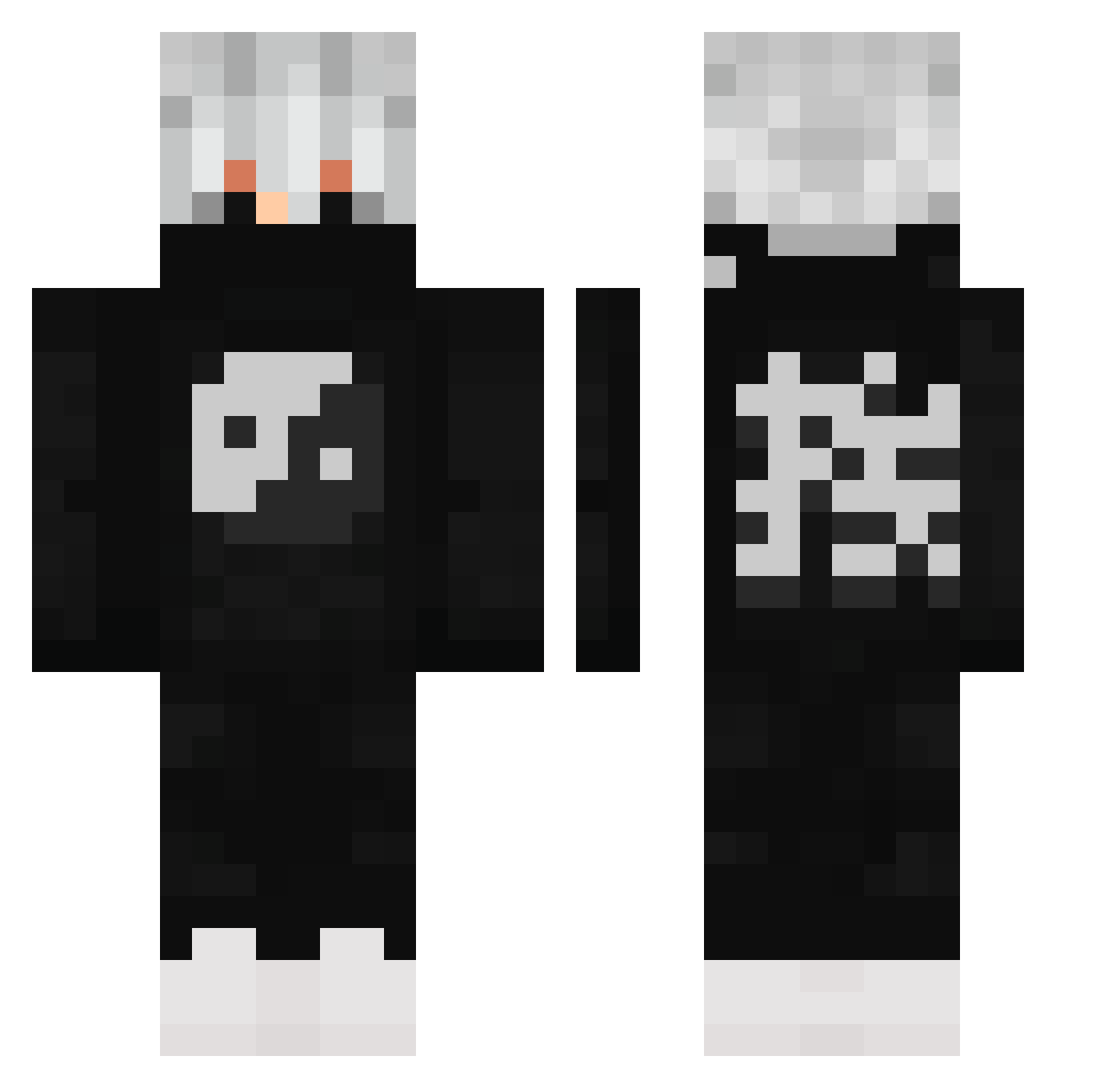
Current Minecraft skin of the player ohFosho, loaded from the official Mojang API. Rotate the 3D model with your mouse or finger, then download the skin as a PNG file and use it in Minecraft: Bedrock Edition or Java Edition for free. When ohFosho changes their skin, this page updates automatically and the old skin stays in the history below.
Other players with this skin (613)
ohFosho was the 568th player we have seen with this skin, first spotted on 12.11.2026. The same skin was seen on these players. Open a nickname to see their current skin and skin history.
 __Gr3y__ Taiichu XOLASAF ImYeng ToxHax KazeHollow Cylixzzz Nathan_boss LeNaiRODirt Fresh_Boy_12 LavenderCrib726 Pluto9999 aew1x Daeth91 SuperUgly20 Shelburz skibidibruno Riyuusei heroemis ysbaba06 _nikat_ K_B1103 LuckSnipe msp2207 ShadowKiri Yshuna Rraes12_ nonettejr KLOceK568 SHynstox dmx12 idkvador Mukrat7 Kmslife Yama05 xCaTaV2 hv0x CinematicMonkey Kyriptr0 biel_greninja mohamedtaher YazzMoneyy Janis_Andrei SpryBurrito1469 Liamow888 Cxld23 Senbonssakura CTRL_DABBERYT Minico356 ALDIphilip EcdAmd2009 Garganthua Holy_GODSENT fdsz SunRider2901 Yokey_Pokey SiriusNL NG_Tomakunz ninja_creeper0_o yjx1024
More Yin Yang Minecraft skins
How to install the ohFosho skin
- Press the Download button above to save the skin as a PNG file.
- Minecraft: Bedrock Edition (PE): open the Dressing Room from the main menu (or tap your character → Edit Character), go to Classic Skins → Owned, press the + (new skin) button, choose the downloaded PNG and pick the Classic (Steve) model. Works on PC and mobile; consoles cannot import custom skins.
- Minecraft: Java Edition: open the Minecraft Launcher, go to the Skins tab, click New Skin, load the PNG, pick the Classic (Steve) model and press Save & Use. You can also upload it at minecraft.net → Profile → Change Skin.
The skin does not show up after import - what should I do?
Restart Minecraft and open the Dressing Room again - imported skins sometimes appear only after a restart. Also make sure you selected the imported skin and picked the Classic (Steve) model.
Which model should I choose, Classic or Slim?
This skin is designed for the Classic (Steve) model. If you pick the wrong model, the arms of the skin will look stretched or squeezed.
Is the skin of ohFosho free to download?
Yes. Press Download, save the PNG file and use it in Minecraft: Bedrock Edition or Java Edition - no payment or registration needed. The skin also works on multiplayer servers and Realms.
More skins
Looking for more? Go back to all Minecraft skins and check the top skins of the week, month and all time, or find any player's skin by nickname.