
oevano - Minecraft Skins & Skin History
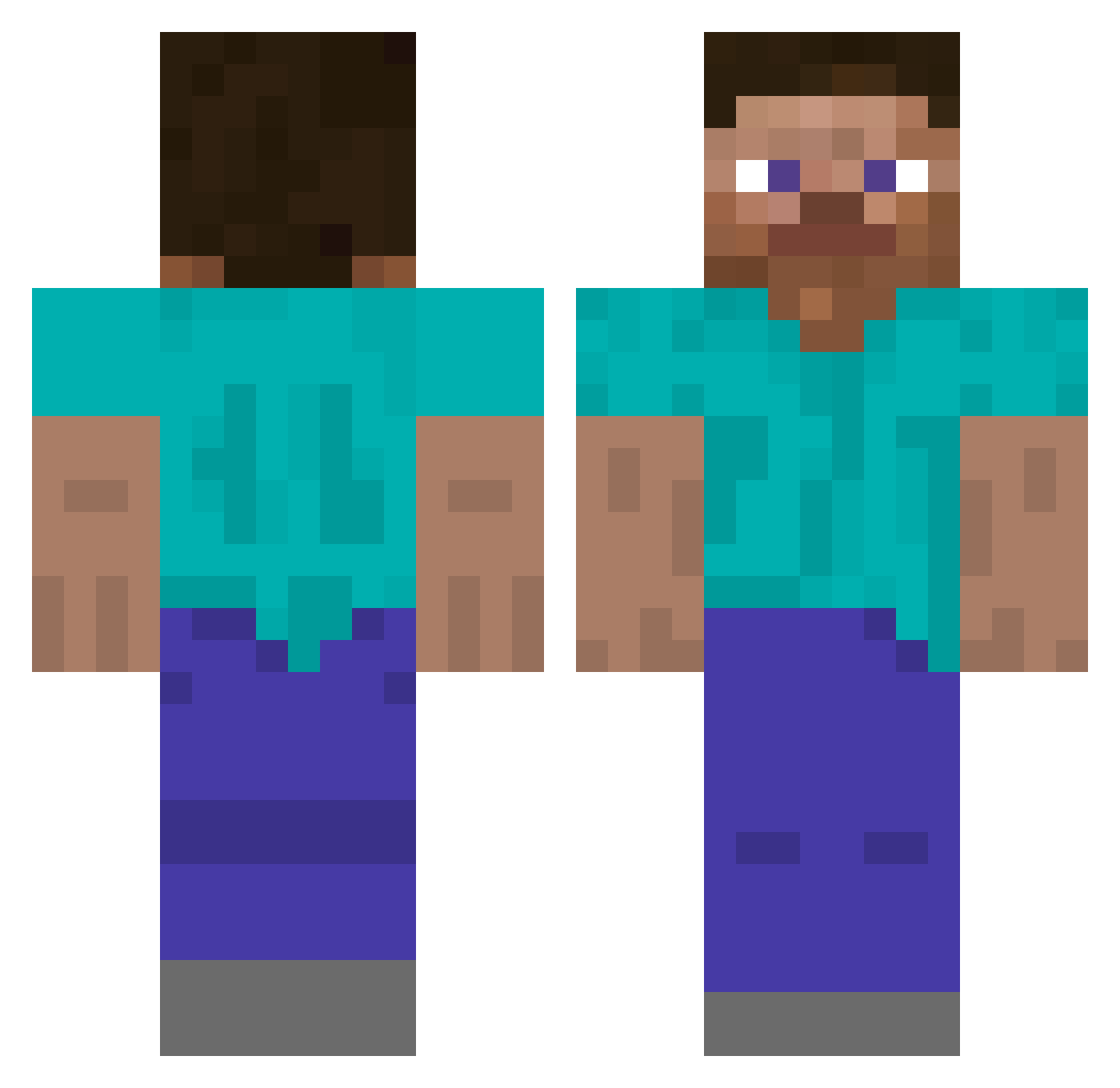
Current Minecraft skin of the player oevano, loaded from the official Mojang API. Rotate the 3D model with your mouse or finger, then download the skin as a PNG file and use it in Minecraft: Bedrock Edition or Java Edition for free. When oevano changes their skin, this page updates automatically and the old skin stays in the history below.
Other players with this skin (356)
oevano was the 337th player we have seen with this skin, first spotted on 14.11.2026. The same skin was seen on these players. Open a nickname to see their current skin and skin history.
 cajooter Minigums RawsDaBaws HackedByGreggo 2kgabriel MrMiklu Harpygun MrSmith990 DevourSauer IsaacChang12304 Merulu Super_Black Trippl_E Beame5647 Cnav ozanyusan t00345Y ViNiBrazBr EDDI08 MineDiamond559 Fenrrirr Cheesehunterr Crucialpuppy205 veds_ Hiticus MrWhiteOut UncIeBen LooooooooongName BioH4Zard BreezeBall seven7174z SlipperyMeat Ilukynn Tischplatten Golden8453 Hazinlee RDaxus01 vinzor216 Amalgamation124 FLUBBERBOBBY Potatus_Pro Karlsen2 Big__T___ rokerkiller SpicyMcDaddy449 KayAraY JustGinseng bin_gon Thijs252 mazejk obamaslastname69 Zeperox Jenna_TollZ Krzemiexx PvP_Lukas parmalade raralol Noah7226 TheJuiceBox7409 hasapetcat
How to install the oevano skin
- Press the Download button above to save the skin as a PNG file.
- Minecraft: Bedrock Edition (PE): open the Dressing Room from the main menu (or tap your character → Edit Character), go to Classic Skins → Owned, press the + (new skin) button, choose the downloaded PNG and pick the Classic (Steve) model. Works on PC and mobile; consoles cannot import custom skins.
- Minecraft: Java Edition: open the Minecraft Launcher, go to the Skins tab, click New Skin, load the PNG, pick the Classic (Steve) model and press Save & Use. You can also upload it at minecraft.net → Profile → Change Skin.
The skin does not show up after import - what should I do?
Restart Minecraft and open the Dressing Room again - imported skins sometimes appear only after a restart. Also make sure you selected the imported skin and picked the Classic (Steve) model.
Which model should I choose, Classic or Slim?
This skin is designed for the Classic (Steve) model. If you pick the wrong model, the arms of the skin will look stretched or squeezed.
Is the skin of oevano free to download?
Yes. Press Download, save the PNG file and use it in Minecraft: Bedrock Edition or Java Edition - no payment or registration needed. The skin also works on multiplayer servers and Realms.
More skins
Looking for more? Go back to all Minecraft skins and check the top skins of the week, month and all time, or find any player's skin by nickname.