
oelebeloe - Minecraft Skins & Skin History
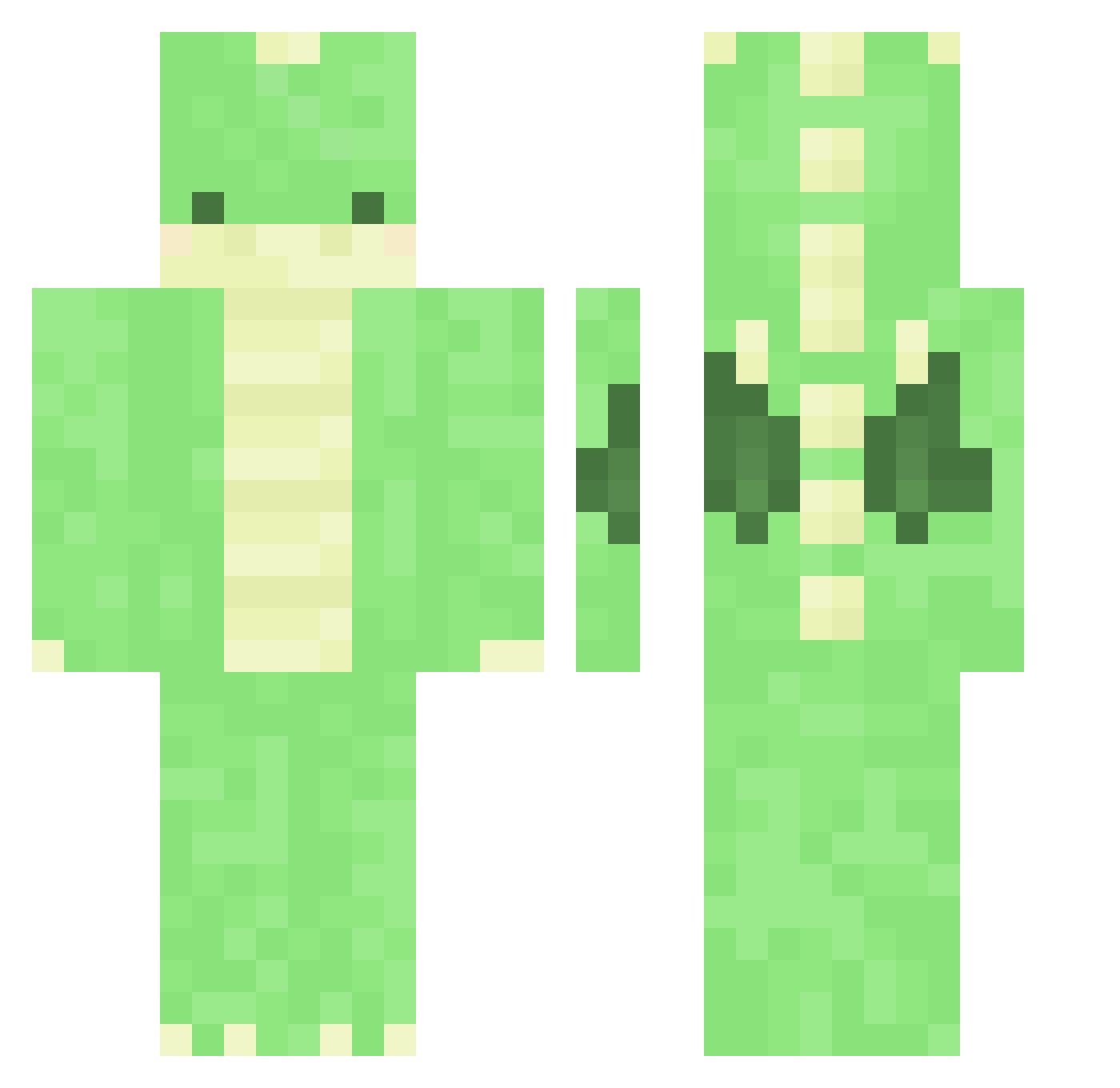
Current Minecraft skin of the player oelebeloe, loaded from the official Mojang API. Rotate the 3D model with your mouse or finger, then download the skin as a PNG file and use it in Minecraft: Bedrock Edition or Java Edition for free. When oelebeloe changes their skin, this page updates automatically and the old skin stays in the history below.
Other players with this skin (350)
oelebeloe was the 331st player we have seen with this skin, first spotted on 25.10.2026. The same skin was seen on these players. Open a nickname to see their current skin and skin history.
 Bamboo_Tea Pinokioww m1aaaa rhibug sooyaaa__uu DesiredPr0file smash_em_bro poison_gang dinomite Sticksi xKoguma blueberryybee Rush_Roke FreshImpala7426 hajra pfs_deelnemer_13 MightyQG91 HA_Han_Jun byrelax106 Emma100 Crunchydoobla96 charlieboone Mr_ldH Yu_Wuv_Me MIDORI_PEIPEI DinoRawrBeing fatui_skirmisher kiribn Joselafina OPV3rbs Qwevy MegaPS zzakks liLshotta21 kiyoms _Loulia_ JJSlayer03 PimPamPetDrilRap ramumamo Squeedeli violets_youtube taeyongzzang KingNhani Lightning_Shovel Lukadis pampino1 Tofu9214 fluffedragon stxrxshine RYO505 LibbyLover SpoonTw Ribeiro12 idminecraft0933 Cori0205 FvckingAndy SanGRia83 Y_Mori_ kang3846 birkebakke
More Dinosaur Minecraft skins
How to install the oelebeloe skin
- Press the Download button above to save the skin as a PNG file.
- Minecraft: Bedrock Edition (PE): open the Dressing Room from the main menu (or tap your character → Edit Character), go to Classic Skins → Owned, press the + (new skin) button, choose the downloaded PNG and pick the Classic (Steve) model. Works on PC and mobile; consoles cannot import custom skins.
- Minecraft: Java Edition: open the Minecraft Launcher, go to the Skins tab, click New Skin, load the PNG, pick the Classic (Steve) model and press Save & Use. You can also upload it at minecraft.net → Profile → Change Skin.
The skin does not show up after import - what should I do?
Restart Minecraft and open the Dressing Room again - imported skins sometimes appear only after a restart. Also make sure you selected the imported skin and picked the Classic (Steve) model.
Which model should I choose, Classic or Slim?
This skin is designed for the Classic (Steve) model. If you pick the wrong model, the arms of the skin will look stretched or squeezed.
Is the skin of oelebeloe free to download?
Yes. Press Download, save the PNG file and use it in Minecraft: Bedrock Edition or Java Edition - no payment or registration needed. The skin also works on multiplayer servers and Realms.
More skins
Looking for more? Go back to all Minecraft skins and check the top skins of the week, month and all time, or find any player's skin by nickname.