
nemu33300 - Minecraft Skins & Skin History
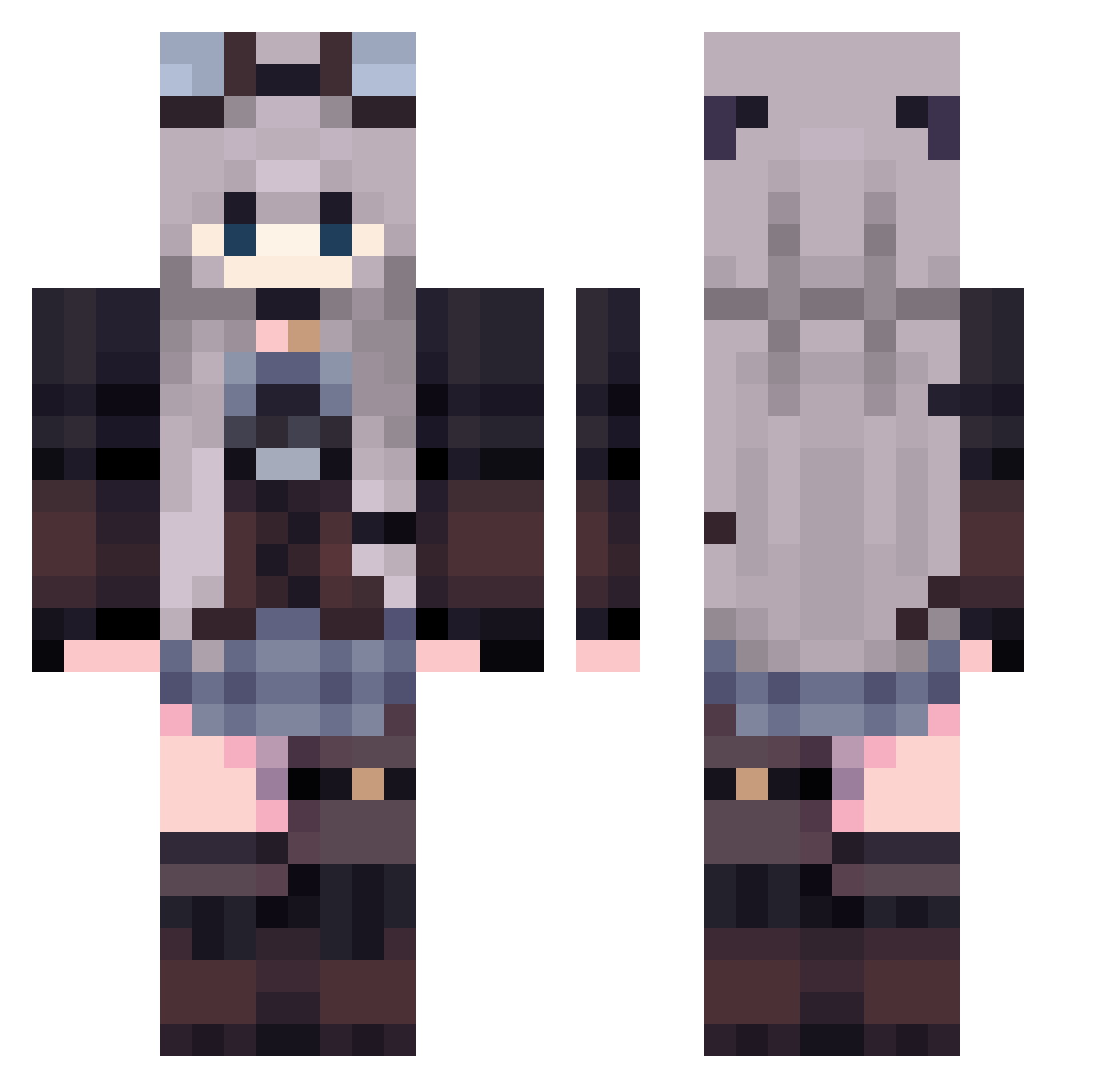
Current Minecraft skin of the player nemu33300, loaded from the official Mojang API. Rotate the 3D model with your mouse or finger, then download the skin as a PNG file and use it in Minecraft: Bedrock Edition or Java Edition for free. When nemu33300 changes their skin, this page updates automatically and the old skin stays in the history below.
Other players with this skin (435)
nemu33300 was the 147th player we have seen with this skin, first spotted on 03.09.2026. The same skin was seen on these players. Open a nickname to see their current skin and skin history.
 kapikapo Narugisuy SyoukoTheShark nutye ilan0630 mangguogan_ zkstrickland nicks_k qTap_4k rainyuy Luna_moonnight Kasumimana Milky_bread StarxxHNS Annasulo miso9722 Wixksxi fefefe1 monoplayerr Percypin simetatu Lighnette Alsiary Hizis ItzRangbi ShotAndMystic Lui_Ying exeMrph Lumi0515 eleali1 obake55_ mevius1215 monian07023 CHITORU Katuch mika0423 Nina012 ViolettSakura amyxace Nyvrir aaazhao1 zhiyuan1123 Soka_kelp WoahLegend poopoil ImLav superkitten2448 dani_ra_1765 Elo0218 FeddyKrytoy Amazorazonas Korshi_Aloe Misaaaaaaaaa Polymorpha Kiri_haru Jiceness Kyra_14 CxkZero rxecxr Jetpama
More Steampunk Minecraft skins
How to install the nemu33300 skin
- Press the Download button above to save the skin as a PNG file.
- Minecraft: Bedrock Edition (PE): open the Dressing Room from the main menu (or tap your character → Edit Character), go to Classic Skins → Owned, press the + (new skin) button, choose the downloaded PNG and pick the Classic (Steve) model. Works on PC and mobile; consoles cannot import custom skins.
- Minecraft: Java Edition: open the Minecraft Launcher, go to the Skins tab, click New Skin, load the PNG, pick the Classic (Steve) model and press Save & Use. You can also upload it at minecraft.net → Profile → Change Skin.
The skin does not show up after import - what should I do?
Restart Minecraft and open the Dressing Room again - imported skins sometimes appear only after a restart. Also make sure you selected the imported skin and picked the Classic (Steve) model.
Which model should I choose, Classic or Slim?
This skin is designed for the Classic (Steve) model. If you pick the wrong model, the arms of the skin will look stretched or squeezed.
Is the skin of nemu33300 free to download?
Yes. Press Download, save the PNG file and use it in Minecraft: Bedrock Edition or Java Edition - no payment or registration needed. The skin also works on multiplayer servers and Realms.
More skins
Looking for more? Go back to all Minecraft skins and check the top skins of the week, month and all time, or find any player's skin by nickname.