
natka_games - Minecraft Skins & Skin History
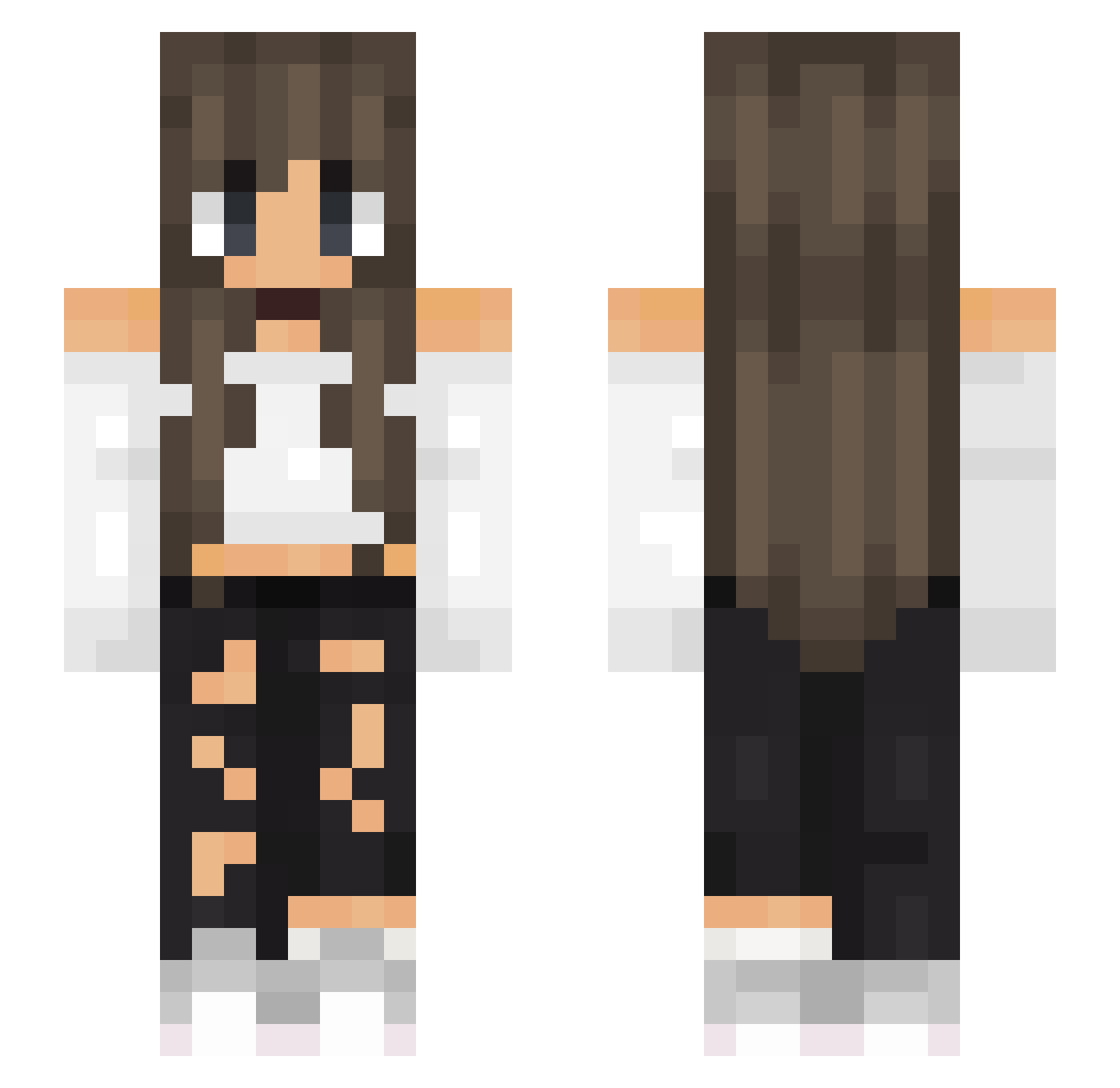
Current Minecraft skin of the player natka_games, loaded from the official Mojang API. Rotate the 3D model with your mouse or finger, then download the skin as a PNG file and use it in Minecraft: Bedrock Edition or Java Edition for free. When natka_games changes their skin, this page updates automatically and the old skin stays in the history below.
Other players with this skin (519)
natka_games was the 389th player we have seen with this skin, first spotted on 10.10.2026. The same skin was seen on these players. Open a nickname to see their current skin and skin history.
 AnaS0uza NatRego fluffled DAMMMME DarckNess_ BellaGameCraft Livianur georgiaaaa jujubcarmo Azilis19 christe11e Stiiizy MrGusser Mara2902 CuteKawaiiGirl69 Yvicklia Basem44 NotQuirky Rowboat2001 Weronika320 Bahar5566 Tere008 Axarus_ Adoreilx OLAOLA12 capnnellie aguardo04 MaeCapone Raxe21 lexienoodles1806 SvetaAnime radiiiii kittylena635 Rico_27 BabyGirl353 Asteroidnest10 EineLerche Plotteke sexyr1zz Louise66 TinyTina12 HeleNine Kpease Biltxo19 London2405 Pati_20 Das_tube Weadle AutoEXP y_tenshi housebuilder123 oliviamundi03 Julcia23 JulietMink BasiaA5 TheTruePeachpyy Zajac1975 Reccoun oZarbZ Savage9032
More Off Shoulder Minecraft skins
See all 444 Off Shoulder skins
How to install the natka_games skin
- Press the Download button above to save the skin as a PNG file.
- Minecraft: Bedrock Edition (PE): open the Dressing Room from the main menu (or tap your character → Edit Character), go to Classic Skins → Owned, press the + (new skin) button, choose the downloaded PNG and pick the Slim (Alex) model. Works on PC and mobile; consoles cannot import custom skins.
- Minecraft: Java Edition: open the Minecraft Launcher, go to the Skins tab, click New Skin, load the PNG, pick the Slim (Alex) model and press Save & Use. You can also upload it at minecraft.net → Profile → Change Skin.
The skin does not show up after import - what should I do?
Restart Minecraft and open the Dressing Room again - imported skins sometimes appear only after a restart. Also make sure you selected the imported skin and picked the Slim (Alex) model.
Which model should I choose, Classic or Slim?
This skin is designed for the Slim (Alex) model. If you pick the wrong model, the arms of the skin will look stretched or squeezed.
Is the skin of natka_games free to download?
Yes. Press Download, save the PNG file and use it in Minecraft: Bedrock Edition or Java Edition - no payment or registration needed. The skin also works on multiplayer servers and Realms.
More skins
Looking for more? Go back to all Minecraft skins and check the top skins of the week, month and all time, or find any player's skin by nickname.