
monkey606 - Minecraft Skins & Skin History
Current Minecraft skin of the player monkey606, loaded from the official Mojang API. Rotate the 3D model with your mouse or finger, then download the skin as a PNG file and use it in Minecraft: Bedrock Edition or Java Edition for free. When monkey606 changes their skin, this page updates automatically and the old skin stays in the history below.
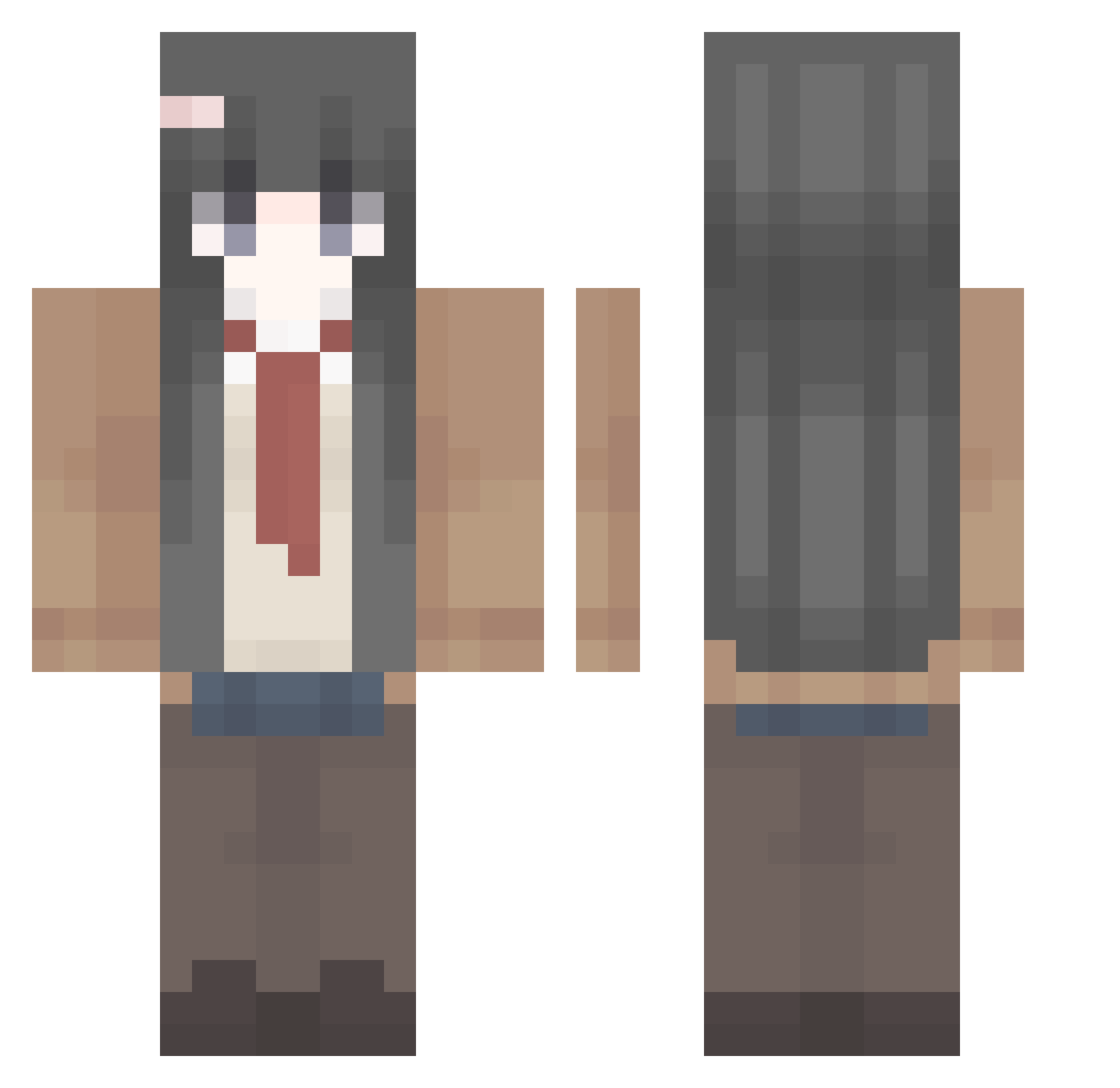
Other players with this skin (410)
monkey606 was the 129th player we have seen with this skin, first spotted on 28.08.2026. The same skin was seen on these players. Open a nickname to see their current skin and skin history.
 xiaohuang_ovo maedasalt ZhouJunAn WuCMin coffee0402 Photoch1ps frieren_3 Cloud0012 xiaoxi0923 HTYLG yuyuwuwu howardatomic sukura0009 zmb1234567 VhgV _Danoo_ 111qn PeppaPigdudu lienlienchii GcatGSR PEEKPINK Marauderking oniIoI crazyshreddder DIMPLING ultrapta Haoqi_SaMa Axaeny SallyRem luozhouxi mucha124 ByHugh WAYZT
 losterflo 10KFOX soraahh hbanii Y_chayu Holleh_ luna0217 XIGuaPI__ King___PYD Moon0212 Flower1496 ZhYuki DestoryGhost Meigum1 KUNN_NN Ayase_Kotori Ngisa467 StAnonymousHY White_Ice_Tea Fabsination49 ChaosCZ caikying afevd Violet0222 Youth09 22EEee22 Sauceular
More School Uniform Minecraft skins
See all 6639 School Uniform skins
How to install the monkey606 skin
- Press the Download button above to save the skin as a PNG file.
- Minecraft: Bedrock Edition (PE): open the Dressing Room from the main menu (or tap your character → Edit Character), go to Classic Skins → Owned, press the + (new skin) button, choose the downloaded PNG and pick the Classic (Steve) model. Works on PC and mobile; consoles cannot import custom skins.
- Minecraft: Java Edition: open the Minecraft Launcher, go to the Skins tab, click New Skin, load the PNG, pick the Classic (Steve) model and press Save & Use. You can also upload it at minecraft.net → Profile → Change Skin.
The skin does not show up after import - what should I do?
Restart Minecraft and open the Dressing Room again - imported skins sometimes appear only after a restart. Also make sure you selected the imported skin and picked the Classic (Steve) model.
Which model should I choose, Classic or Slim?
This skin is designed for the Classic (Steve) model. If you pick the wrong model, the arms of the skin will look stretched or squeezed.
Is the skin of monkey606 free to download?
Yes. Press Download, save the PNG file and use it in Minecraft: Bedrock Edition or Java Edition - no payment or registration needed. The skin also works on multiplayer servers and Realms.
More skins
Looking for more? Go back to all Minecraft skins and check the top skins of the week, month and all time, or find any player's skin by nickname.