
martusikse - Minecraft Skins & Skin History
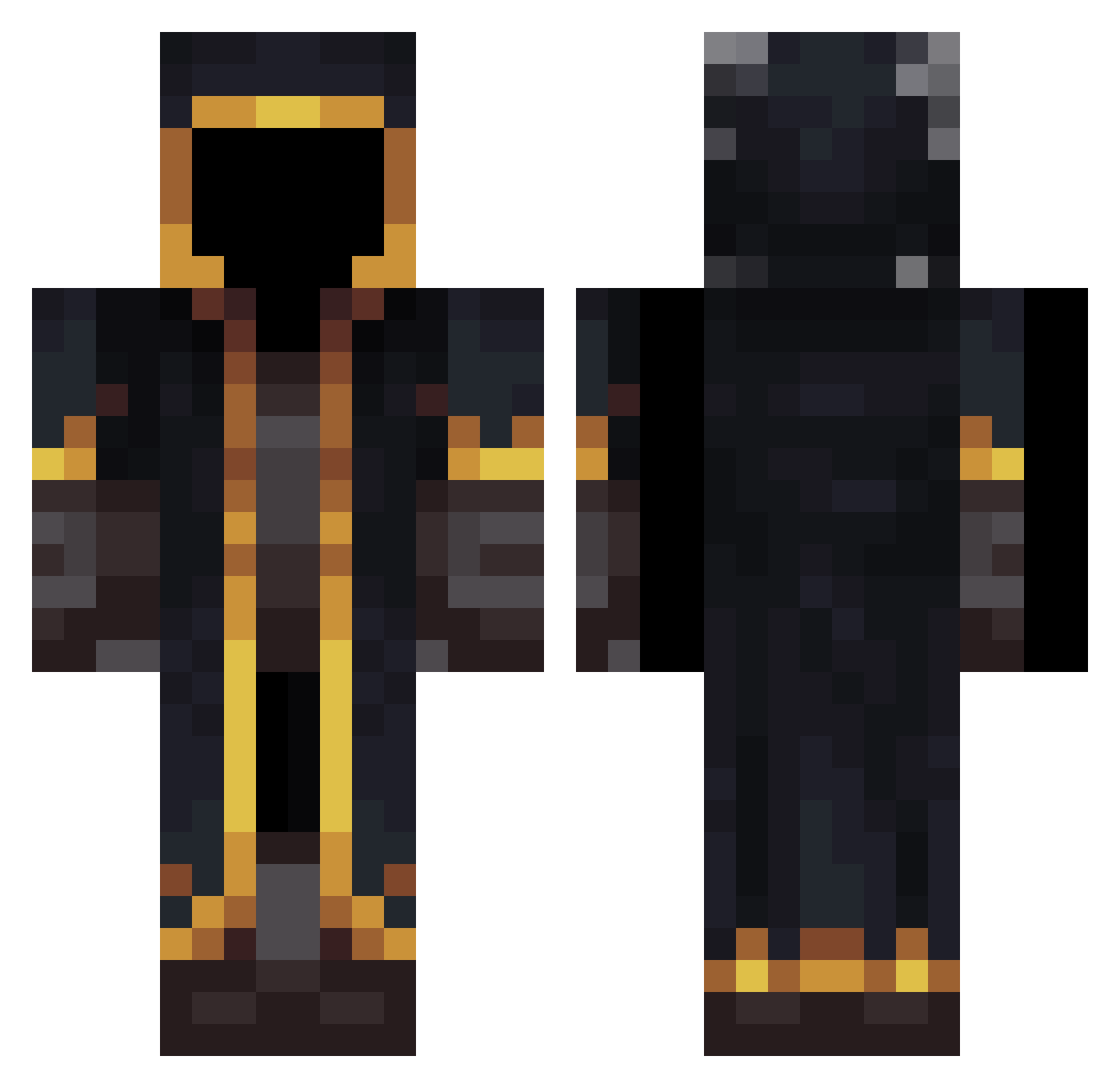
Current Minecraft skin of the player martusikse, loaded from the official Mojang API. Rotate the 3D model with your mouse or finger, then download the skin as a PNG file and use it in Minecraft: Bedrock Edition or Java Edition for free. When martusikse changes their skin, this page updates automatically and the old skin stays in the history below.
Other players with this skin (532)
martusikse was the 278th player we have seen with this skin, first spotted on 22.09.2026. The same skin was seen on these players. Open a nickname to see their current skin and skin history.
 Moonlight__Dawn jAck1125 Broitzpain TexTong Reginhard Lolaso990 RIOH23 Akinkhaliz TaaMaichh AOM712 BearBoyshaq min1206 BigB0bbies Muc0 SunnyRec Ethereal_Enigma Joker2302 S1ror Ploitering MELTINGJAGUAR G_Tech90 OPukulele laqovoc Umutakaa Titex64 Ivanux_7 gregcleo SuperJohs_20 pro_0 Jyunter UnTioSimpatico max123453453 op_opp xw1246 JujuGHG111 Hunters_Bane Niwnk Mxtiass MrMudy Maankara SkyroomSS YouGot_Wood Ac3x2b DanZha Sanider Mega_Reaper Isithwebuli OldHermitOld 0_snickers_0 savi0902 Add24712 Dabo01 Rizek75 Twickenham6768 lhdnb RetawolfeR1 grahamj42 XiangNiLeA PabloMiguel1983 PoweringScheme
More Mage Minecraft skins
How to install the martusikse skin
- Press the Download button above to save the skin as a PNG file.
- Minecraft: Bedrock Edition (PE): open the Dressing Room from the main menu (or tap your character → Edit Character), go to Classic Skins → Owned, press the + (new skin) button, choose the downloaded PNG and pick the Classic (Steve) model. Works on PC and mobile; consoles cannot import custom skins.
- Minecraft: Java Edition: open the Minecraft Launcher, go to the Skins tab, click New Skin, load the PNG, pick the Classic (Steve) model and press Save & Use. You can also upload it at minecraft.net → Profile → Change Skin.
The skin does not show up after import - what should I do?
Restart Minecraft and open the Dressing Room again - imported skins sometimes appear only after a restart. Also make sure you selected the imported skin and picked the Classic (Steve) model.
Which model should I choose, Classic or Slim?
This skin is designed for the Classic (Steve) model. If you pick the wrong model, the arms of the skin will look stretched or squeezed.
Is the skin of martusikse free to download?
Yes. Press Download, save the PNG file and use it in Minecraft: Bedrock Edition or Java Edition - no payment or registration needed. The skin also works on multiplayer servers and Realms.
More skins
Looking for more? Go back to all Minecraft skins and check the top skins of the week, month and all time, or find any player's skin by nickname.